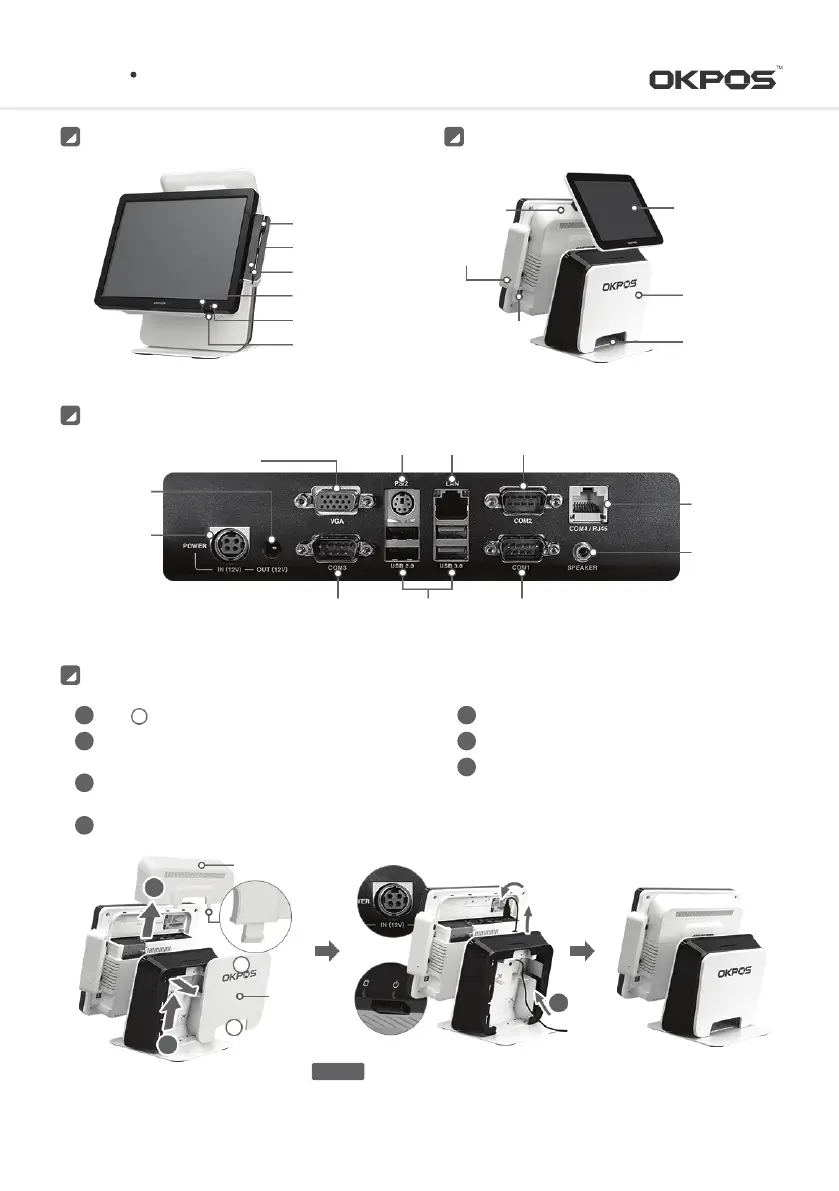
RearFront
ZED POS
Cable Holder
Stand
Rear Cover
Dual Monitor
(optional)
Cable Cover
MSR Reset
Button
2 X USB Port
MSR
Power Signal
Error Signal
HDD Signal
Power Signal
Power Button
I/O Port
Serial Port
(RJ45-COM4)
DC-IN Power
(12V)
DC-OUT Power
(12V)
VGA Port
USB PortSerial Port(DSUB9-COM3)
Speaker Port
PS/2 Mouse, Keyboard LAN
Serial Port(DSUB9-COM1)
Serial Port(DSUB9-COM2)
Reassemble the cable cover
Reassemble the stand rear case
Activate the system by pressing the power button
5
6
7
Hold tightly, and pull up the rear cover for detaching
Push up the cover by press the PUSH parts of
cable cover for detaching
Insert the Power adapter cable to power port by following
the direction of the arrow
③
Connect the peripheral cables to I/O ports on demand
A
1
1
2
3
4
System Installation and Turn-on/off
Cable Cover
Stand
Rear Cover
1
2
A
B
3
Make sure the adapter direction before plugging in
CAUTION
3
Service Manual



 To Next Page