SETTING
All system data will be deleted.
We recommend you to back up important data to an external hard disk before you run the recovery function on the device.
CAUTION
If you encounter problems in the program or system OS, the hard disk can be recovered to the
previous state or the factory state.
HDD Disk Recovery
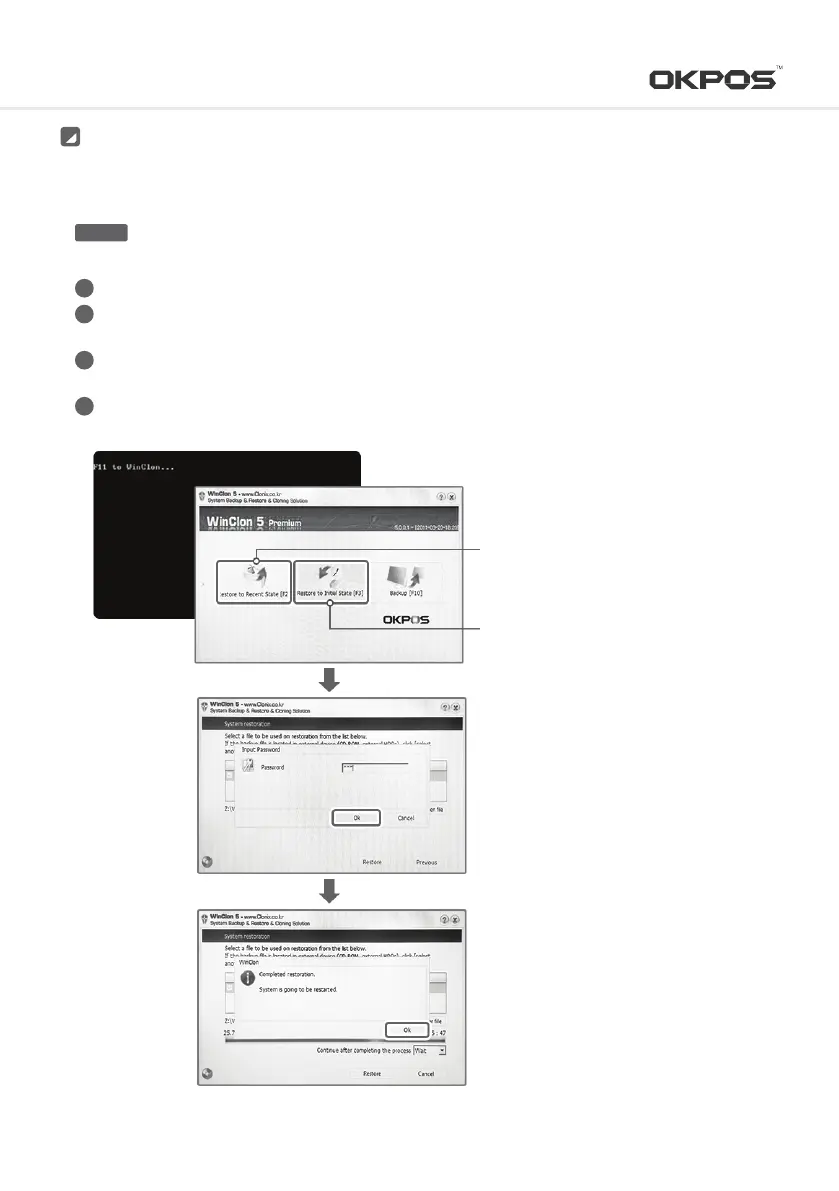
Connect the keyboard and mouse to the system
After turning on the system, follow the 0n-screen instructions: press the keyboard <F11> when the
‘F11 to WinClon…’ message appears on the screen within 3 to 4 seconds (PC POST process)
When Winclon Appears on the screen, press <F2> key or <F3> on your keyboard or click the mouse to select
‘Recover recent state’ or ‘Recover initial state’
After entering the password, press the <OK> button to continue the recovery (Password: pos)
1
2
3
4
※ ‘Recover initial state’ is restored to the
factory default state.
※ ‘Recover recent state’ is restored to the
most recent backup of Windows.
16
Service Manual



 To Next Page