EasyManua.ls Logo

Okuma OSP-U100M - Page 101

Okuma OSP-U100M
511 pages
Print Icon
To Next Page IconTo Next Page
To Previous Page IconTo Previous Page
Loading...
4203-E
P-81
SECTION
5
AUTOMATIC
MODE
OPERATION
(c)
Designation
mode
PSLJ
(or
PS
i_>
*,*,*;)
1)
Key
in
as
PSI_I
or
PSLJ
*,*,*;.
2)
Select
the
main
file
name
in
the
same
procedures
as
2),
3)
and
4)
in
(a).
3)
Select
the
program
name
in
the
same
procedures
as
3)
and
4)
in
(b).
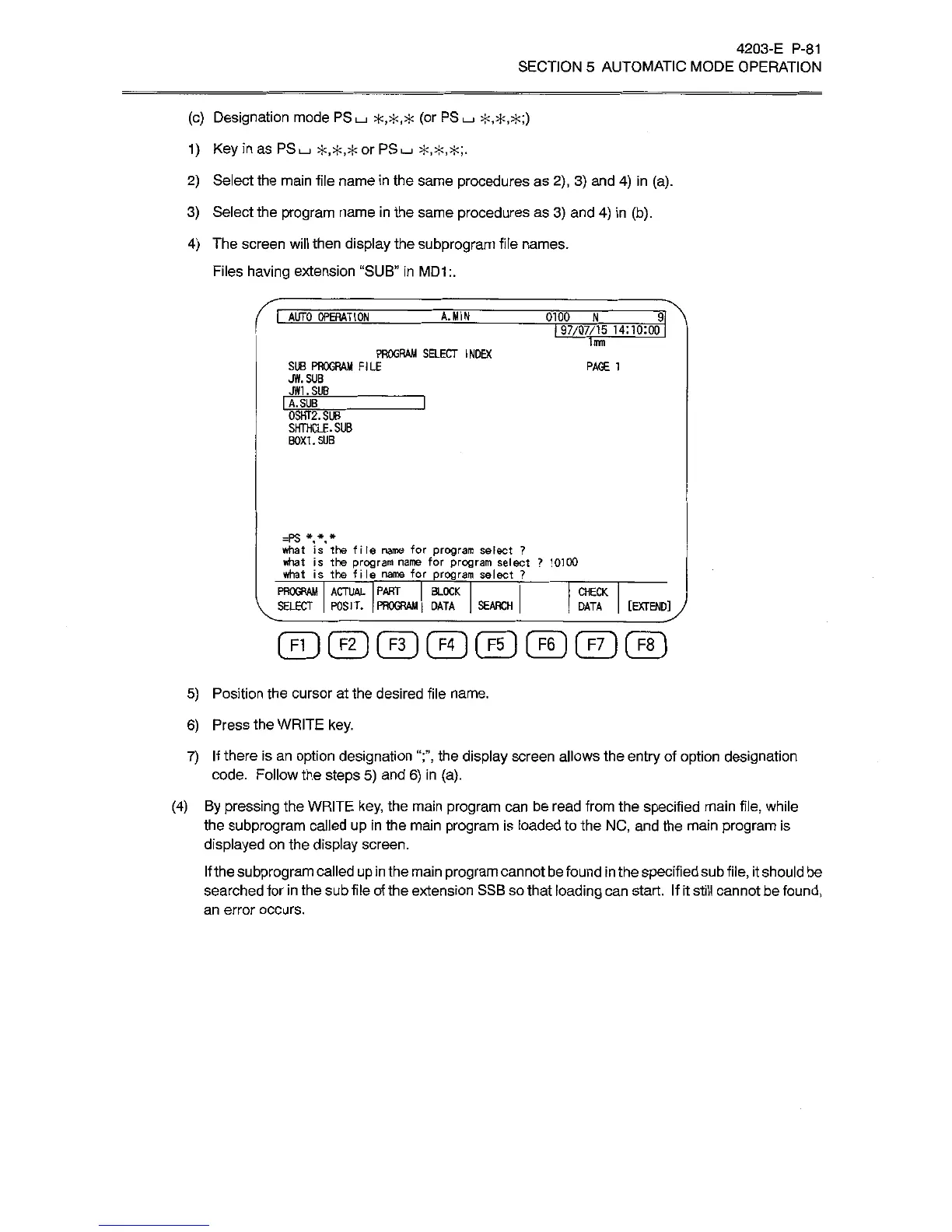
4)
The
screen
will
then
display
the
subprogram
file
names.
Files
having
extension
“SUB”
in
MD1:.
I
AUTO
OPERATION
A.MIN
0100
N
I
97/07/15
14:10:00
Irnn
PROGRAM
SELECT
INDEX
SU8
PROGRAM
FILE
JW.
SUB
JW1.SUB
_
PAGE
1
I
A.
SUB
0SHT2.SUB
SHTHCLE.SUB
BOX1.SUB
=PS
*
*
*
what
is
the
file
name
for
program
select
?
what
is
the
program
name
for
program
select
?
10100
what
is
the
file
name
for
program
select
?
PROGRAM
ACTUAL
PART
BLOCK
SELECT
|
POSIT.
|
PROGRAM
|
DATA
CHECK
SEARCH
[EXTENDiy
DATA
5)
Position
the
cursor
at
the
desired
file
name.
6)
Press
the
WRITE
key.
7)
If
there
is
an
option
designation
the
display
screen
allows
the
entry
of
option
designation
code.
Follow
the
steps
5)
and
6)
in
(a).
(4)
By
pressing
the
WRITE
key,
the
main
program
can
be
read
from
the
specified
main
file,
while
the
subprogram
called
up
in
the
main
program
is
loaded
to
the
NC,
and
the
main
program
is
displayed
on
the
display
screen.
If
the
subprogram
called
up
in
the
main
program
cannot
be
found
in
the
specified
sub
file,
it
should
be
searched
for
in
the
sub
file
of
the
extension
SSB
so
that
loading
can
start.
If
it
still
cannot
be
found,
an
error
occurs.

Related product manuals