EasyManua.ls Logo

Okuma OSP-U100M - Page 100

Okuma OSP-U100M
511 pages
Print Icon
To Next Page IconTo Next Page
To Previous Page IconTo Previous Page
Loading...
4203-E
P-80
SECTION
5
AUTOMATIC
MODE
OPERATION
(b)
Designation
mode
PSI_J
(or
PSLJ
*,*;)
1)
Key
in
as
PSi_i
or
PSi_i
2)
Select
main
file
names
in
the
same
procedures
as
2),
3)
and
4)
in
(a).
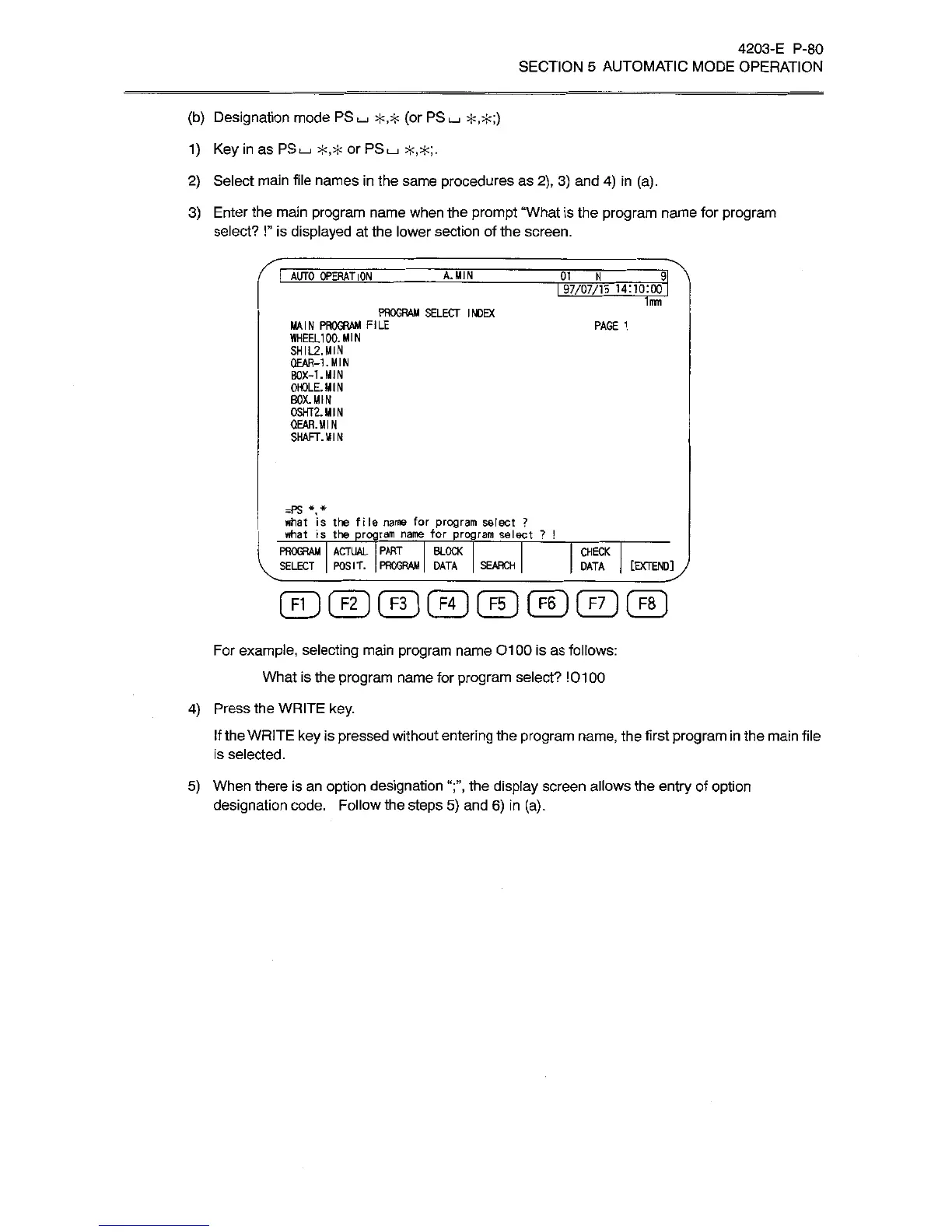
3)
Enter
the
main
program
name
when
the
prompt
“What
is
the
program
name
for
program
select?
!’’
is
displayed
at
the
lower
section
of
the
screen.
i"\
I
AUTO
OPERATION
A.
MIN
01
_
N
I
97/07/15
14:10:00
1mm
PROGRAM
SELECT
INDEX
MAIN
PROGRAM
FILE
WHEEL100.
MIN
SHIL2.MIN
QEAR-1.MIN
BOX-1.
MIN
0H0LE.MIN
BOX.
MIN
0SHT2.MIN
OEAR.MIN
SHAFT.
MIN
PAGE
1
=PS
*,*
what
is
the
file
name
for
program
select
?
what
is
the
program
name
for
program
select
?
!
PROGRAM
ACTUAL
PART
BLOCK
SELECT
|
POSIT.
PROGRAM
|
DATA
CHECK
[EXTEND]
J
SEARCH
DATA
©©©©©©©@
For
example,
selecting
main
program
name
01
00
is
as
follows:
What
is
the
program
name
for
program
select?
10100
4)
Press
the
WRITE
key.
If
the
WRITE
key
is
pressed
without
entering
the
program
name,
the
first
program
in
the
main
file
is
selected.
5)
When
there
is
an
option
designation
the
display
screen
allows
the
entry
of
option
designation
code.
Follow
the
steps
5)
and
6)
in
(a).

Related product manuals