EasyManua.ls Logo

Okuma OSP-U100M - Page 196

Okuma OSP-U100M
511 pages
Print Icon
To Next Page IconTo Next Page
To Previous Page IconTo Previous Page
Loading...
4203-
E
P-175
SECTION
1
DATA
SETTING
5.
Tool
Data
Set
Commands
5-1.
Tool
Length
Offset
and
Cutter
Radius
Compensation
Tool
offset
or
compensation
has
been
incorporated
since
the
tip
position
is
dependent
on
tool
type.
Tool
data
consists
of
length
offset
data
and
cutter
radius
compensation
data.
The
system
offers
50
sets
of
tool
length
offset
and
cutter
radius
compensation
data
as
the
standard
feature,
and
this
can
be
expanded
to
100,
200,
or
300
sets
of
offset
and
compensation
data.
For
offset
number
0,
only
”0”
can
be
set.
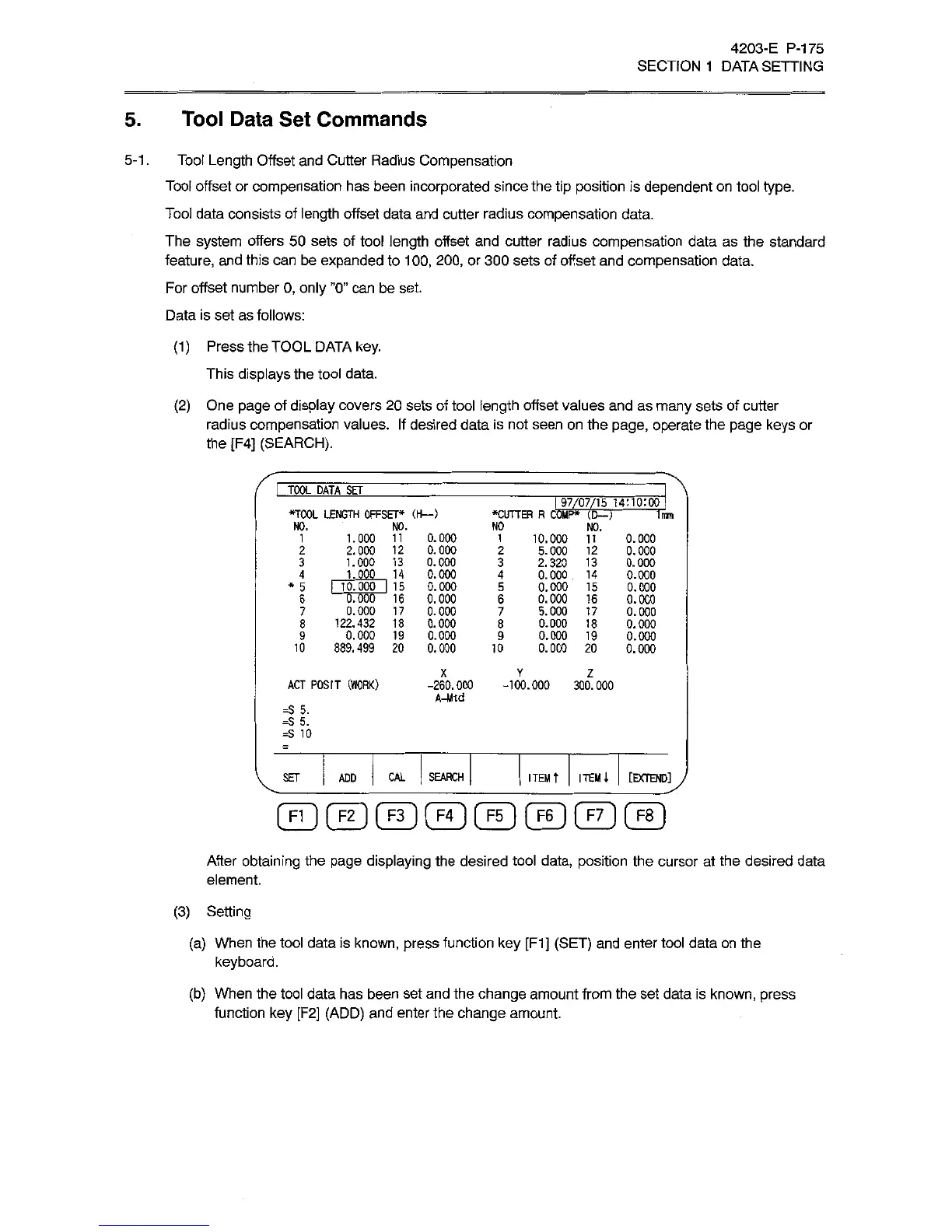
Data
is
set
as
follows:
(1
)
Press
the
TOOL
DATA
key.
This
displays
the
tool
data.
(2)
One
page
of
display
covers
20
sets
of
tool
length
offset
values
and
as
many
sets
of
cutter
radius
compensation
values.
If
desired
data
is
not
seen
on
the
page,
operate
the
page
keys
or
the
[F4]
(SEARCH).
TOOL
DATA
SEf
197/07/15
1
4:10:00
•CUTTER
R
COMP*
(D—
)
•TOOL
LENGTH
OFFSET*
(H—
)
Trim
NO.
NO.
NO
NO.
1.000
11
0.000
2.000
12
0.000
1.000
13
0.000
1.000
14
0.000
*
5
I
10.000
I
15
0.000
0.000
0.000
0.000
0.000
889.499
20
0.000
1
1
10.000
11
5.000
12
2.320
13
0.000
14
0.000
15
0.000
16
5.000
17
0.000
18
0.000
19
0.000
20
0.000
0.000
0.000
0.000
0.000
0.000
0.000
0.000
0.000
0.000
2
2
3
3
4
4
5
6
0.000
16
0.000
17
8
122.432
18
0.000
19
6
7
7
8
9
9
10
10
X
Y
Z
ACT
POSIT
(WORK)
-260.000
-100.000
300.000
A-Mtd
=S
5.
=S
5.
=S
10
[EXTEND]
J
SET
CAL
SEARCH
ITEM
t
ITEM
l
ADD
©©©©©©©@
After
obtaining
the
page
displaying
the
desired
tool
data,
position
the
cursor
at
the
desired
data
element.
(3)
Setting
(a)
When
the
tool
data
is
known,
press
function
key
[F1]
(SET)
and
enter
tool
data
on
the
keyboard.
(b)
When
the
tool
data
has
been
set
and
the
change
amount
from
the
set
data
is
known,
press
function
key
[F2]
(ADD)
and
enter
the
change
amount.