EasyManua.ls Logo

Okuma OSP-U100M - Page 207

Okuma OSP-U100M
511 pages
Print Icon
To Next Page IconTo Next Page
To Previous Page IconTo Previous Page
Loading...
4203-E
P-186
SECTION
2
PROGRAM
OPERATION
3.
Directory
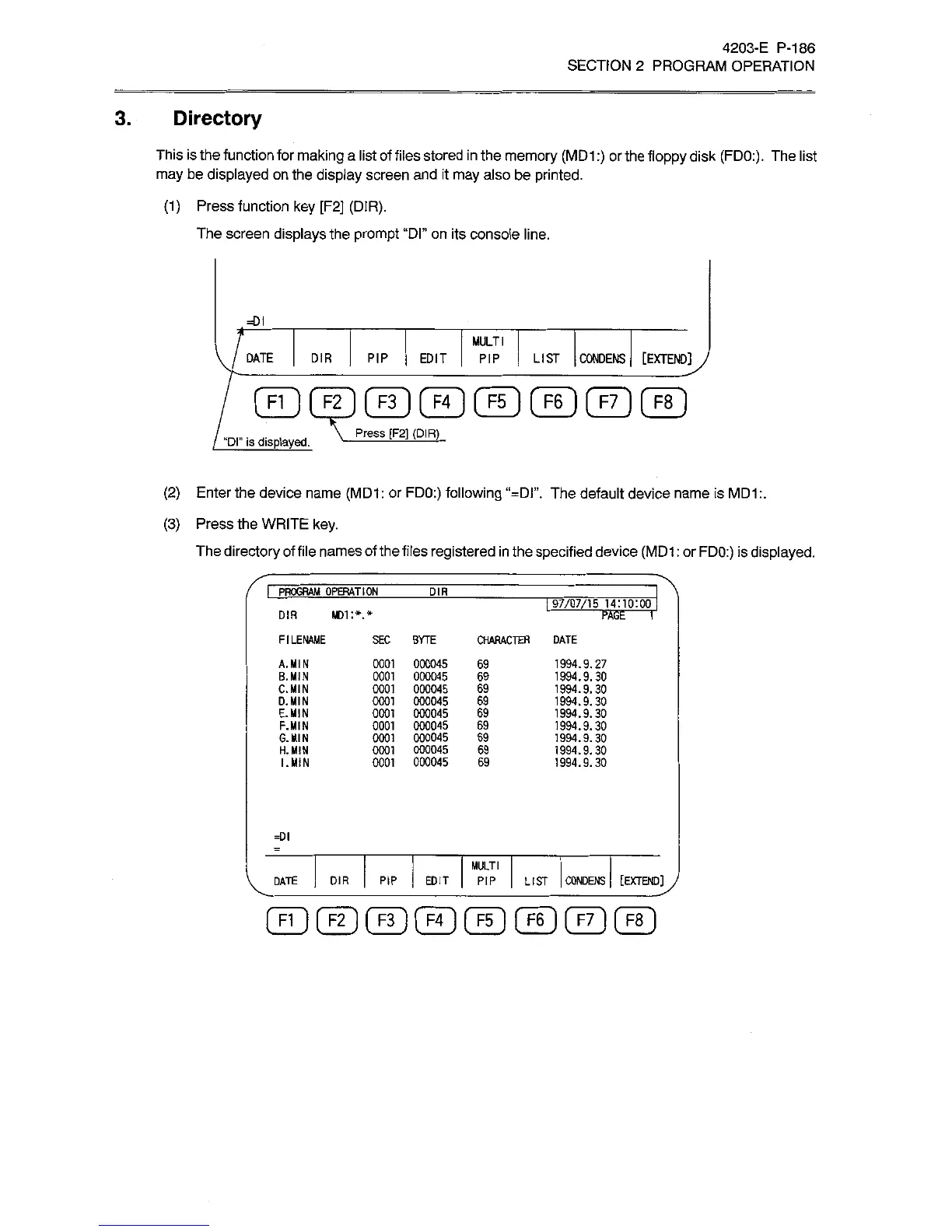
This
is
the
function
for
making
a
list
of
files
stored
in
the
memory
(MD1
:)
or
the
floppy
disk
(FDO:).
The
list
may
be
displayed
on
the
display
screen
and
it
may
also
be
printed.
(1)
Press
function
key
[F2]
(DIR).
The
screen
displays
the
prompt
“Dl”
on
its
console
line.
=DI
MULTI
PIP
EDIT
PIP
[EXTEND
jy
DATE
DIR
LIST
CONDENS
FI
]
[
F2
]
[
F3
]
[
F4
(
F5
]
F6
]
[
F7
]
[
F8
Press
[F2]
(DIR)
“Dl''
is
displayed.
(2)
Enter
the
device
name
(MD1
:
or
FDO:)
following
“=DI”.
The
default
device
name
is
MD1
(3)
Press
the
WRITE
key.
The
directory
of
file
names
of
the
files
registered
in
the
specified
device
(MD1
:
or
FDO:)
is
displayed.
I
PROGRAM
OPERATION
DIR
I
97/07/15
14:10:00
MD1
:*.*
DIR
PAGE
T
FILENAME
SEC
BYTE
CHARACTER
DATE
0001
000045
0001
000045
0001
000045
0001
000045
0001
000045
0001
000045
0001
000045
0001
000045
0001
000045
1994.9.27
1994.9.30
1994.9.30
1994.9.30
1994.9.30
1994.9.30
1994.9.
30
1994.9.30
1994.9.30
A.
MIN
8.
MIN
C.MIN
O.MIN
E.MIN
F.MIN
G.MIN
H.
MIN
I.
MIN
69
69
69
69
69
69
69
69
69
=DI
MULTI
DIR
I
PIP
EDIT
|
PIP
|
LIST
CONDENS
[EXTEND]
J
DATE

Related product manuals