EasyManua.ls Logo

Okuma OSP-U100M - OSP Format I;O Function

Okuma OSP-U100M
511 pages
Print Icon
To Next Page IconTo Next Page
To Previous Page IconTo Previous Page
Loading...
4203-E
P-324
SECTION
3
DATA
INPUT/OUTPUT
OPERATION
2.
OSP
Format
I/O
Function
The
OSP
format
I/O
function
makes
input/output
of
the
part
programs
using
an
OSP
format
3.5-inch
floppy
disk.
2-1
.
Operation
Overview
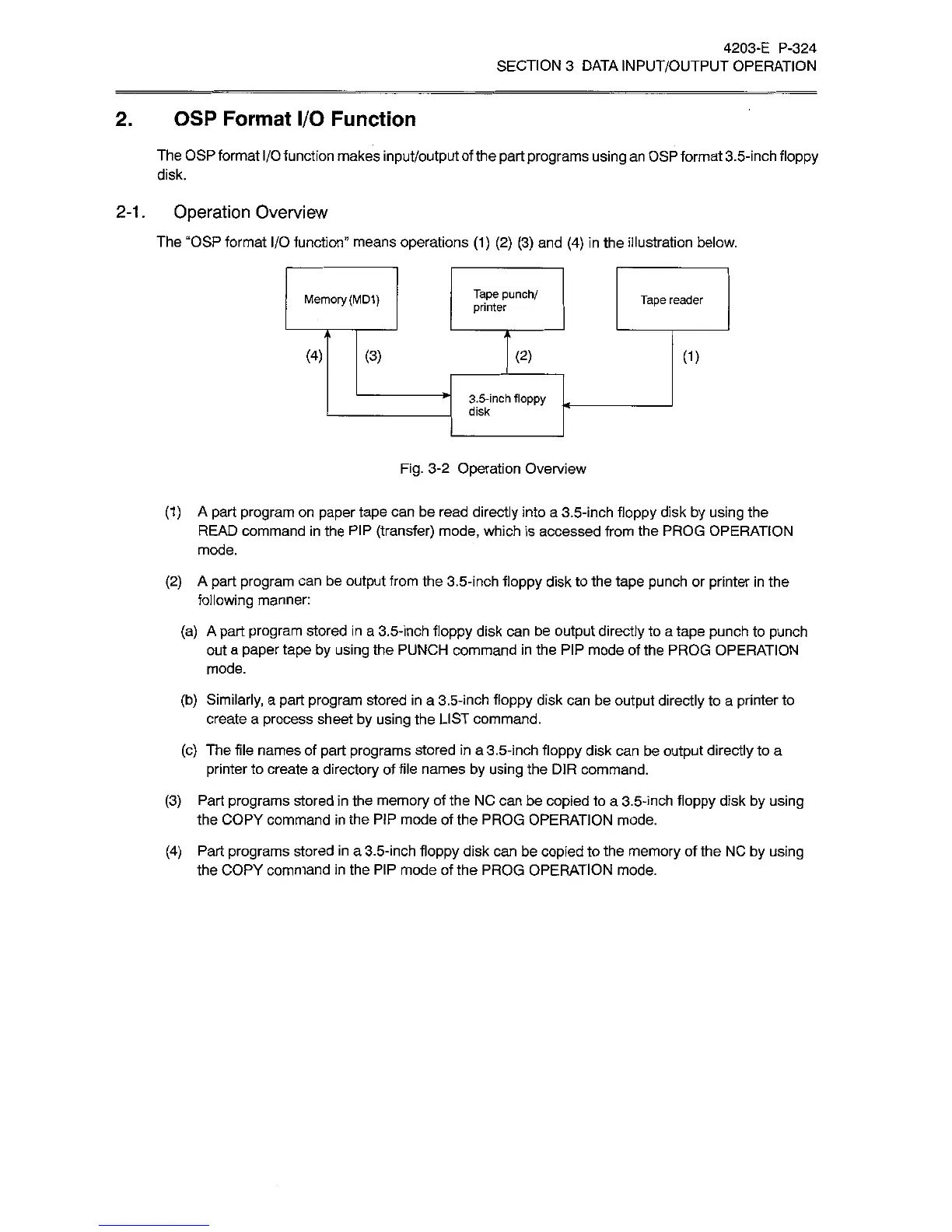
The
“OSP
format
I/O
function"
means
operations
(1) (2) (3)
and
(4)
in
the
illustration
below.
Tape
punch/
printer
Memory
(MD1)
Tape
reader
(4)
(3)
(2)
0)
3.5-inch
floppy
disk
Fig.
3-2
Operation
Overview
(1)
A
part
program
on
paper
tape
can
be
read
directly
into
a
3.5-inch
floppy
disk
by
using
the
READ
command
in
the
PIP
(transfer)
mode,
which
is
accessed
from
the
PROG
OPERATION
mode.
(2)
A
part
program
can
be
output
from
the
3.5-inch
floppy
disk
to
the
tape
punch
or
printer
in
the
following
manner:
(a)
A
part
program
stored
in
a
3.5-inch
floppy
disk
can
be
output
directly
to
a
tape
punch
to
punch
out
a
paper
tape
by
using
the
PUNCH
command
in
the
PIP
mode
of
the
PROG
OPERATION
mode.
(b)
Similarly,
a
part
program
stored
in
a
3.5-inch
floppy
disk
can
be
output
directly
to
a
printer
to
create
a
process
sheet
by
using
the
LIST
command.
(c)
The
file
names
of
part
programs
stored
in
a
3.5-inch
floppy
disk
can
be
output
directly
to
a
printer
to
create
a
directory
of
file
names
by
using
the
DIR
command.
(3)
Part
programs
stored
in
the
memory
of
the
NC
can
be
copied
to
a
3.5-inch
floppy
disk
by
using
the
COPY
command
in
the
PIP
mode
of
the
PROG
OPERATION
mode.
(4)
Part
programs
stored
in
a
3.5-inch
floppy
disk
can
be
copied
to
the
memory
of
the
NC
by
using
the
COPY
command
in
the
PIP
mode
of
the
PROG
OPERATION
mode.

Related product manuals