EasyManua.ls Logo

Okuma OSP-U100M - Page 391

Okuma OSP-U100M
511 pages
Print Icon
To Next Page IconTo Next Page
To Previous Page IconTo Previous Page
Loading...
4203-E
P-369
SECTION
3
DESCRIPTION
OF
PARAMETER
AND
SETTING
PROCEDURE
<Setting
procedure>
I
PARAMETER
SET
I
97/07/15
14:10:00
*USER
PARAMETER*
lmm
X
Y
Z
I
5000.000
1
-5000.000
5000.000
-5000.000
P
PROG
LIMIT
WRK
N
PROG
LIMIT
WRK
P
PROG
LIMIT
MC
N
PROG
LIMIT
MC
G60
OVERRUN
AMT
BACKLASH
CLAMP
IN-P
5000.000
-5000.000
5000.000
-5000.000
1.000
0.000
0.000
0.000
0.000
0.000
4§K
1.000
0.
000
0.000
1.000
0.000
0.000
0.000
0.000
0.000
0.000
0.000
0.000
X
Y
z
ACT
POSIT
(MC)
-0.001
-0.001
-0.001
ITEM
t
ITEM
i
(EXTEND]
SET
CAL
SEARCH
ADD
©©©©©©©©
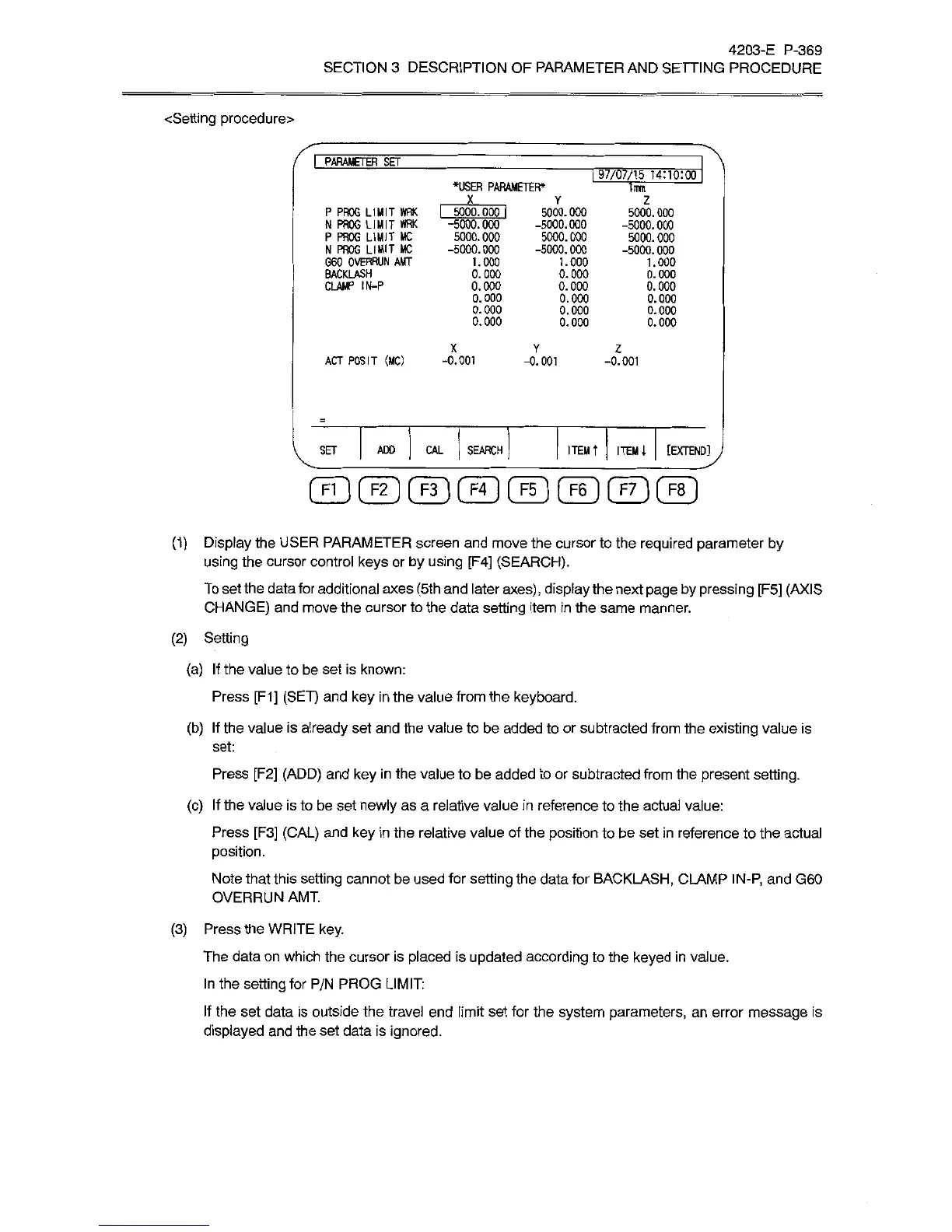
(1)
Display
the
USER
PARAMETER
screen
and
move
the
cursor
to
the
required
parameter
by
using
the
cursor
control
keys
or
by
using
[F4]
(SEARCH).
To
set
the
data
for
additional
axes
(5th
and
later
axes),
display
the
next
page
by
pressing
[F5]
(AXIS
CHANGE)
and
move
the
cursor
to
the
data
setting
item
in
the
same
manner.
(2)
Setting
(a)
If
the
value
to
be
set
is
known:
Press
[F1]
(SET)
and
key
in
the
value
from
the
keyboard.
(b)
If
the
value
is
already
set
and
the
value
to
be
added
to
or
subtracted
from
the
existing
value
is
set:
Press
[F2]
(ADD)
and
key
in
the
value
to
be
added
to
or
subtracted
from
the
present
setting.
(c)
If
the
value
is
to
be
set
newly
as
a
relative
value
in
reference
to
the
actual
value:
Press
[F3]
(CAL)
and
key
in
the
relative
value
of
the
position
to
be
set
in
reference
to
the
actual
position.
Note
that
this
setting
cannot
be
used
for
setting
the
data
for
BACKLASH,
CLAMP
IN-P,
and
G60
OVERRUN
AMT.
(3)
Press
the
WRITE
key.
The
data
on
which
the
cursor
is
placed
is
updated
according
to
the
keyed
in
value.
In
the
setting
for
P/N
PROG
LIMIT:
If
the
set
data
is
outside
the
travel
end
limit
set
for
the
system
parameters,
an
error
message
is
displayed
and
the
set
data
is
ignored.