EasyManua.ls Logo

Okuma OSP-U100M - Page 392

Okuma OSP-U100M
511 pages
Print Icon
To Next Page IconTo Next Page
To Previous Page IconTo Previous Page
Loading...
4203-E
P-370
SECTION
3
DESCRIPTION
OF
PARAMETER
AND
SETTING
PROCEDURE
4.
G/M
Code
Macro
Program
name
of
the
programs
used
as
Geode
macro
(GlO0toG120)
and
M
code
macro
(M201
to
M2
10)
should
be
set.
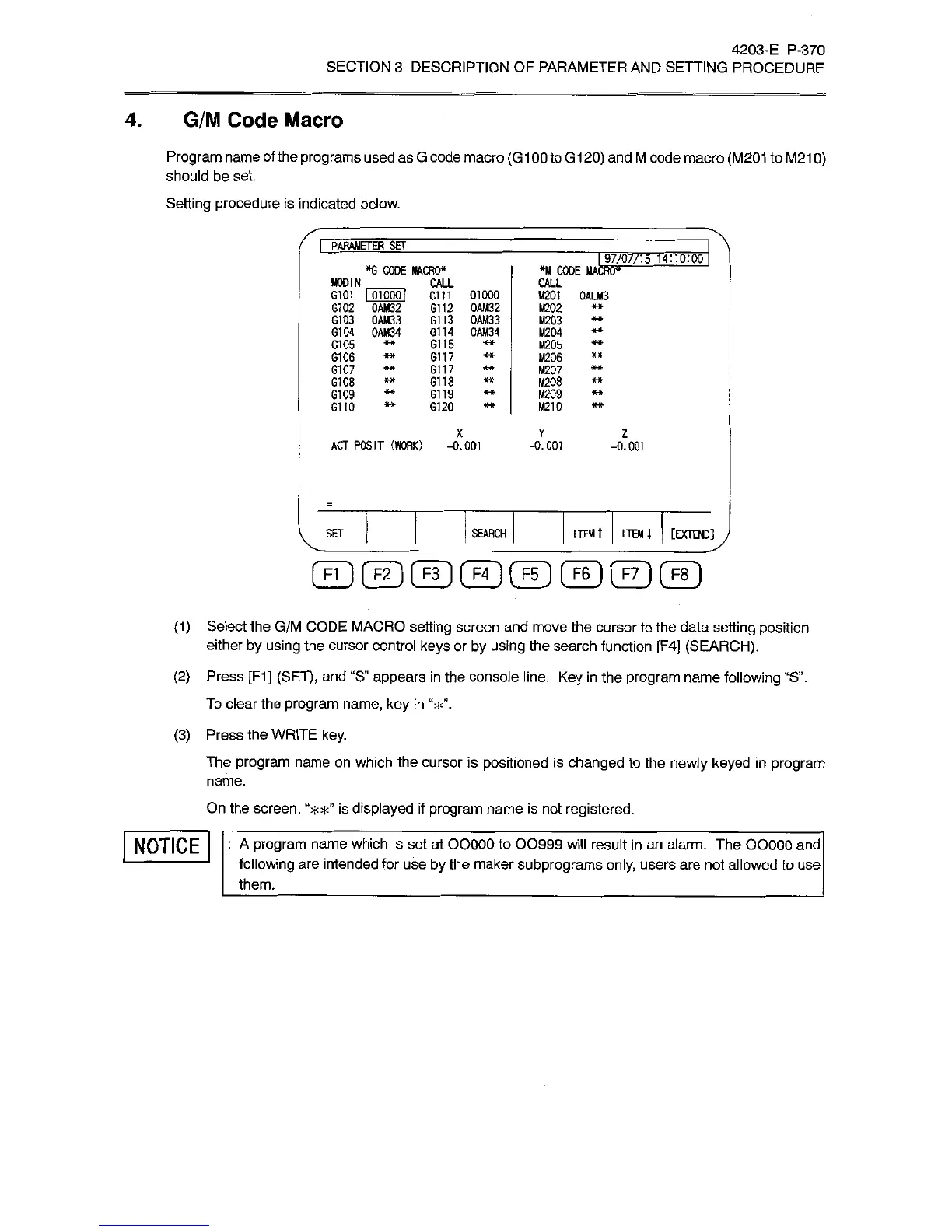
Setting
procedure
is
indicated
below.
I
PARAMETER
SET
97/07/15
14:10:00
*G
CODE
MACRO*
*M
CODE
MACRO
MODIN
_
6101
I
01000
i
G102
0AM32
G103
0AM33
G104
0AM34
CALL
CALL
Gin
01000
G112
0AM32
G113
0AM33
G114
OAM34
M201
0ALM3
M202
M203
M204
G105
G115
M205
G106
G117
M206
G107
G117
M207
G108
Gil
8
M208
G109
G119
M209
G110
G120
M210
X
Y
2
ACT
POSIT
(WORK)
-0.001
-0.001
-0.001
SET
SEARCH
ITEM
t
ITEM
i
[EXTEND]
(ID©©©©©CfDCfD
(1)
Select
the
G/M
CODE
MACRO
setting
screen
and
move
the
cursor
to
the
data
setting
position
either
by
using
the
cursor
control
keys
or
by
using
the
search
function
[F4]
(SEARCH).
(2)
Press
[F1]
(SET),
and
“S”
appears
in
the
console
line.
Key
in
the
program
name
following
“S”.
To
clear
the
program
name,
key
in
(3)
Press
the
WRITE
key.
The
program
name
on
which
the
cursor
is
positioned
is
changed
to
the
newly
keyed
in
program
name.
On
the
screen,
“**”
is
displayed
if
program
name
is
not
registered.
NOTICE
:
A
program
name
which
is
set
at
OOOOO
to
00999
will
result
in
an
alarm.
The
OOOOO
and
following
are
intended
for
use
by
the
maker
subprograms
only,
users
are
not
allowed
to
use
them.