EasyManua.ls Logo

Okuma OSP-U100M - Page 403

Okuma OSP-U100M
511 pages
Print Icon
To Next Page IconTo Next Page
To Previous Page IconTo Previous Page
Loading...
4203-E
P-381
SECTION
3
DESCRIPTION
OF
PARAMETER
AND
SETTING
PROCEDURE
Parameter
Setting
Range
Initial
Setting
Value
Item
Contents
No.
In-position
time
over
check
period
If
all
axes
do
not
arrive
within
in-position
zone
within
the
preset
duration
after
the
completion
of
calculation,
an
alarm
occurs.
This
duration
is
set.
Whether
the
in-position
time
over
check
function
is
made
effective
or
not
is
determined
by
the
setting
for
NC
optional
parameter
(bit)
No.
15,
bit
6.
19
6000
0
to
6000
(x
0.1
sec)
Allowable
num¬
ber
(n)
of
torque
low
for
synchro¬
nized
tapping
An
alarm
occurs
when
the
spindle
load
torque
exceeds
the
allowable
value
for
the
duration
of
6.4*n
(msec)
continuously
while
the
synchronized
tapping
torque
is
monitored.
Sets
the
allowable
number
(n)
of
low
torque
for
the
synchronized
tapping.
_
21
0
0
to
32
(times)
File
read
waiting
time
for
channel
0
in
DNC-B
mode
Sets
the
duration
from
file
name
desig¬
nation
(DC4
output)
to
the
file
read
(DC1
output)
for
channel
0
with
DC
code
control.
If
“0”
is
set,
the
parameter
No.
34
will
be
used
automatically.
23
0
0
to
9999
(sec)
File
read
waiting
time
for
channel
1
in
DNC-B
mode
Sets
the
duration
from
file
name
desig¬
nation
(DC4
output)
to
file
read
(DC1
output)
for
channel
1
with
DC
code
control.
If
“0”
is
set,
the
parameter
No.
35
will
be
used
automatically.
24
0
0
to
9999
(sec)
File
read
waiting
time
for
channel
2
in
DNC-B
mode
Sets
the
duration
from
file
name
desig¬
nation
(DC4
output)
to
file
read
(DC1
output)
for
channel
2
with
DC
code
control.
If
“0”
is
set,
the
parameter
No.
36
will
be
used
automatically.
25
0
to
9999
0
(sec)
File
read
waiting
time
for
channel
3
in
DNC-B
mode
26
Sets
the
duration
from
file
name
desig¬
nation
(DC4
output)
to
file
read
(DC1
output)
for
channel
3
with
DC
code
control.
If
“0”
is
set,
the
parameter
No.
37
will
be
used
automatically.
0
0
to
9999
(sec)
File
read
waiting
time
for
channel
4
in
DNC-B
mode
Sets
the
duration
from
file
name
desig¬
nation
(DC4
output)
to
file
read
(DC1
output)
for
channel
4
with
DC
code
control.
If
“0”
is
set,
the
parameter
No.
38
will
be
used
automatically.
27
0
0
to
9999
(sec)
Maximum
allowable
sets
of
screw
pitch
error
compensation
This
parameter
specifies
the
total
number
of
sets
of
pitch
error
compensation
data
of
all
axes.
33
2304
0
to
2304
(points)
This
specifies
the
duration
in
which
the
RS232C
channel
0
must
be
set
ready.
If
it
is
not
set
ready
within
the
time
specified,
an
alarm
occurs.
34*
Ready
comple¬
tion
waiting
time
for
RS232C
channel
0
10
1
to
9999
(sec)
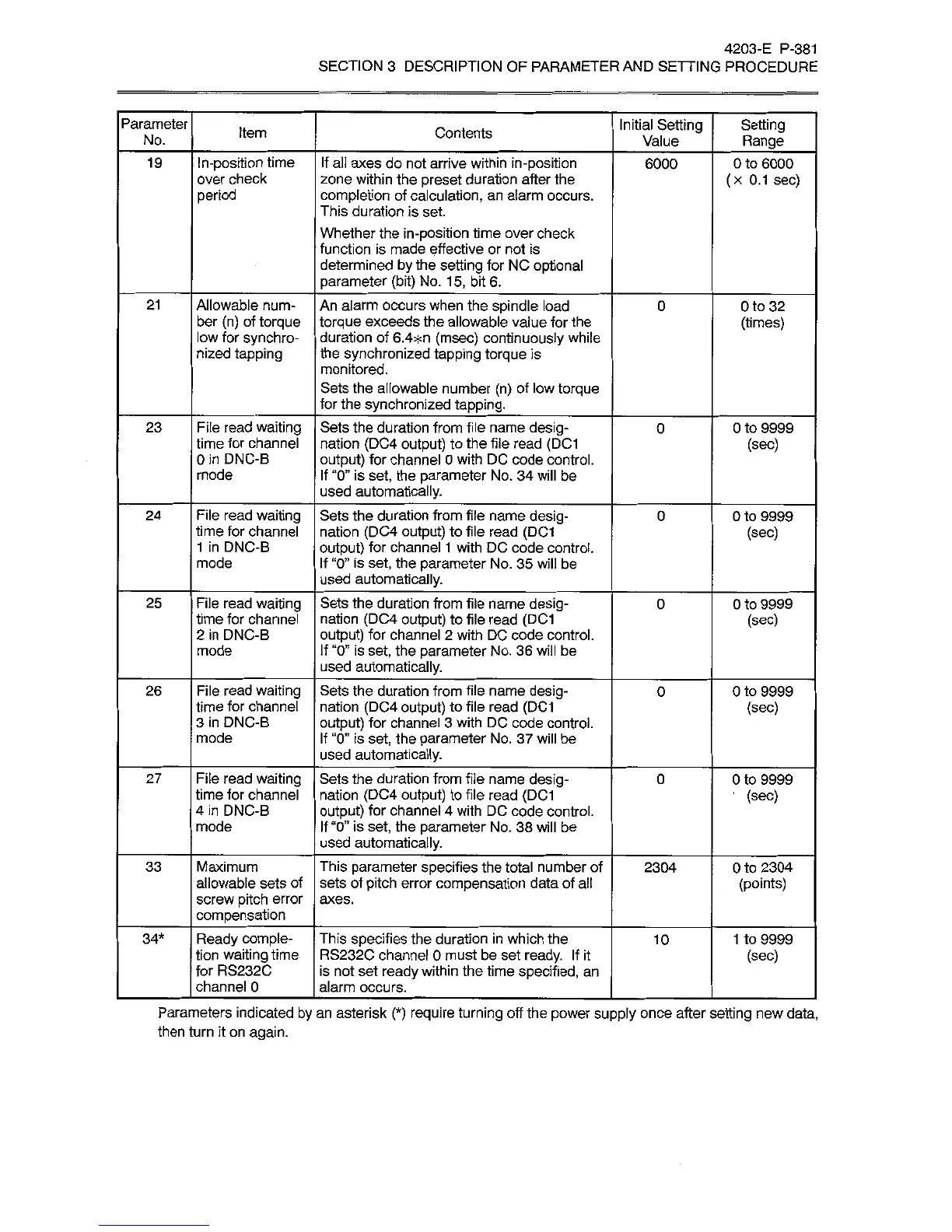
Parameters
indicated
by
an
asterisk
(*)
require
turning
off
the
power
supply
once
after
setting
new
data,
then
turn
it
on
again.

Related product manuals