EasyManua.ls Logo

Okuma OSP-U100M - Page 404

Okuma OSP-U100M
511 pages
Print Icon
To Next Page IconTo Next Page
To Previous Page IconTo Previous Page
Loading...
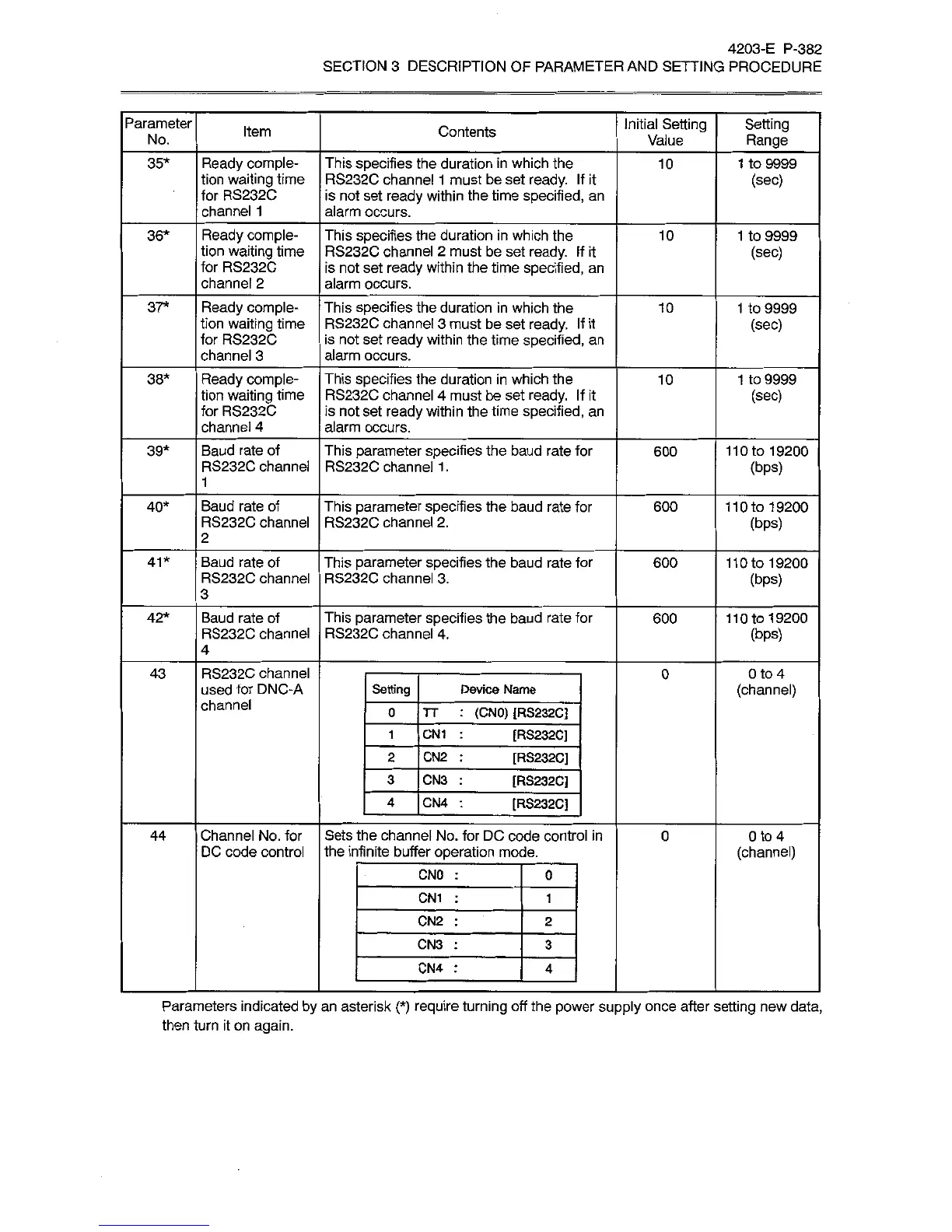
4203-E
P-382
SECTION
3
DESCRIPTION
OF
PARAMETER
AND
SETTING
PROCEDURE
Parameter
Initial
Setting
Value
Setting
Range
Item
Contents
No.
Ready
comple¬
tion
waiting
time
for
RS232C
channel
1
This
specifies
the
duration
in
which
the
RS232C
channel
1
must
be
set
ready.
If
it
is
not
set
ready
within
the
time
specified,
an
alarm
occurs.
35*
10
1
to
9999
(sec)
36*
Ready
comple¬
tion
waiting
time
for
RS232C
channel
2
This
specifies
the
duration
in
which
the
RS232C
channel
2
must
be
set
ready.
If
it
is
not
set
ready
within
the
time
specified,
an
alarm
occurs.
10
1
to
9999
(sec)
37*
Ready
comple¬
tion
waiting
time
for
RS232C
channel
3
This
specifies
the
duration
in
which
the
RS232C
channel
3
must
be
set
ready.
If
it
is
not
set
ready
within
the
time
specified,
an
alarm
occurs.
10
1
to
9999
(sec)
Ready
comple¬
tion
waiting
time
for
RS232C
channel
4
38*
This
specifies
the
duration
in
which
the
RS232C
channel
4
must
be
set
ready.
If
it
is
not
set
ready
within
the
time
specified,
an
alarm
occurs.
10
1
to
9999
(sec)
Baud
rate
of
RS232C
channel
39*
This
parameter
specifies
the
baud
rate
for
RS232C
channel
1
.
600
110
to
19200
(bps)
1
Baud
rate
of
RS232C
channel
This
parameter
specifies
the
baud
rate
for
RS232C
channel
2.
40*
600
110
to
19200
(bps)
2
Baud
rate
of
RS232C
channel
This
parameter
specifies
the
baud
rate
for
RS232C
channel
3.
41*
600
110
to
19200
(bps)
3
Baud
rate
of
RS232C
channel
This
parameter
specifies
the
baud
rate
for
RS232C
channel
4.
42*
600
110
to
19200
(bps)
4
RS232C
channel
used
for
DNC-A
channel
43
0
0
to
4
(channel)
Setting
Device
Name
0
TT
(CN0)
[RS232C]
CN1
[RS232C]
1
2
CN2
[RS232C]
3
CN3
[RS232C]
4
CN4
[RS232C]
Channel
No.
for
DC
code
control
Sets
the
channel
No.
for
DC
code
control
in
the
infinite
buffer
operation
mode.
0
44
0
to
4
(channel)
CN0
0
CN1
1
CN2
2
CN3
3
CN4
4
Parameters
indicated
by
an
asterisk
(*)
require
turning
off
the
power
supply
once
after
setting
new
data,
then
turn
it
on
again.