EasyManua.ls Logo

Okuma OSP-U100M - Page 429

Okuma OSP-U100M
511 pages
Print Icon
To Next Page IconTo Next Page
To Previous Page IconTo Previous Page
Loading...
4203-E
P-407
SECTION
3
DESCRIPTION
OF
PARAMETER
AND
SETTING
PROCEDURE
Initial
Setting
Value
Parame¬
ter
No.
Bit
Contents
Set
1
SetO
No.
0
0
1
0
2
0
3
0
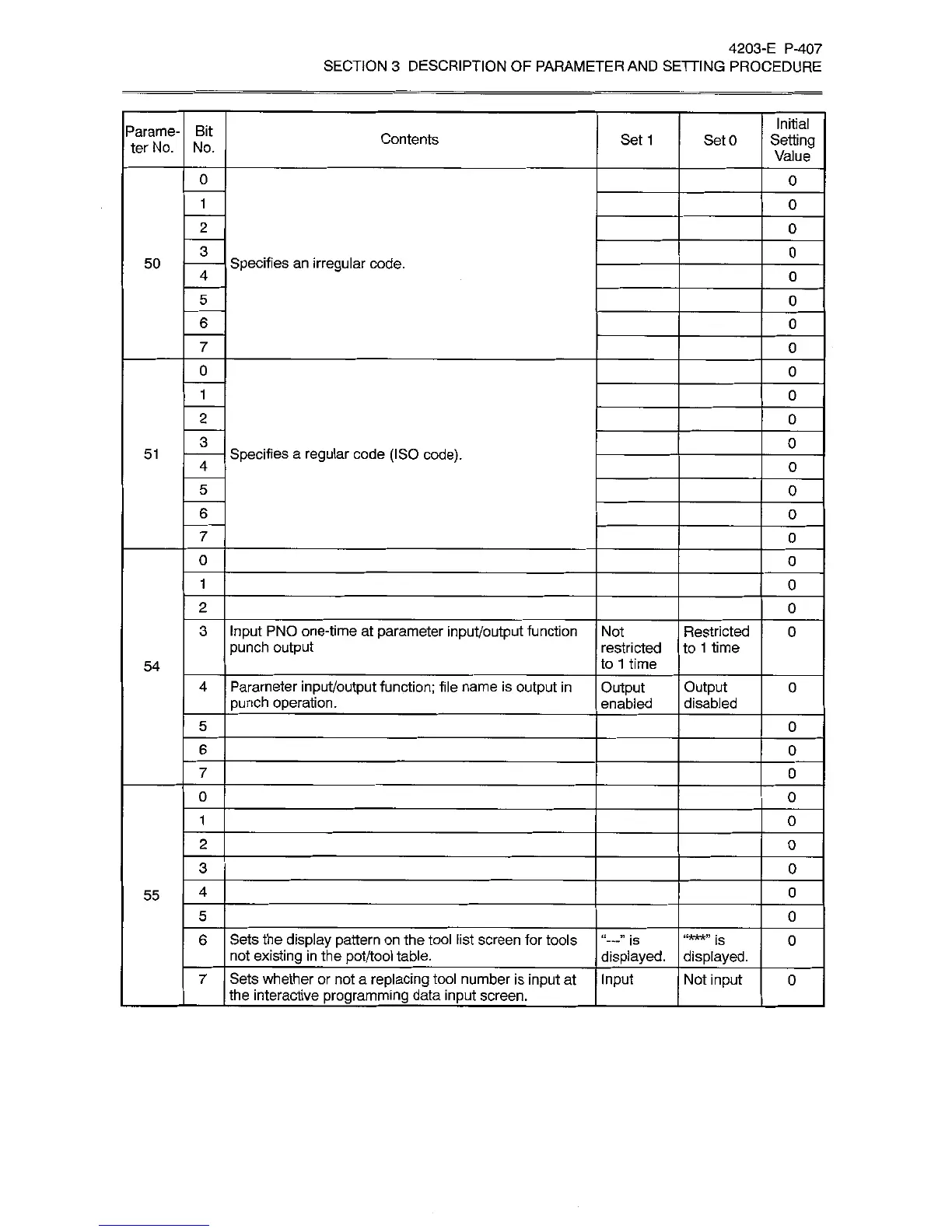
Specifies
an
irregular
code.
50
4
0
5
0
6
0
7
0
0
0
1
0
2
0
3
0
Specifies
a
regular
code
(ISO
code).
51
4
0
5
0
6
0
7
0
0
0
1
0
2
0
3
Input
PNO
one-time
at
parameter
input/output
function
punch
output
Not
Restricted
to
1
time
0
restricted
to
1
time
54
Parameter
input/output
function;
file
name
is
output
in
punch
operation.
4
Output
enabled
Output
disabled
0
5
0
6
0
7
0
0
0
1
0
2
0
3
0
4
0
55
5
0
Sets
the
display
pattern
on
the
tool
list
screen
for
tools
not
existing
in
the
pot/tool
table.
6
is
displayed.
“***”
is
displayed.
0
Sets
whether
or
not
a
replacing
tool
number
is
input
at
the
interactive
programming
data
input
screen.
_
Input
Not
input
7
0