EasyManua.ls Logo

Okuma OSP-U100M - Machine Axis Parameter

Okuma OSP-U100M
511 pages
Print Icon
To Next Page IconTo Next Page
To Previous Page IconTo Previous Page
Loading...
4203-E
P-408
SECTION
3
DESCRIPTION
OF
PARAMETER
AND
SETTING
PROCEDURE
Initial
Setting
Value
Parame¬
ter
No.
Bit
Contents
Set
1
SetO
No.
0*
0
1
0
2*
0
3*
0
4*
0
56
Special
MTB
model
parameter
5*
Specified
model
Model
not
specified
0
Display
of
PLC
data
display,
ladder
diagram,
and
data
trace
screens
6
Displayed
Not
0
displayed
Display
of
PLC
check
(run
mode
DTM
screen)
screen
Displayed
7
Not
0
displayed
0
0
The
direct
position
sensor
operation
confirmation
function
is
made
effective.
Ineffective
1
Effective
0
2
0
3
0
In
the
Z-axis
return
operation
in
the
G73/G83
fixed
cycle,
GOO
mode
is
replaced
with
G01
mode.
GOO
4
G01
0
59
For
the
PPC,
this
parameter
sets
whether
or
not
the
manual
operation
screen
(touch
panel)
is
displayed.
(MX)
5
Displayed
Not
0
displayed
6
0
7
0
In
the
G10/G11
mode,
actual
position
data
is
calculated
including
the
mirror
image,
incremental
function,
attachment
offset,
and
tool
length
offset
value.
Effective
0
Ineffective
0
In
the
G10/G11
mode,
actual
position
data
is
calculated
including
the
mirror
image
and
incremental
function.
Effective
Ineffective
1
0
In
the
G69/G68
mode,
actual
position
data
is
calculated
including
the
mirror
image,
incremental
function,
attachment
offset,
and
tool
length
offset
value.
_
2
Effective
Ineffective
0
60
3
0
4
0
5
0
6
0
7
0
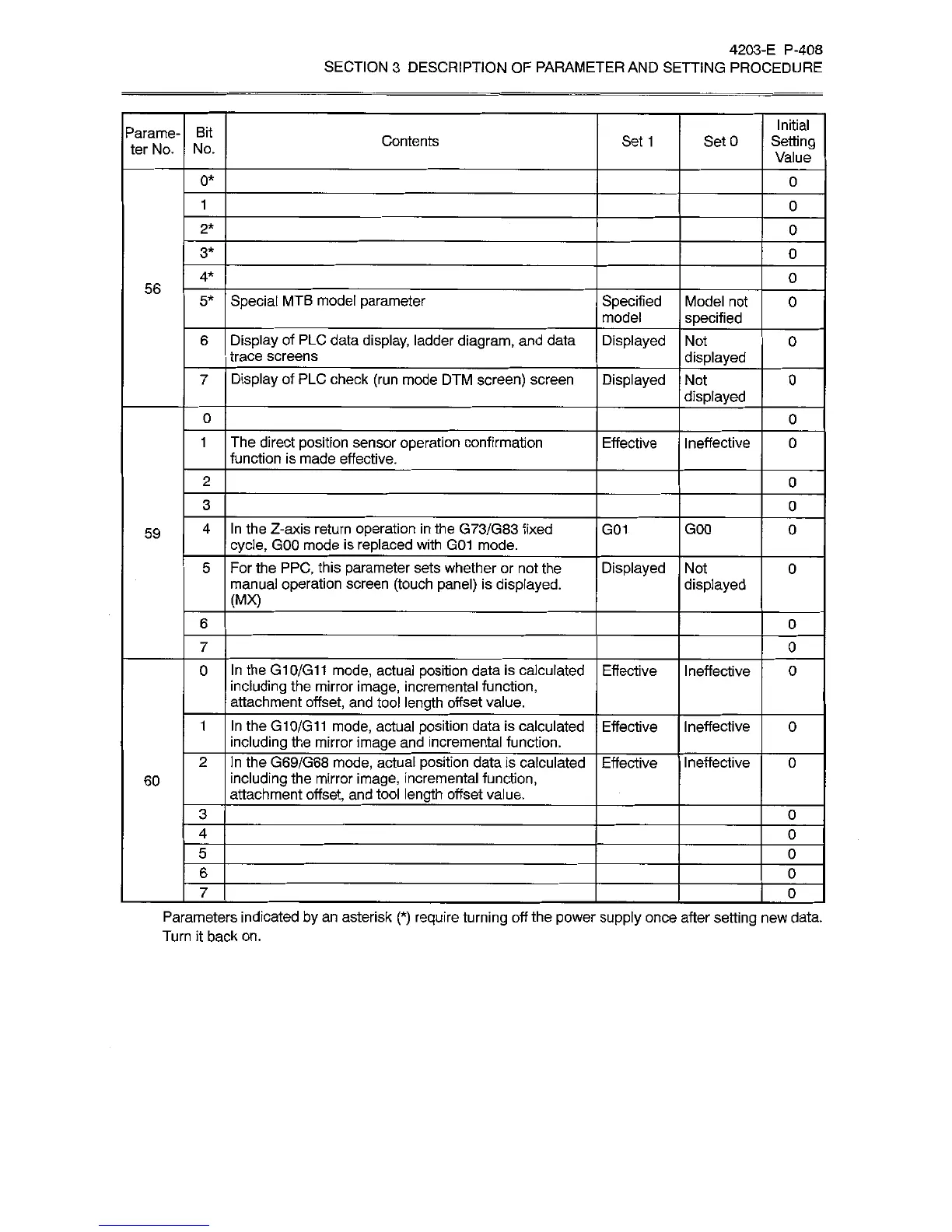
Parameters
indicated
by
an
asterisk
(*)
require
turning
off
the
power
supply
once
after
setting
new
data.
Turn
it
back
on.