EasyManua.ls Logo

Okuma OSP-U100M - Page 431

Okuma OSP-U100M
511 pages
Print Icon
To Next Page IconTo Next Page
To Previous Page IconTo Previous Page
Loading...
4203-E
P-409
SECTION
3
DESCRIPTION
OF
PARAMETER
AND
SETTING
PROCEDURE
Initial
Setting
Value
Parame¬
ter
No.
Bit
Contents
Set
1
SetO
No.
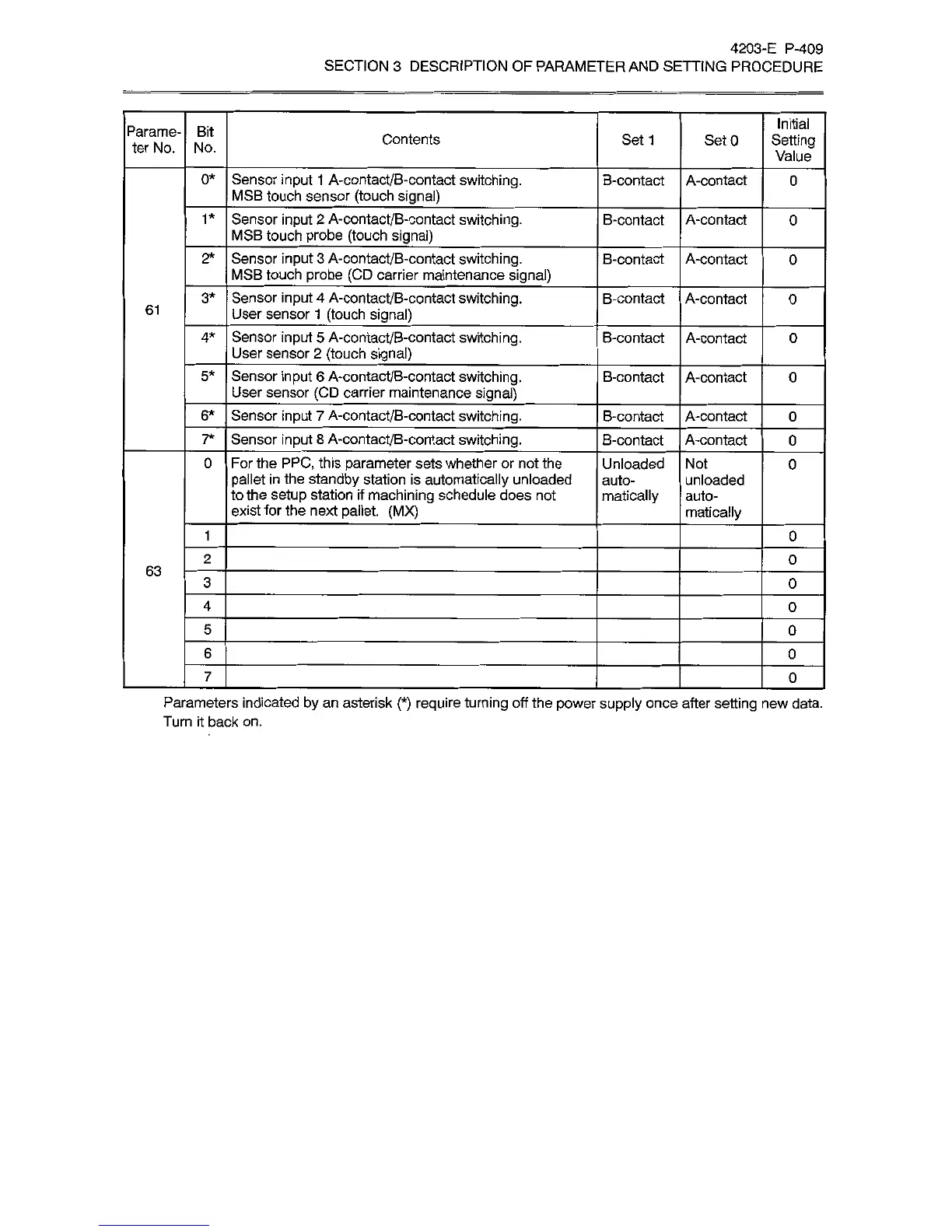
0*
Sensor
input
1
A-contact/B-contact
switching.
MSB
touch
sensor
(touch
signal)
_
B-contact
A-contact
0
Sensor
input
2
A-contact/B-contact
switching.
MSB
touch
probe
(touch
signal)
1*
B-contact
A-contact
0
Sensor
input
3
A-contact/B-contact
switching.
MSB
touch
probe
(CD
carrier
maintenance
signal)
2*
B-contact
A-contact
0
Sensor
input
4
A-contact/B-contact
switching.
User
sensor
1
(touch
signal)
_
3*
B-contact
A-contact
0
61
Sensor
input
5
A-contact/B-contact
switching.
User
sensor
2
(touch
signal)
_
4*
B-contact
A-contact
0
Sensor
input
6
A-contact/B-contact
switching.
User
sensor
(CD
carrier
maintenance
signal)
5*
B-contact
A-contact
0
Sensor
input
7
A-contact/B-contact
switching.
6*
B-contact
A-contact
0
7*
Sensor
input
8
A-contact/B-contact
switching.
B-contact
A-contact
0
For
the
PPC,
this
parameter
sets
whether
or
not
the
pallet
in
the
standby
station
is
automatically
unloaded
to
the
setup
station
if
machining
schedule
does
not
exist
for
the
next
pallet.
(MX)
0
Unloaded
auto¬
matically
Not
0
unloaded
auto¬
matically
1
0
2
0
63
3
0
4
0
5
0
6
0
7
0
Parameters
indicated
by
an
asterisk
(*)
require
turning
off
the
power
supply
once
after
setting
new
data.
Turn
it
back
on.