EasyManua.ls Logo

Okuma OSP-U100M - Page 456

Okuma OSP-U100M
511 pages
Print Icon
To Next Page IconTo Next Page
To Previous Page IconTo Previous Page
Loading...
4203-E
P-434
SECTION
3
DESCRIPTION
OF
PARAMETER
AND
SETTING
PROCEDURE
Setting
procedure
is
as
follows:
(1
)
Press
the
PARAM
ETER
key.
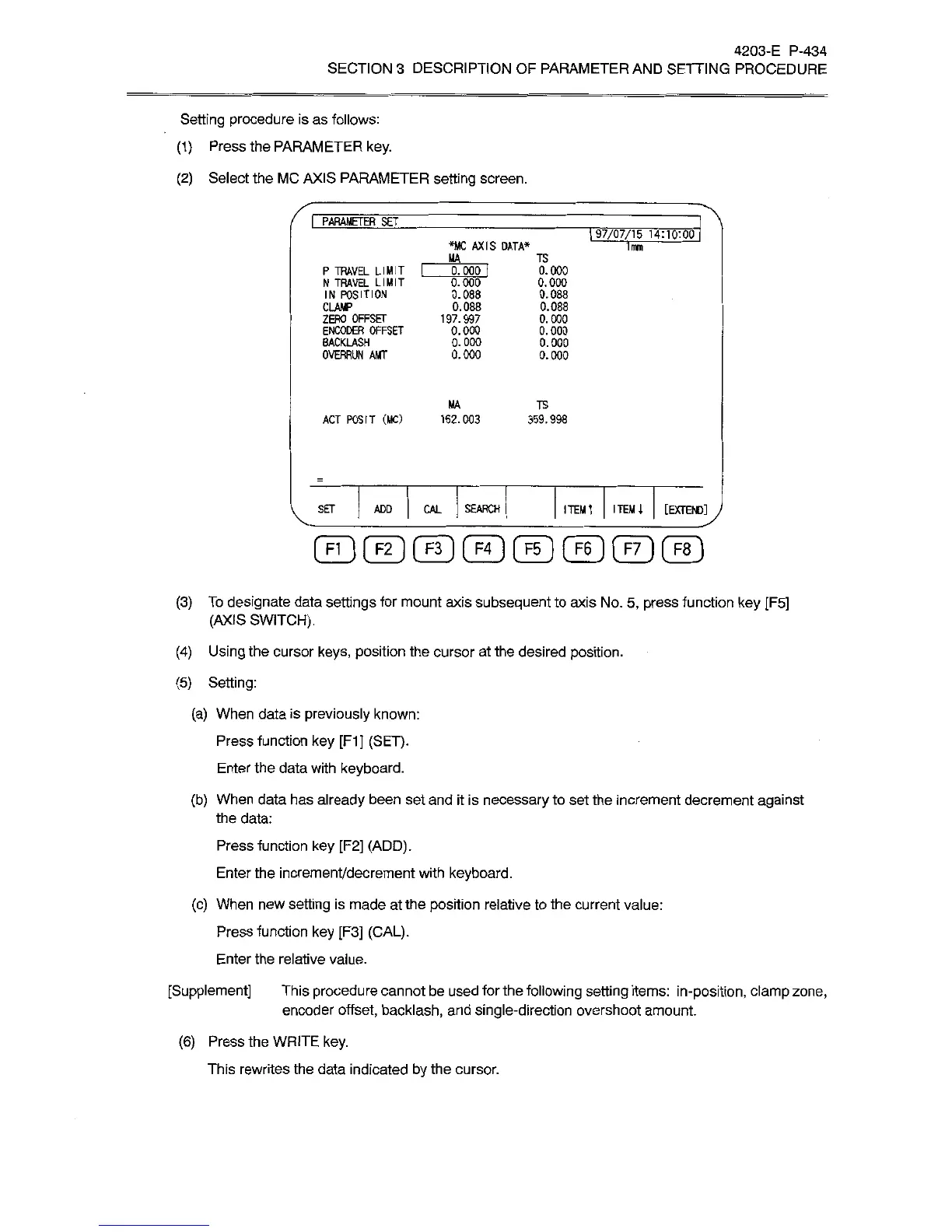
(2)
Select
the
MC
AXIS
PARAMETER
setting
screen.
I
PARAMETER
SET
197/07/15
14:
1
0
:
00
*MC
AXIS
DATA*
1mm
MA
TS
0.000
1
P
TRAVEL
LIMIT
N
TRAVEL
LIMIT
IN
POSITION
CLAMP
ZERO
OFFSET
ENCODER
OFFSET
BACKLASH
OVERRUN
AMT
0.000
0.
000
0.088
0.088
0.000
0.000
0.000
0.000
0.088
0.088
197.997
0.000
0.000
0.000
0.000
MA
TS
ACT
POSIT
(MC)
162.003
359.998
ITEM
t
ITEM
l
[EXTEND]
SEARCH
SET
ADD
CAL
(3)
To
designate
data
settings
for
mount
axis
subsequent
to
axis
No.
5,
press
function
key
[F5]
(AXIS
SWITCH).
(4)
Using
the
cursor
keys,
position
the
cursor
at
the
desired
position.
(5)
Setting:
(a)
When
data
is
previously
known:
Press
function
key
[F1]
(SET).
Enter
the
data
with
keyboard.
(b)
When
data
has
already
been
set
and
it
is
necessary
to
set
the
increment
decrement
against
the
data:
Press
function
key
[F2]
(ADD).
Enter
the
increment/decrement
with
keyboard.
(c)
When
new
setting
is
made
at
the
position
relative
to
the
current
value:
Press
function
key
[F3]
(CAL).
Enter
the
relative
value.
[Supplement]
This
procedure
cannot
be
used
for
the
following
setting
items:
in-position,
clamp
zone,
encoder
offset,
backlash,
and
single-direction
overshoot
amount.
(6)
Press
the
WRITE
key.
This
rewrites
the
data
indicated
by
the
cursor.