EasyManua.ls Logo

Okuma OSP-U100M - Page 459

Okuma OSP-U100M
511 pages
Print Icon
To Next Page IconTo Next Page
To Previous Page IconTo Previous Page
Loading...
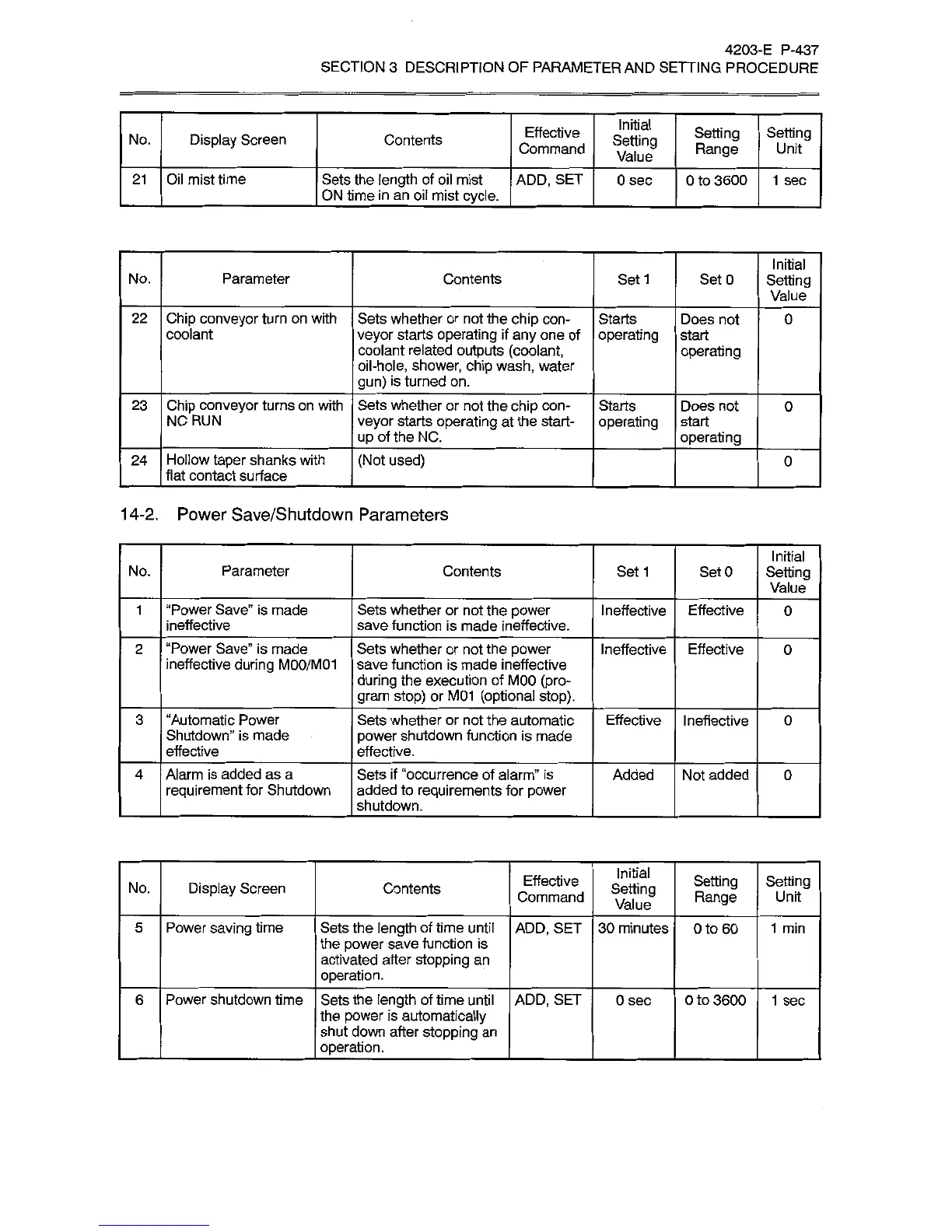
4203-E
P-437
SECTION
3
DESCRIPTION
OF
PARAMETER
AND
SETTING
PROCEDURE
Initial
Effective
Command
Setting
Range
Setting
No.
Display
Screen
Contents
Setting
Value
Unit
Oil
mist
time
Sets
the
length
of
oil
mist
ON
time
in
an
oil
mist
cycle.
21
ADD,
SET
0
sec
0
to
3600
1
sec
Initial
Setting
Value
No.
Parameter
Contents
Set
1
SetO
Chip
conveyor
turn
on
with
coolant
22
Sets
whether
or
not
the
chip
con¬
veyor
starts
operating
if
any
one
of
coolant
related
outputs
(coolant,
oil-hole,
shower,
chip
wash,
water
gun)
is
turned
on.
Starts
operating
Does
not
start
operating
0
Chip
conveyor
turns
on
with
NC
RUN
Sets
whether
or
not
the
chip
con¬
veyor
starts
operating
at
the
start¬
up
of
the
NC.
23
Starts
operating
Does
not
start
operating
0
Hollow
taper
shanks
with
flat
contact
surface
24
(Not
used)
0
14-2.
Power
Save/Shutdown
Parameters
Initial
Setting
Value
No.
Parameter
Contents
Set
1
SetO
“Power
Save”
is
made
ineffective
Sets
whether
or
not
the
power
save
function
is
made
ineffective.
Ineffective
1
Effective
0
“Power
Save”
is
made
ineffective
during
M00/M01
Sets
whether
or
not
the
power
save
function
is
made
ineffective
during
the
execution
of
MOO
(pro¬
gram
stop)
or
M01
(optional
stop).
2
Ineffective
Effective
0
3
“Automatic
Power
Shutdown”
is
made
effective
Sets
whether
or
not
the
automatic
power
shutdown
function
is
made
effective.
Effective
Ineffective
0
Alarm
is
added
as
a
requirement
for
Shutdown
Sets
if
“occurrence
of
alarm”
is
added
to
requirements
for
power
shutdown.
Added
4
Not
added
0
Initial
Setting
Value
Effective
Command
Setting
Range
Setting
Contents
No.
Display
Screen
Unit
Power
saving
time
Sets
the
length
of
time
until
the
power
save
function
is
activated
after
stopping
an
operation.
ADD,
SET
5
30
minutes
0
to
60
1
min
Power
shutdown
time
6
Sets
the
length
of
time
until
the
power
is
automatically
shut
down
after
stopping
an
operation.
ADD,
SET
0
sec
0
to
3600
1
sec

Related product manuals