EasyManua.ls Logo

Okuma OSP-U100M - Page 80

Okuma OSP-U100M
511 pages
Print Icon
To Next Page IconTo Next Page
To Previous Page IconTo Previous Page
Loading...
4203-
E
P-60
SECTION
3
MANUAL
OPERATION
FUNCTIONS
4-1-2.
Operation
on
ATC
Operation
Panel
(1)
Status
indication
and
operation
keys
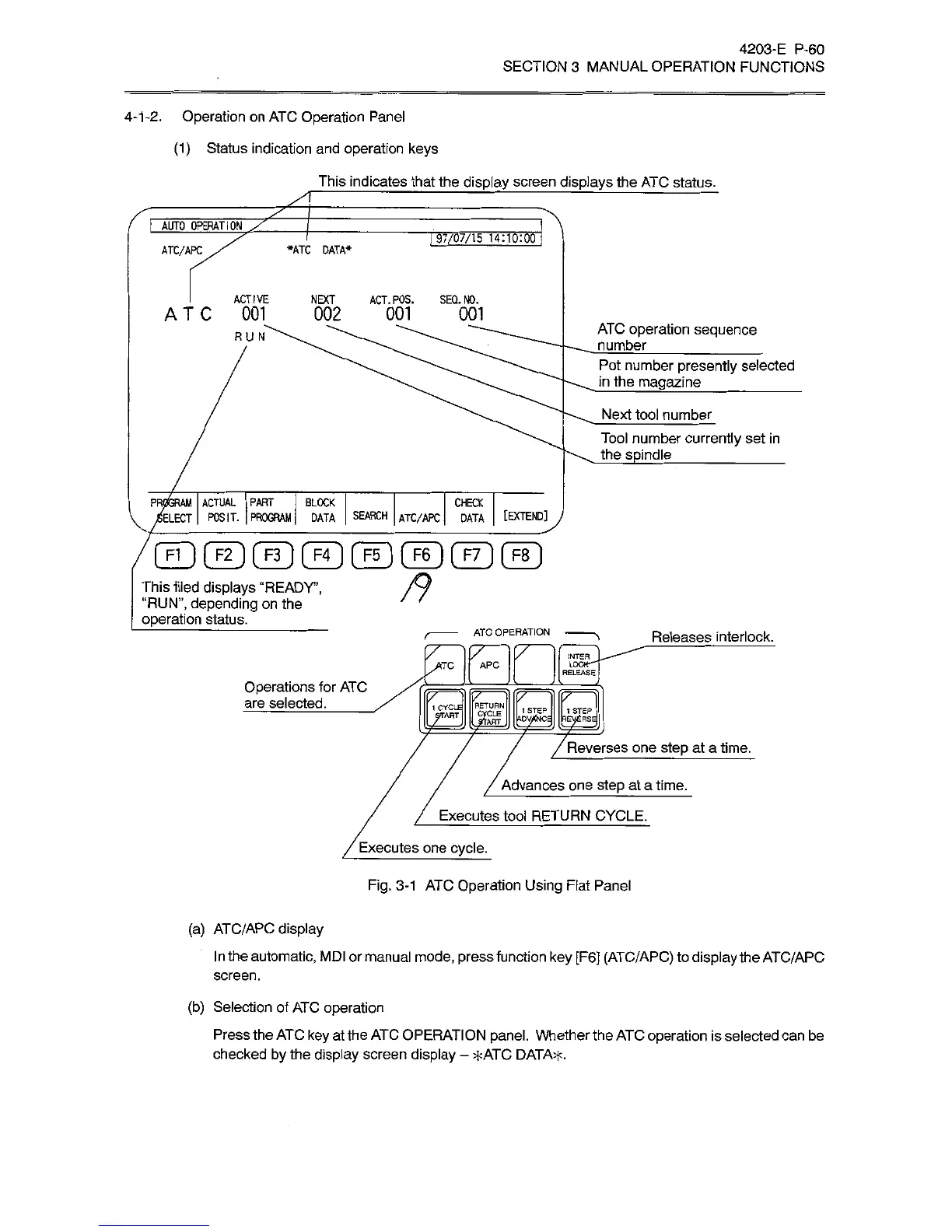
This
indicates
that
the
display
screen
displays
the
ATC
status.
I
AUTO
OPERATION
x"
97/07/15
14:10:00
ATC/APC
*ATC
DATA*
I
ACTIVE
NEXT
ACT.POS.
SEQ.N0.
ATC
001
002
001
001
ATC
operation
sequence
number
_
RUN
Pot
number
presently
selected
in
the
magazine
_
Next
tool
number
Tool
number
currently
set
in
the
spindle
_
PR(
(SRAM
ACTUAL
PART
BLOCK
LECT
POSIT.
PROGRAM
DATA
SEARCH
I
ATC/APC
I
DATA
I
[EXTEND]
CHECK
This
tiled
displays
“READY’,
“RUN”,
depending
on
the
operation
status.
ATC
OPERATION
Releases
interlock.
INTER
LOCK""”
RELEASE
APC
Operations
for
ATC
are
selected.
_
[7
jÿRT,
/
Reverses
one
step
at
a
time.
Advances
one
step
at
a
time.
Executes
tool
RETURN
CYCLE.
Executes
one
cycle.
Fig.
3-1
ATC
Operation
Using
Flat
Panel
(a)
ATC/APC
display
In
the
automatic,
MDI
or
manual
mode,
press
function
key
[F6]
(ATC/APC)
to
display
the
ATC/APC
screen.
(b)
Selection
of
ATC
operation
Press
the
ATC
key
at
the
ATC
OPERATION
panel.
Whether
the
ATC
operation
is
selected
can
be
checked
by
the
display
screen
display
-
*ATC
DATA*.

Related product manuals