EasyManua.ls Logo

Okuma OSP-U100M - Page 85

Okuma OSP-U100M
511 pages
Print Icon
To Next Page IconTo Next Page
To Previous Page IconTo Previous Page
Loading...
4203-E
P-65
SECTION
3
MANUAL
OPERATION
FUNCTIONS
Operating
method
is
shown
below:
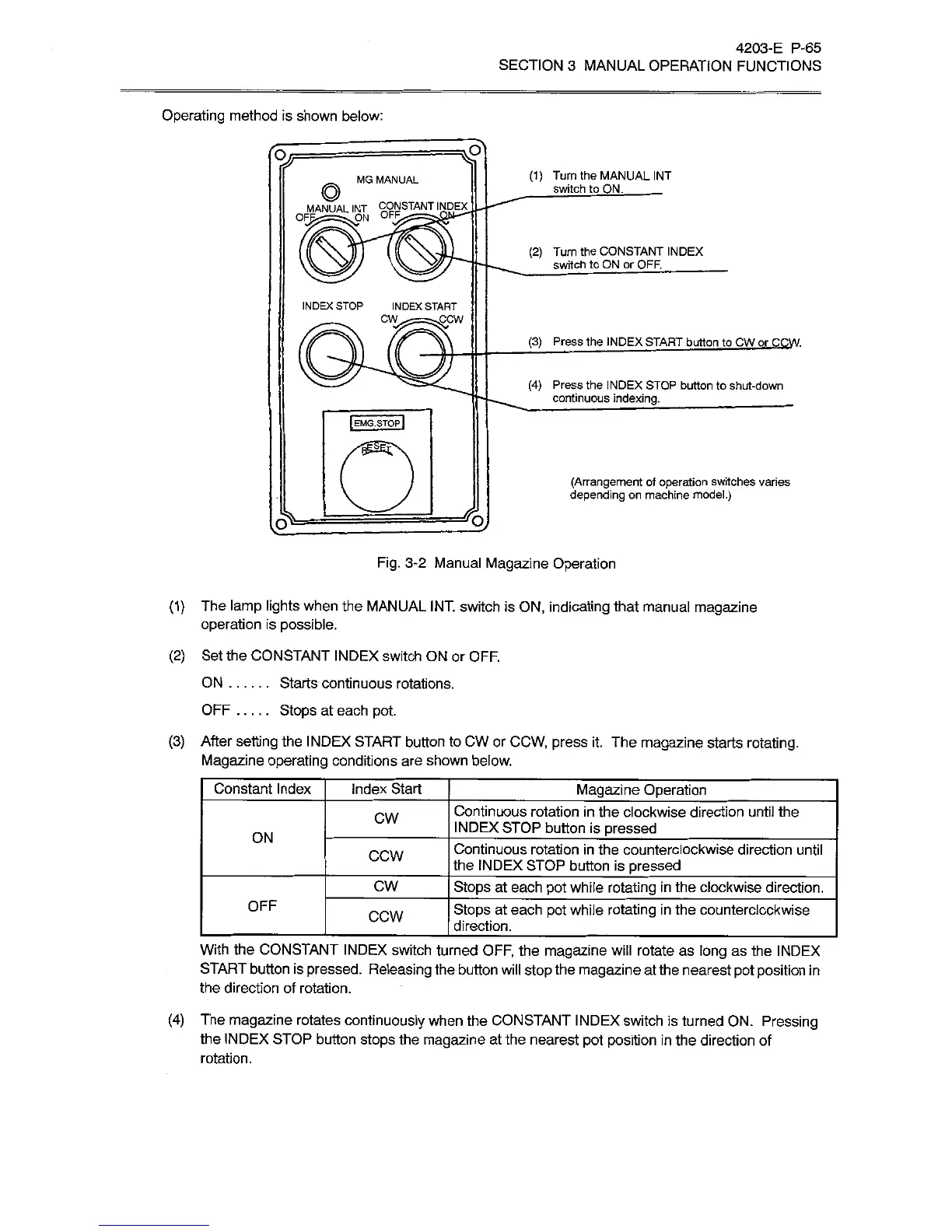
(1)
Turn
the
MANUAL
INT
switch
to
ON.
_
MG
MANUAL
©
OFPÿON
OFF
STANT
INDEX
(2)
Turn
the
CONSTANT
INDEX
switch
to
ON
or
OFF.
_
INDEX
STOP
INDEX
START
CW
sCCW
(3)
Press
the
INDEX
START
button
to
CW
or
COW.
(4)
Press
the
I
N
DEX
STOP
button
to
shut-down
continuous
indexing.
__
IEMG.STOPI
(Arrangement
of
operation
switches
varies
depending
on
machine
model.)
£oJ
Fig.
3-2
Manual
Magazine
Operation
(1)
The
lamp
lights
when
the
MANUAL
INT.
switch
is
ON,
indicating
that
manual
magazine
operation
is
possible.
(2)
Set
the
CONSTANT
INDEX
switch
ON
or
OFF.
Starts
continuous
rotations.
Stops
at
each
pot.
(3)
After
setting
the
INDEX
START
button
to
CW
or
CCW,
press
it.
The
magazine
starts
rotating.
Magazine
operating
conditions
are
shown
below.
ON
OFF
Constant
Index
Index
Start
Magazine
Operation
Continuous
rotation
in
the
clockwise
direction
until
the
INDEX
STOP
button
is
pressed
CW
ON
Continuous
rotation
in
the
counterclockwise
direction
until
the
INDEX
STOP
button
is
pressed
CCW
CW
Stops
at
each
pot
while
rotating
in
the
clockwise
direction.
OFF
Stops
at
each
pot
while
rotating
in
the
counterclockwise
direction.
CCW
With
the
CONSTANT
INDEX
switch
turned
OFF,
the
magazine
will
rotate
as
long
as
the
INDEX
START
button
is
pressed.
Releasing
the
button
will
stop
the
magazine
at
the
nearest
pot
position
in
the
direction
of
rotation.
(4)
The
magazine
rotates
continuously
when
the
CONSTANT
INDEX
switch
is
turned
ON.
Pressing
the
INDEX
STOP
button
stops
the
magazine
at
the
nearest
pot
position
in
the
direction
of
rotation.

Related product manuals