EasyManua.ls Logo

Okuma OSP-U100M - Page 91

Okuma OSP-U100M
511 pages
Print Icon
To Next Page IconTo Next Page
To Previous Page IconTo Previous Page
Loading...
4203-E
P-71
SECTION
3
MANUAL
OPERATION
FUNCTIONS
6.
Other
Functions
These
include
the
COOLANT,
OIL
MIST,
AIR
BLOW,
OIL
HOLE,
CHIP
CONVEYOR
and
DISPLAY
SCREEN.
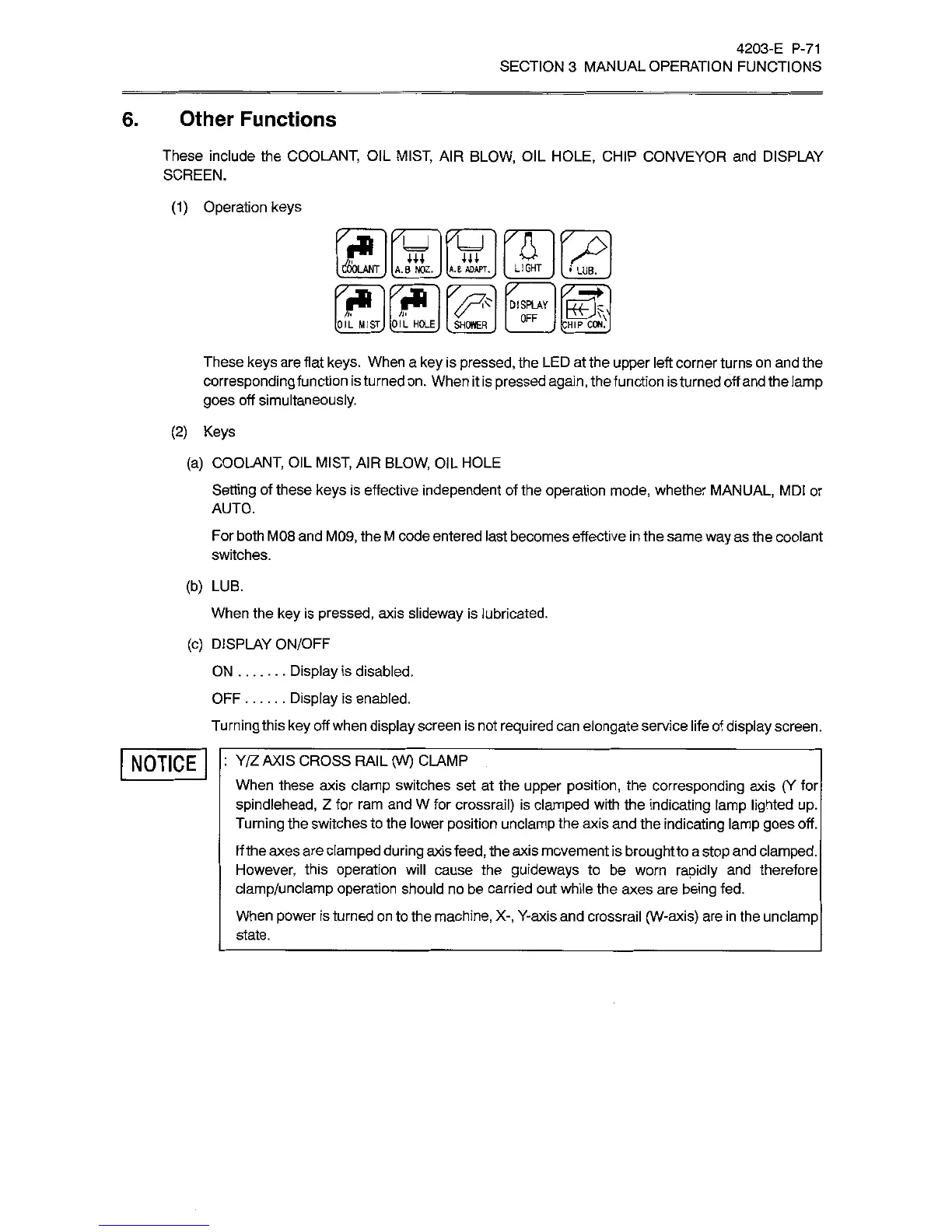
(1)
Operation
keys
DESKS
These
keys
are
flat
keys.
When
a
key
is
pressed,
the
LED
at
the
upper
left
corner
turns
on
and
the
corresponding
function
is
turned
on.
When
it
is
pressed
again,
the
function
is
turned
off
and
the
lamp
goes
off
simultaneously.
(2)
Keys
(a)
COOLANT,
OIL
MIST,
AIR
BLOW,
OIL
HOLE
Setting
of
these
keys
is
effective
independent
of
the
operation
mode,
whether
MANUAL,
MDI
or
AUTO.
For
both
M08
and
M09,
the
M
code
entered
last
becomes
effective
in
the
same
way
as
the
coolant
switches.
(b)
LUB.
When
the
key
is
pressed,
axis
slideway
is
lubricated.
(c)
DISPLAY
ON/OFF
Display
is
disabled.
Display
is
enabled.
Turning
this
key
off
when
display
screen
is
not
required
can
elongate
service
life
of
display
screen.
ON
OFF
NOTICE
:
Y/Z
AXIS
CROSS
RAIL
(W)
CLAMP
When
these
axis
clamp
switches
set
at
the
upper
position,
the
corresponding
axis
(Y
for
spindlehead,
Z
for
ram
and
W
for
crossrail)
is
clamped
with
the
indicating
lamp
lighted
up.
Turning
the
switches
to
the
lower
position
unclamp
the
axis
and
the
indicating
lamp
goes
off.
If
the
axes
are
clamped
during
axis
feed,
the
axis
movement
is
brought
to
a
stop
and
clamped.
However,
this
operation
will
cause
the
guideways
to
be
worn
rapidly
and
therefore
clamp/unclamp
operation
should
no
be
carried
out
while
the
axes
are
being
fed.
When
power
is
turned
on
to
the
machine,
X-,
Y-axis
and
crossrail
(W-axis)
are
in
the
unclamp
state.

Related product manuals