EasyManua.ls Logo

Okuma OSP-U100M - Automatic Mode Operation and MDI Mode Operation

Okuma OSP-U100M
511 pages
Print Icon
To Next Page IconTo Next Page
To Previous Page IconTo Previous Page
Loading...
4203-E
P-74
SECTION
4
MDI
OPERATION
2.
Automatic
Mode
Operation
and
MDI
Mode
Operation
(1)
During
the
execution
of
the
automatic
mode
operation,
the
MDI
mode
operation
may
be
inserted
after
interrupting
the
automatic
mode
operation.
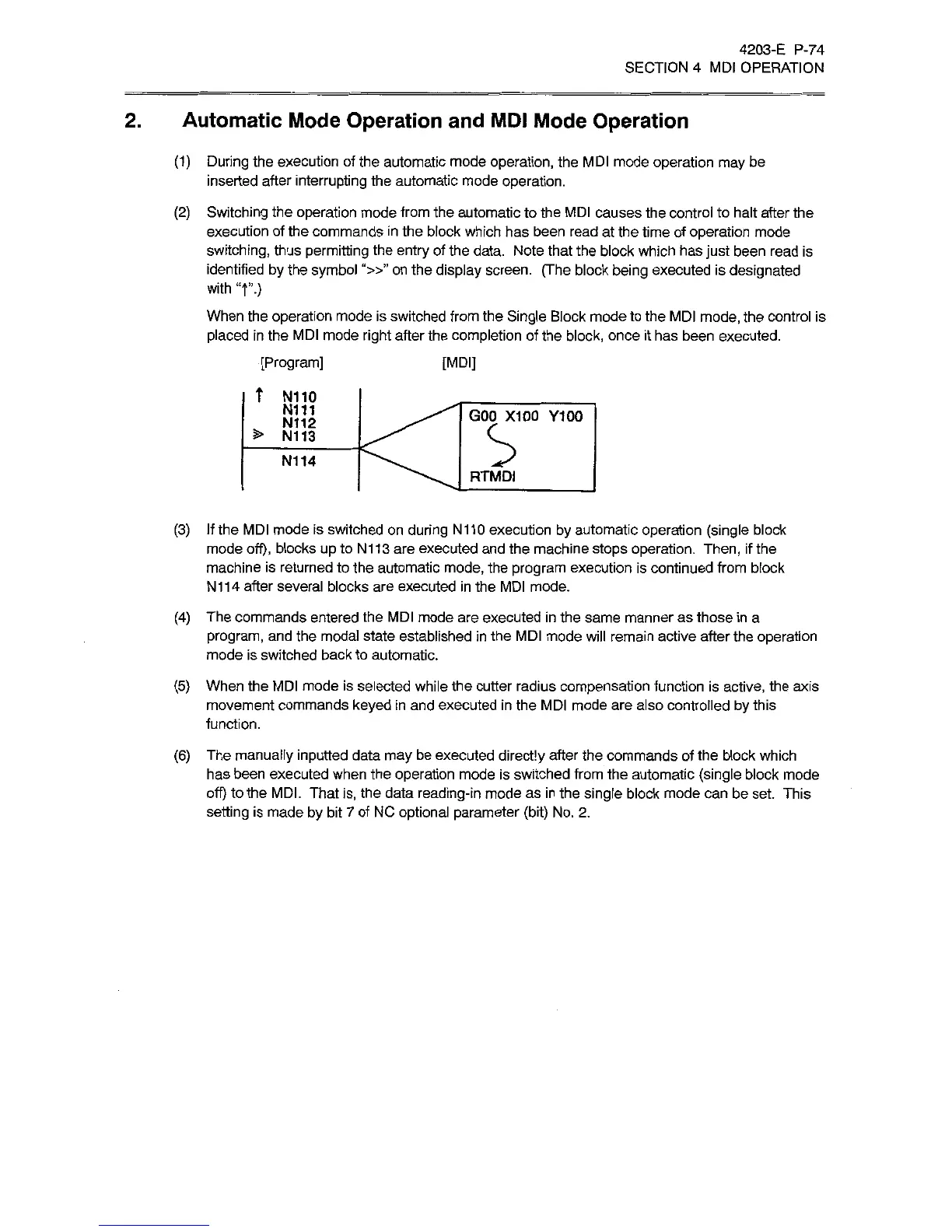
(2)
Switching
the
operation
mode
from
the
automatic
to
the
MDI
causes
the
control
to
halt
after
the
execution
of
the
commands
in
the
block
which
has
been
read
at
the
time
of
operation
mode
switching,
thus
permitting
the
entry
of
the
data.
Note
that
the
block
which
has
just
been
read
is
identified
by
the
symbol
“»”
on
the
display
screen.
(The
block
being
executed
is
designated
with
T.)
When
the
operation
mode
is
switched
from
the
Single
Block
mode
to
the
MDI
mode,
the
control
is
placed
in
the
MDI
mode
right
after
the
completion
of
the
block,
once
it
has
been
executed.
[Program]
t
N110
N111
N112
>
N113
[MDI]
GOO
X100
Y100
N114
RTMDI
(3)
If
the
MDI
mode
is
switched
on
during
N110
execution
by
automatic
operation
(single
block
mode
off),
blocks
up
to
N113
are
executed
and
the
machine
stops
operation.
Then,
if
the
machine
is
returned
to
the
automatic
mode,
the
program
execution
is
continued
from
block
N114
after
several
blocks
are
executed
in
the
MDI
mode.
(4)
The
commands
entered
the
MDI
mode
are
executed
in
the
same
manner
as
those
in
a
program,
and
the
modal
state
established
in
the
MDI
mode
will
remain
active
after
the
operation
mode
is
switched
back
to
automatic.
(5)
When
the
MDI
mode
is
selected
while
the
cutter
radius
compensation
function
is
active,
the
axis
movement
commands
keyed
in
and
executed
in
the
MDI
mode
are
also
controlled
by
this
function.
(6)
The
manually
inputted
data
may
be
executed
directly
after
the
commands
of
the
block
which
has
been
executed
when
the
operation
mode
is
switched
from
the
automatic
(single
block
mode
off)
to
the
MDI.
That
is,
the
data
reading-in
mode
as
in
the
single
block
mode
can
be
set
This
setting
is
made
by
bit
7
of
NC
optional
parameter
(bit)
No.
2.

Related product manuals