EasyManua.ls Logo

Okuma OSP-U100M - Page 97

Okuma OSP-U100M
511 pages
Print Icon
To Next Page IconTo Next Page
To Previous Page IconTo Previous Page
Loading...
4203-E
P-77
SECTION
5
AUTOMATIC
MODE
OPERATION
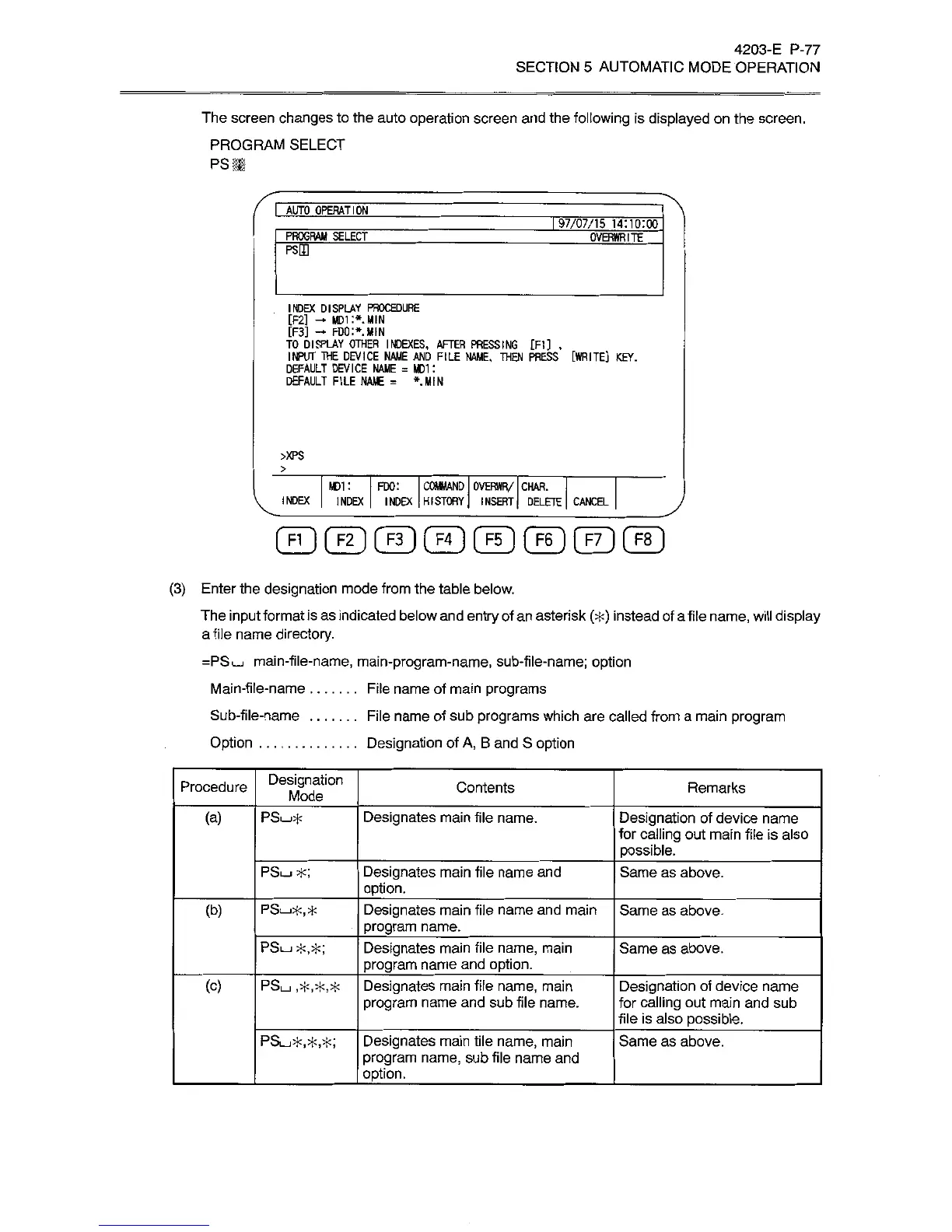
The
screen
changes
to
the
auto
operation
screen
and
the
following
is
displayed
on
the
screen.
PROGRAM
SELECT
PS
If
I
AUTO
OPERATION
197/07/15
14:10:00
PROGRAM
SELECT
OVERWRITE
PSEQ
INDEX
DISPLAY
PROCEDURE
[F2]
-
MDi:*
MIN
[F3]
FDO:*.
MIN
TO
DISPLAY
OTHER
INDEXES,
AFTER
PRESSING
[FI]
.
INPUT
THE
DEVICE
NAME
AND
FILE
NAME.
THEN
PRESS
[WRITE]
KEY.
DEFAULT
DEVICE
NAME
=
MDI
:
DEFAULT
FILE
NAME
=
*
MIN
>XPS
>
MDI
:
FDO:
COMMAND
OVERWR/
CHAR.
INDEX
|
INDEX
INDEX
HISTORY
INSERT
j
DELETE
CANCEL
(3)
Enter
the
designation
mode
from
the
table
below.
The
input
format
is
as
indicated
below
and
entry
of
an
asterisk
(*)
instead
of
a
file
name,
will
display
a
file
name
directory.
=PSL_I
main-file-name,
main-program-name,
sub-file-name;
option
File
name
of
main
programs
File
name
of
sub
programs
which
are
called
from
a
main
program
Designation
of
A,
B
and
S
option
Main-file-name
Sub-file-name
Option
Designation
Mode
Procedure
Contents
Remarks
(a)
PSL_I*
Designates
main
file
name.
Designation
of
device
name
for
calling
out
main
file
is
also
possible.
PSu
*;
Designates
main
file
name
and
option.
_
Same
as
above.
(b)
PSL_,*,*
Designates
main
file
name
and
main
program
name.
_
Same
as
above.
PSI_J*,*;
Designates
main
file
name,
main
program
name
and
option.
Same
as
above.
(c)
PSi_i
,5k,*,*
Designates
main
file
name,
main
program
name
and
sub
file
name.
Designation
of
device
name
for
calling
out
main
and
sub
file
is
also
possible.
PSÿ*,*,*;
Designates
main
tile
name,
main
program
name,
sub
file
name
and
option.
_
Same
as
above.

Related product manuals