EasyManua.ls Logo

Okuma OSP-U10M - Page 59

Okuma OSP-U10M
511 pages
Print Icon
To Next Page IconTo Next Page
To Previous Page IconTo Previous Page
Loading...
4203-E
P-39
SECTION
1
OPERATION
2-4.
Other
Controls
on
NC
Operation
Panel
(1)
Function
Keys:
F1
to
F8
When
an
operator
selects
a
desired
operation
mode,
the
screen
displays
the
necessary
operation
functions
at
the
bottom
line.
Each
function
corresponds
to
a
function
key
(F1
through
F8).
Select
the
function
to
execute
and
press
the
corresponding
function
key.
The
functions
assigned
to
the
function
keys
change
according
to
the
currently
valid
mode
as
the
operation
progresses.
(2)
?
(Help)
Key
This
key,
called
the
help
key,
is
provided
to
the
left
side
of
function
key
BE
[FI].
The
key
is
used
to
display
the
description
of
the
alarm
which
occurred
during
machine
operation
and
also
the
alarm
history.
(3)
Display
Screen
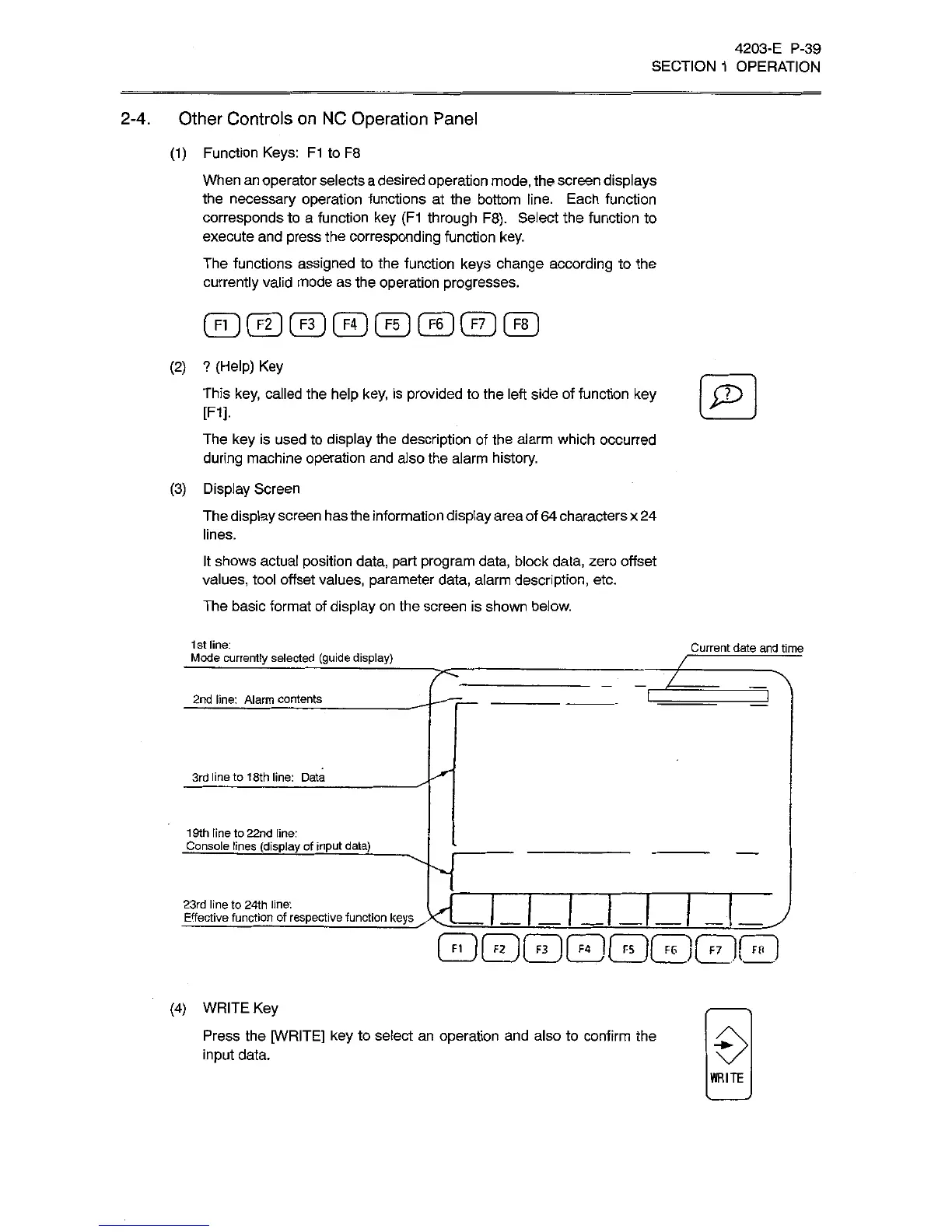
The
display
screen
has
the
information
display
area
of
64
characters
x
24
lines.
It
shows
actual
position
data,
part
program
data,
block
data,
zero
offset
values,
tool
offset
values,
parameter
data,
alarm
description,
etc.
The
basic
format
of
display
on
the
screen
is
shown
below.
1st
line:
Mode
currently
selected
(guide
display)
Current
date
and
time
7ÿ
7
2nd
line:
Alarm
contents
3rd
line
to
18th
line:
Data
19th
line
to
22nd
line:
Console
lines
(display
of
input
data)
23rd
line
to
24th
line:
J
j
j
j
Effective
function
of
respective
function
keys
I
I
1
I
GDGDGDB0GDGDQ
(4)
WRITE
Key
Press
the
[WRITE]
key
to
select
an
operation
and
also
to
confirm
the
input
data.
WRITE

Related product manuals