2
2
.
.
R
R
E
E
A
A
D
D
I
I
N
N
G
G
M
M
E
E
A
A
S
S
U
U
R
R
E
E
M
M
E
E
N
N
T
T
S
S
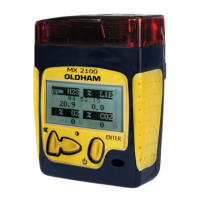
The gas content measured by each of the cells "in service" can be consulted on the alphanumeric display unit.
This is divided into four separate areas, each one corresponding to a "measuring channel".
Example:
- A maximum of four measurements can be displayed simu ltaneously.
In each field, the measurement is displayed as follows:
• Measurement, measuring unit and gas symbol
The time is also shown at the bottom of the display unit.
Remark: The display unit can be manually programmed for reading from the front or from the top, depending on how
the appliance is carried by the user (on belt, in pocket, etc.).
This operation is performed by holding down the "acknowledge audio alarm" key for 3 seconds.
If five channels are used, the display in the last position will alternate.
If there are no toxic cells, the Oxygen and Explo. measurements will be displayed at the top of the dial.
3
3
.
.
S
S
W
W
I
I
T
T
C
C
H
H
I
I
N
N
G
G
O
O
N
N
REMINDER: Before switching on the MX 2100, check that the necessary cells are connected.
When you switch the appliance on, you have a choice of two procedures:
• a standard procedure adopted in most cases,
• a procedure allowing you to select a reference explosive gas, this procedure being useful when checking for
a specific gas (town gas, methane, etc.).
3.1. Switching on in standard mode
• Briefly press the "On/Off/Enter" key.
Data field
second "toxic" channel
Data field
First "toxic" channel
Information field
Oxygen or toxic channel
CO2 or COV, etc.
Data field
"Explo" channel


 To Next Page