Page 40
WIRELESS H2S TRANSMITTER (WT SERIES) - USER GUIDE
12. How to re-enter the configuration mode with security
enabled.
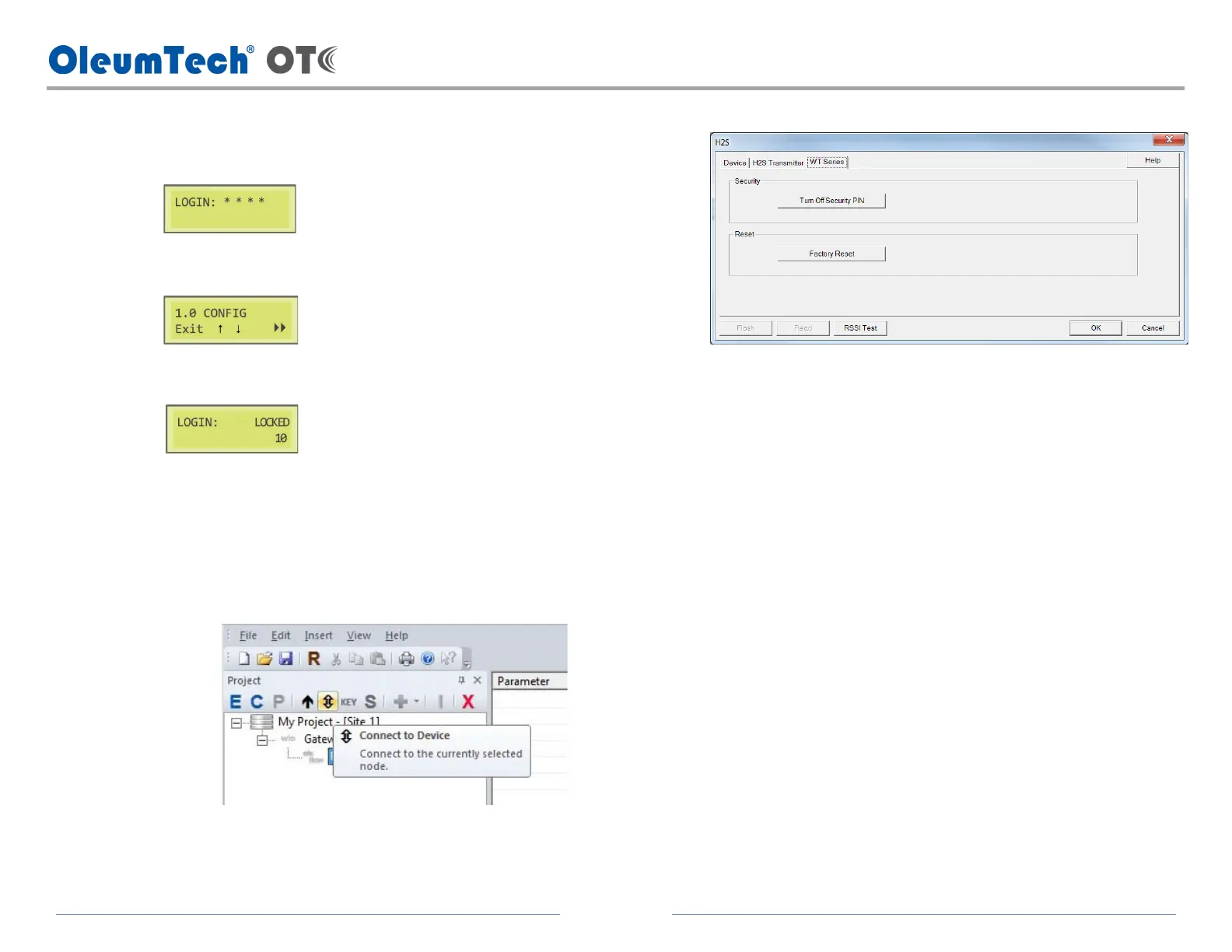
a. Press and hold down the F2 button until LOGIN appears on the screen.
b. Enter the 4-digit security key.
c. Incorrect security key entry locks user out for ten seconds.
d. If the security key is forgotten, disabling the security key can only be
achieved using the BreeZ software.
i. Open the BreeZ project file on the PC.
ii. Connect the PC to the transmitter.
iii. Click the transmitter in the project tree.
iv. Click the icon (Connect to Device) button.
v. Click on WT Series tab.
vi. Click Turn Off Security PIN.
vii. Re-enable security key on the transmitter if desired using the
transmitter’s LCD interface.
13. How to reset the transmitter / power cycle.
a. The device hardware can be reset or power cycled without
disconnecting the battery pack.
i. via LCD module: press and hold down the F1 + F4 buttons for ~4
seconds and release the buttons.
ii. via Software: use the Factory Reset function shown above in the
screenshot.



 To Next Page