HVBTR1200‐004A
3|Page
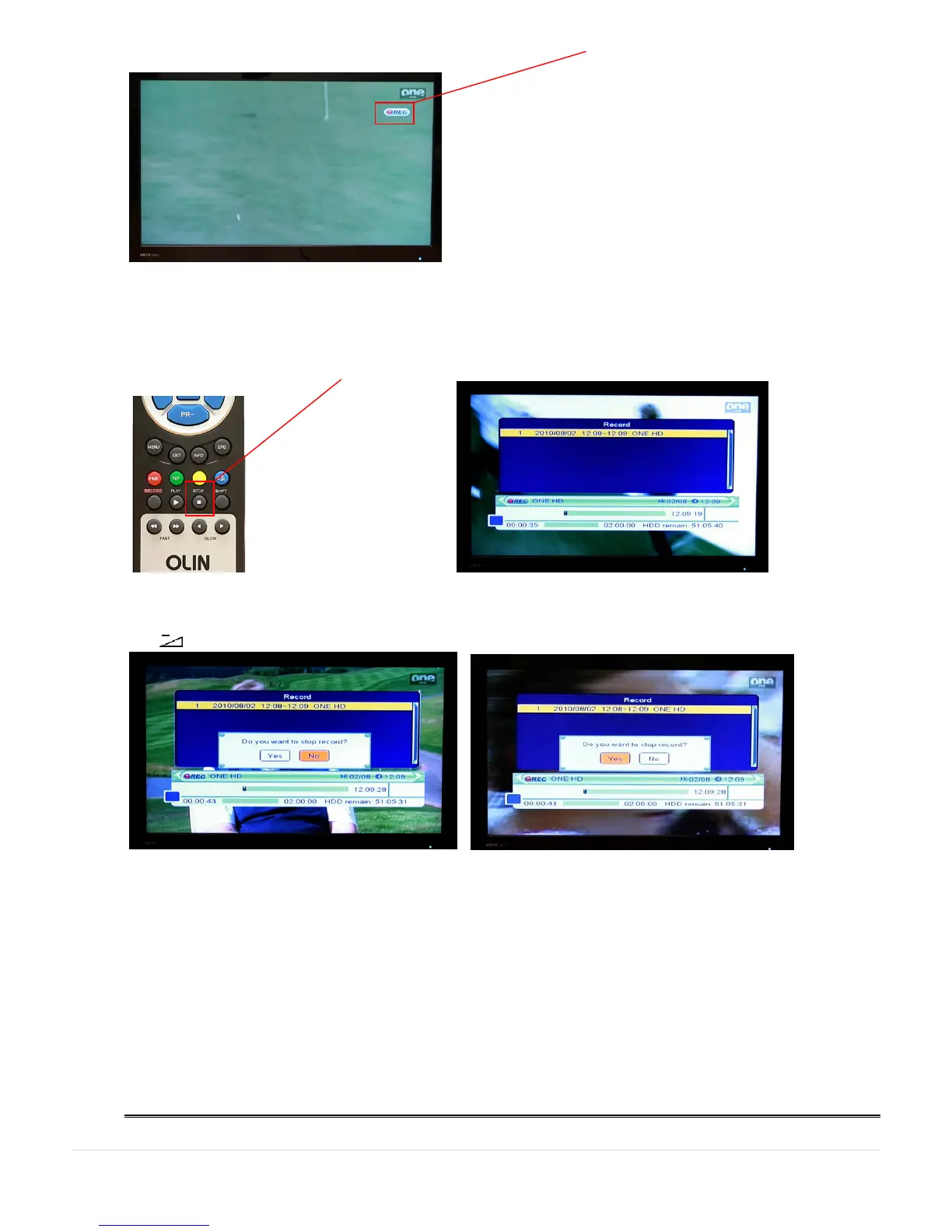
EXIT key on the RCU clears the screen of recording information. The REC symbol stays on the screen of the
channel you are recording.
You leave the recording to automatically complete when it reaches the end of the recording Duration.
You can also finish the recording before the end of the recording Duration:
To finish recording, press the STOP key on the RCU. A display will show what you have recorded.
Press STOP key on the RCU again. The HVBTR-1200 will ask for confirmation that you wish to finish the recording.
Use (left direction) key to select Yes and OK key to stop recording.
Other tips for instant recording:
- Watching same Logical Channel Number (LCN). HVBTR-1200 is not a dual tuner. But you can move
between the different channels in the Logical Channel Number (LCN) that you are recording. For example you
can record ABC1 and watch ABC2 (or another ABC channel). But you cannot record ABC 1 and watch channel
9 or 10 etc.



 To Next Page