16
Giu
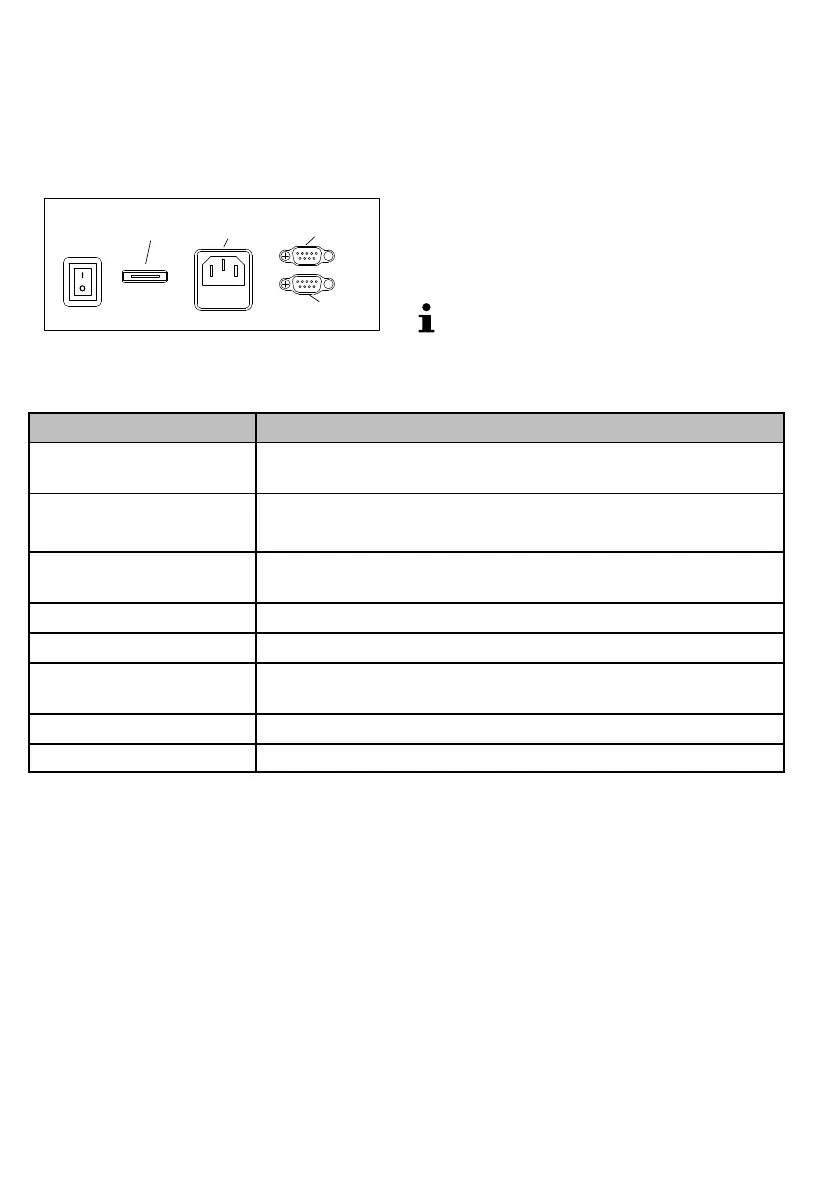
Connections
The bank note counter is provided with several connec
tion ports and a microSD memory card slot.
1 microSD memory card slot
2 Power plug socket
3 External display (RS 232)
4 Printer (RS 232)
1
3
4
2
10
Software update
Download the "update.bin" file from the Olympia
homepage (www.olympia-vertrieb.de).
Load the "update.bin" on a microSD memory card.
Switch the machine off.
Insert the microSD memory card in the corresponding
slot provided on the rear of the machine. The contacts
must point downwards.
Switch the machine on. During the updates, the feed
rollers rotate and the display remains empty.
When the update has been completed, the feed rollers
stop and the display appears as normal.
If you want to complete the software update on
several machines, set the "update.bin" file property
attribute to "read only".
Technical specifications
Model NC 620
Infeed tray and output tray
capacity
500 bank notes / 200 bank notes
Counting speed 600 / 1,000 bank notes/minute (value count),
1,500 / 1,800 bank notes/minute (quantity count)
Material thickness of the
bank notes
0.08 mm to 0.18 mm
Power supply 230 V/ 50 Hz
Power consumption 60 W (counting)
Permissible ambient
temperature
0 to 40 °C; 30 to 85% relative humidity
Dimensions 285 x 280 x 286 mm
Weight 6.1 kg


 To Next Page