12
Giu
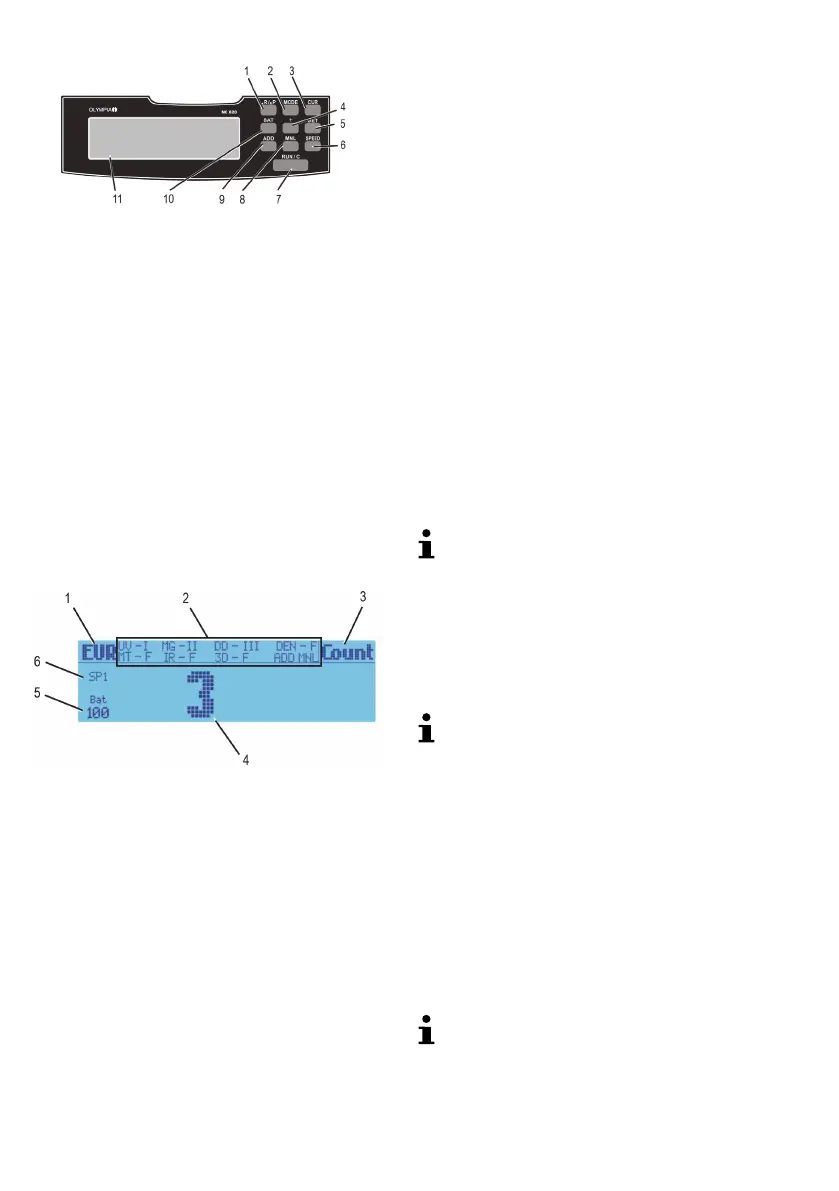
Operating elements
1
1 REP/PRINT Display or print results of value count
2 MODE Select a function
3 CUR Select the currency
4 BAT Batch - stop the counting of bank notes
after a preset number have been counted
5 + Increase the quantity preset for the Batch
function
6 SET Set the sensors/sensitivity
7 ADD Activate/Deactivate the Add function
8 MNL Activate/Deactivate the manual counting
function
9 SPEED Change the counting speed
10 RUN/C Start counting / Delete count results
11 Display (see 2)
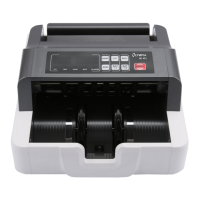
Display
2
Display sections 1 - 6
1 The set currency
2 The set sensors and their sensitivity
3 The counting function is activated
4 The number counted
5 The Batch function is activated, batches of 100 are
counted
6 The counting speed is set to 1,000 bank notes per
minute
Functions
Value counting
This function enables bank notes of the same currency
but with different denominations to be counted in one
operation. In this case, the machine counts the total
value of all the bank notes and the number of bank
notes according to each specific denomination.
Before the counting process:
CUR until the required currency (
Eur, tL, GbP,
USd or SEH) appears in the display [1].
MODE until VALUE appears in the display [3].
After the counting process:
The number of bank notes counted appears in the dis
play [4] and the total value (val) to the right.
REP/PRINT The number of the corresponding
bank note denominations are displayed.
8 seconds after the last button was pressed, the total
value reappears in the display.
REP/PRINT 3 sec. The quantities of the indi
vidual bank notes and the total value are printed out on a
printer.
To be able to print, a printer must be connected at
the RS-232 port.
Sorting
With this function, the first bank note is used as a refer
ence for those following. If the machine detects a bank
note which deviates from the reference note, the ma
chine stops.
CF3 appears in the display [3]. The deviat
ing bank note can be removed.
Only those bank notes which match the first note
are counted. The total value of bank notes counted
is also established.
Before the counting process:
CUR until the required currency (
Eur, tL, GbP,
USd or SEH) appears in the display [1].
MODE until SORT appears in the display [3].
After the counting process:
The display shows the total number of bank notes coun
ted, the total value of the bank notes counted and the
value of the individual denominations.
REP/PRINT 3 sec. The quantity and total
value are printed out on a printer.
To be able to print, a printer must be connected at
the RS-232 port.


 To Next Page