EasyManua.ls Logo

Olympic 50 - AC and Battery Operation; Weighing Child; Weight Lock;Unlock; To Weigh Next Child

Olympic 50
23 pages
Print Icon
To Next Page IconTo Next Page
To Previous Page IconTo Previous Page
Loading...
Operation—AC
or
Battery
|
7
The
following
instructions
apply
whether
Smart
Scale
is
operating
connected
to
a
wall
outlet
or
operating
on
its
rechargeable
batteries.
NOTE:
The
Scale
can
be
used
for
weighing
while
the
batteries
are
recharging
or
even
if
the
batteries
have
been
removed.
To
Turn
On/
Off
‘Press
the
On/Off
button
on
the
front
panel.
Wait
until
a
series
of
walking
dashes
go
across
the
display.
When
the
zero
weight
reading
appears,
the
Scale has
automatically
found
its
zero
reference
point.
The
Scale
is
adjusted
at
the
factory
to
power-up
in
the
Pounds-Ounces
mode.
See
page
4-2
to
change
power-up
mode
to
kilograms.
Note:
Weight
ofblankets
orany
other
objects
placed
on
the
platform
before
the
zero
reading
appears
will
be
automati-
cally
cancelled.
Adjusting
Platform
Ends
©
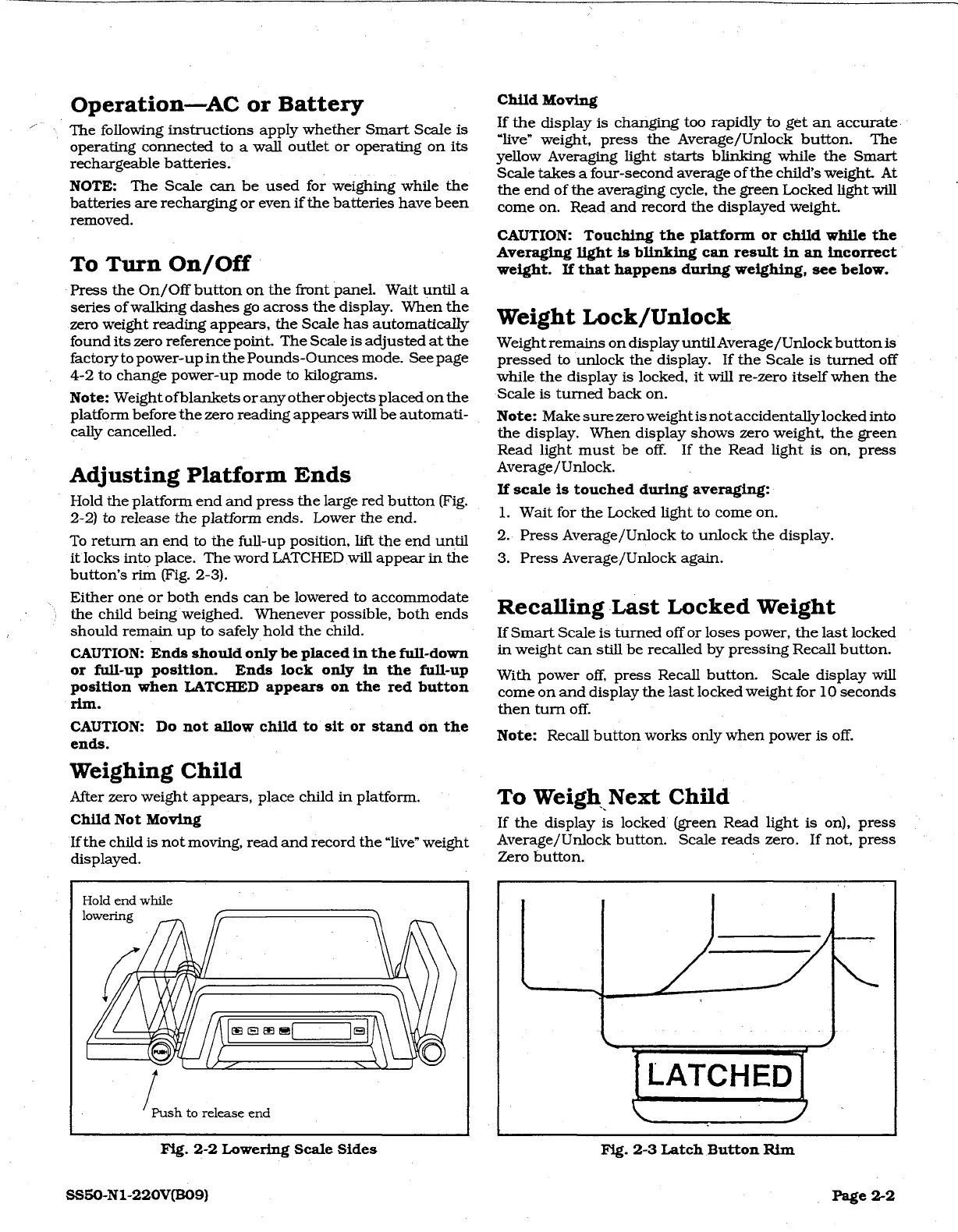
Hold
the
platform
end
and
press
the
large
red
button
(Fig.
2-2)
to
release
the
platform
ends.
Lower
the
end.
Toretum
an
end
to
the
full-up
position,
lift
the
end
until
it
locks
into
place.
The
word
LATCHED
will
appear
in
the
button’s
rim
(Fig.
2-3).
Either
one
or
both
ends
can
be
lowered
to
accommodate
the
child
being
weighed.
Whenever
possible,
both
ends
should
remain
up
to
safely
hold
the
child.
CAUTION:
Ends
should
only
be
placed
in
the
full-down
or
full-up
position.
Ends
lock
only
in
the full-up
position
when
LATCHED
appears
on
the
red
button
rim.
CAUTION:
Do
not
allow
child
to
sit
or
stand
on
the
ends.
Weighing
Child
After
zero
weight
appears,
place
child
in
platform.
Child
Not
Moving
If
the
child
is
not
moving,
read
and
record
the
“live”
weight
displayed.
Child
Moving
If
the
display
is
changing
too
rapidly
to
get
an
accurate.
“live”
weight,
press
the
Average/Unlock
button.
The
yellow
Averaging
light
starts
blinking
while
the
Smart
Scale takes
a
four-second
average
of
the
child’s
weight.
At
the
end
of
the
averaging
cycle,
the
green
Locked
light
will
come
on.
Read
and
record
the
displayed
weight.
CAUTION:
Touching
the
platform
or
child
while
the
Averaging
light
is
blinking
can
result
in
an
incorrect
weight.
If
that
happens
during
weighing,
see
below.
Weight
Lock/Unlock
Weight
remains
on
display
until
Average
/Unlock
button
is
pressed
to
unlock
the
display.
If
the
Scale
is
turned
off
while
the
display
is
locked,
it
will
re-zero
itself
when
the
Scale
is
turned
back
on.
Note:
Make
sure
zero
weightis
not
accidentally
locked
into
the
display.
When
display
shows
zero
weight,
the
green
Read
light
must
be
off.
If
the
Read
light
is
on,
press
Average/Unlock.
If
scale
is
touched
during
averaging:
1.
Wait
for
the
Locked
light
to
come
on.
2.
Press
Average/Unlock
to
unlock
the
display.
3.
Press
Average/Unlock
again.
Recalling
Last
Locked
Weight
If
Smart
Scale
is
turned
off
or
loses
power,
the
last
locked
©
in
weight
can
still
be
recalied
by
pressing
Recall
button.
With
power
off,
press
Recall
button.
Scale
display
will
come
on
and
display
the
last
locked
weight
for
10
seconds
then
turn
off.
Note:
Recall
button
works
only
when
power
is
off.
To
Weigh
Next
Child
If
the
display
is
locked’
(green
Read
light
is
on),
press
Average/Unlock
button.
Scale
reads
zero.
If
not,
press
Zero
button.
Hold
end
while
6
/
Push
to
release
end
LATCHED
Fig.
2-2
Lowering
Scale
Sides
SS50-N1-220V(B09)
Fig.
2-3
Latch
Button
Rim
|
Page
22