EasyManua.ls Logo

Olympic 50 - Operation Controls and Signals; Controls and Signals

Olympic 50
23 pages
Print Icon
To Next Page IconTo Next Page
To Previous Page IconTo Previous Page
Loading...
Section
Two
Operation
Model
50
Controls
and
Signals
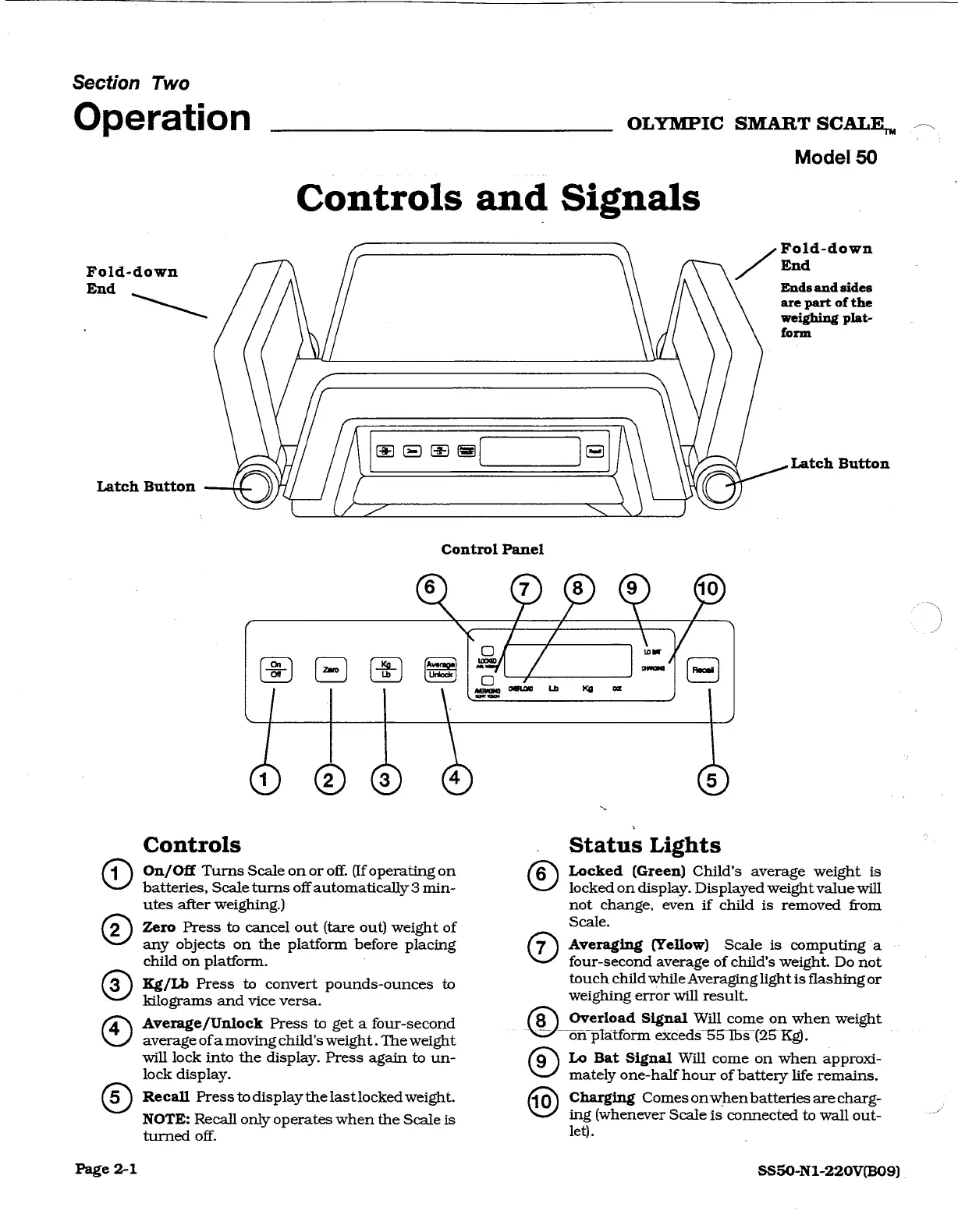
Foid-down
Fold-down
A
End
Latch
Button
End
Ends
and
sides
are
part
of
the
weighing
plat-
form
Latch
Button
N
Control
Panel
Q
@@
@
sem
Ze
©
Controls
On/Off
Turns
Scale
on
or
off.
(If
operating
on
batteries,
Scale
turns
off
automatically
3
min-
utes
after
weighing.)
Zero
Press
to
cancel
out
(tare
out)
weight
of
any
objects
on
the
platform
before
placing
child
on
platform.
Kg/Lb
Press
to
convert
pounds-ounces
to
kilograms
and
vice
versa.
Average/Unlock
Press
to
get
a
four-second
average
ofa
moving
child's
weight
.
The
weight
will
lock
into
the
display.
Press
again
to
un-
lock
display.
Recall
Press
to
display
thelastlocked
weight.
NOTE:
Recall
only
operates
when
the
Scale
is
turned
off.
©,
ox
à
Status
Lights
Locked
(Green)
Child’s
average
weight
is
locked
on display.
Displayed
weight
value
will
not
change,
even
if
child
is
removed
from
Scale.
Averaging
(Yellow)
Scale
is
computing
a
-
four-second
average
of
child's
weight.
Do
not
touch
child
while
Averaginglight
is
flashing
or
weighing
error
will
result.
(8)
Overload
Signal
Will
come
on
when
weight
on
platform
exceds
55
lbs
(25
Kg).
Lo
Bat
Signal
Will
come
on
when
approxi-
mately
one-half
hour
of
battery
life
remains.
Charging
Comes
onwhen
batteries
are
charg-
ing
(whenever
Scale
is
connected
to
wall
out-
let).
SS50-N1-220V(B09)
OLYMPIC
SMART
SCALE,