EasyManua.ls Logo

Olympic 50 - Installation; Electrical Requirements; Initial Battery Charge

Olympic 50
23 pages
Print Icon
To Next Page IconTo Next Page
To Previous Page IconTo Previous Page
Loading...
Section
Three
Installation
OLYMPIC
SMART
SCALE,
Smart
Scale
is
shipped
fully
assembled.
Display
Protective
Cover
Prior
to
first
use,
remove
and
discard
the
green
protectiv
cover
over
the
display.
Stationary
Use
Place
Scale
on
flat,
level
table
or
counter
surface.
Make
sure
that
Scale
cannot
slide
or
"walk"
off
the
edge.
Weight
of
Scale
is
approximately
57
pounds.
Portable
Use
If
the
Scale
is
to
be
used
on
a
cart,
it
is
recommended
that
it
be
bolted
to
the
cart
using
the
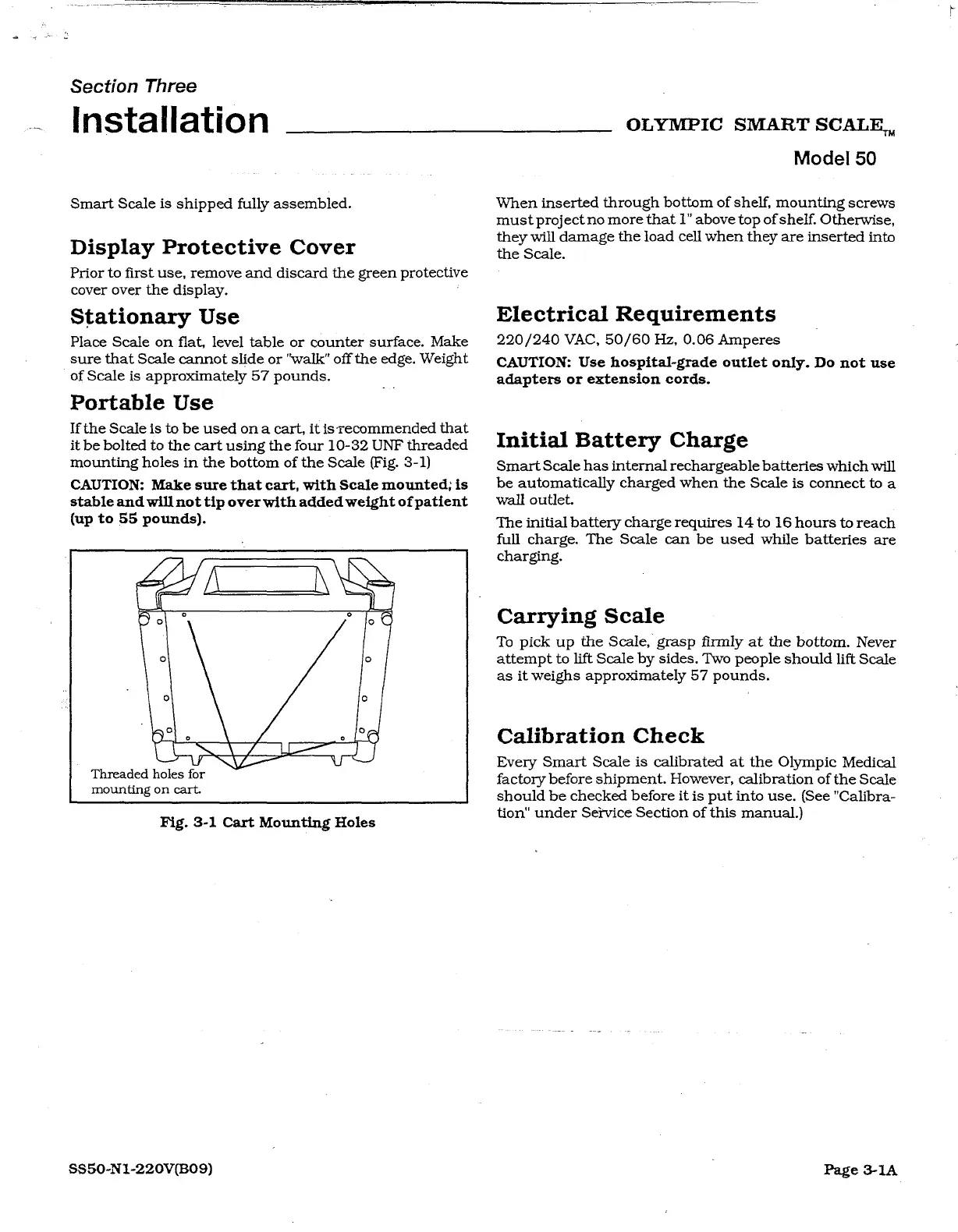
four
10-32
UNF
threaded
mounting
holes
in
the
bottom
of
the
Scale
(Fig.
3-1)
CAUTION:
Make
sure that
cart,
with
Scale
mounted;
is
stable
and
will
not
tip
over
with
added
weight
of
patient
(up
to
55
pounds).
AN
Threaded
holes
for
mounting
on
cart.
Fig.
3-1
Cart
Mounting
Holes
SS50-N1-220V(B09)
Model
50
When
inserted
through
bottom
of
shelf,
mounting
screws
must
project
no
more
that
1"
above
top
ofshelf.
Otherwise,
they
will
damage
the
load
cell
when
they
are
inserted
into
the
Scale.
Electrical
Requirements
220/240
VAC,
50/60
Hz,
0.06
Amperes
CAUTION:
Use
hospital-grade
outlet
only.
Do
not
use
adapters
or
extension
cords.
Initial
Battery
Charge
Smart
Scale
has
internal
rechargeable
batteries
which
will
be
automatically
charged
when
the
Scale
is
connect
to
a
wall
outlet.
The
initial
battery
charge
requires
14
to
16
hours
to
reach
full
charge.
The
Scale can
be
used
while
batteries
are
charging.
Carrying
Scale
To
pick
up
the
Scale,
grasp
firmly
at
the
bottom.
Never
attempt
to
lift
Scale
by
sides.
Two
people
should
lift
Scale
as
it
weighs
approximately
57
pounds.
Calibration
Check
Every
Smart
Scale
is
calibrated
at
the
Olympic
Medical
factory
before
shipment.
However,
calibration
of
the
Scale
should
be
checked
before
it
is
put
into
use. (See
"Calibra-
tion“
under
Service
Section
of
this
manual.)
Page
3-1A