EasyManua.ls Logo

Olympic 50 - Page 9

Olympic 50
23 pages
Print Icon
To Next Page IconTo Next Page
To Previous Page IconTo Previous Page
Loading...
cell
movement
such
as
wires
or
mechanical
binding.
-
Take
measurements
with
respect
to
signal
ground,
TP10.
Troubleshoot
the
Scale
using
the
test
points
on
the
Main
Board.
The
test
points
are
in
numerical
order
from
left
to
right
on
the
front
of
the
Main
Board.
Their
function
is
summarized
in
the
table,
Fig.
4-10.
-
Operate
Scale
both
on
batteries
and
AC
to
see
ifsymptom
is
the
same.
Dissasembly
1.
Turn
off
the
Scale
and
unplug
from
the
wall
outlet.
2.
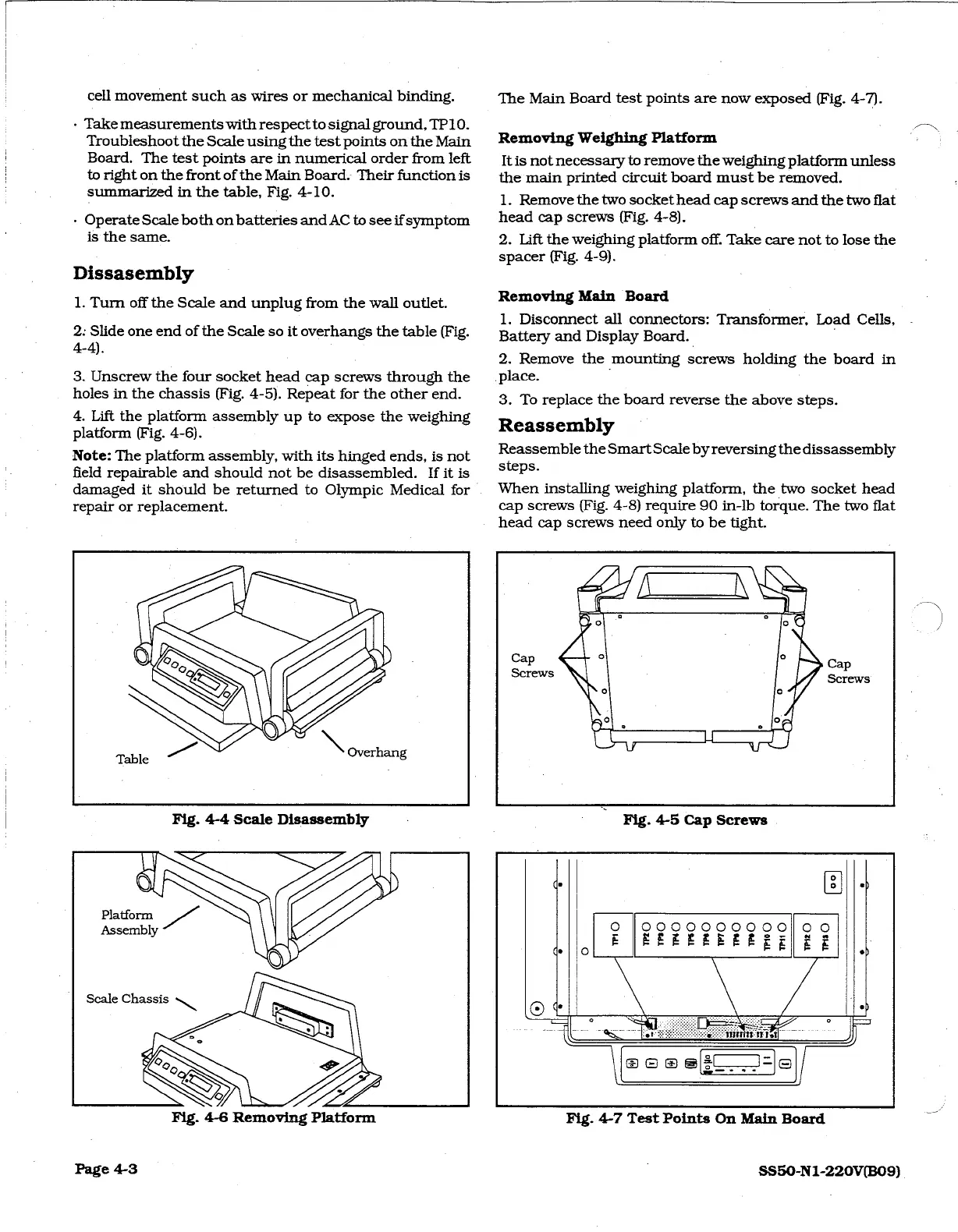
Slide
one
end
of
the
Scale
so
it
overhangs
the
table
(Fig.
4-4).
3.
Unscrew
the
four
socket
head
cap
screws
through
the
holes
in
the
chassis
(Fig.
4-5).
Repeat
for
the
other
end.
4.
Lift
the
platform
assembly
up
to
expose
the
weighing
platform
(Fig.
4-6).
Note:
The
platform
assembly,
with
its
hinged
ends,
is
not
field
repairable
and
should
not
be
disassembled.
If
it
is
damaged
it
should
be
returned
to
Olympic
Medical
for
repair
or
replacement.
The
Main
Board
test
points
are
now
exposed
(Fig.
4-7).
Removing
Weighing
Platform
It
is
not
necessary
to
remove
the
weighing
platform
unless
the
main
printed
circuit
board
must
be
removed.
1.
Remove
the
two
socket
head
cap
screws
and
the
two
flat
head
cap
screws
(Fig.
4-8).
2.
Lift
the
weighing
platform
off.
Take
care
not
to
lose
the
spacer
(Fig.
4-9).
Removing
Main
Board
1.
Disconnect
all
connectors:
Transformer,
Load
Cells,
Battery
and Display
Board.
2.
Remove
the
mounting
screws
holding
the
board
in
.place.
3.
To
replace
the
board
reverse
the
above
steps.
Reassembly
Reassemble
the
Smart
Scale
by
reversing
the
dissassembly
steps.
When
installing
weighing
platform,
the
two
socket
head
cap
screws
(Fig.
4-8)
require
90
in-ib
torque.
The
two
flat
head
cap
screws
need
only
to
be
tight.
Fig.
4-5
Cap
Screws
Fig.
4-6
Removing
Platform
Page
4-3
Fig.
4-7
Test
Points
On
Main
Board
SS50-N1-220V(B09)