SETTING THE SELF-TIMER
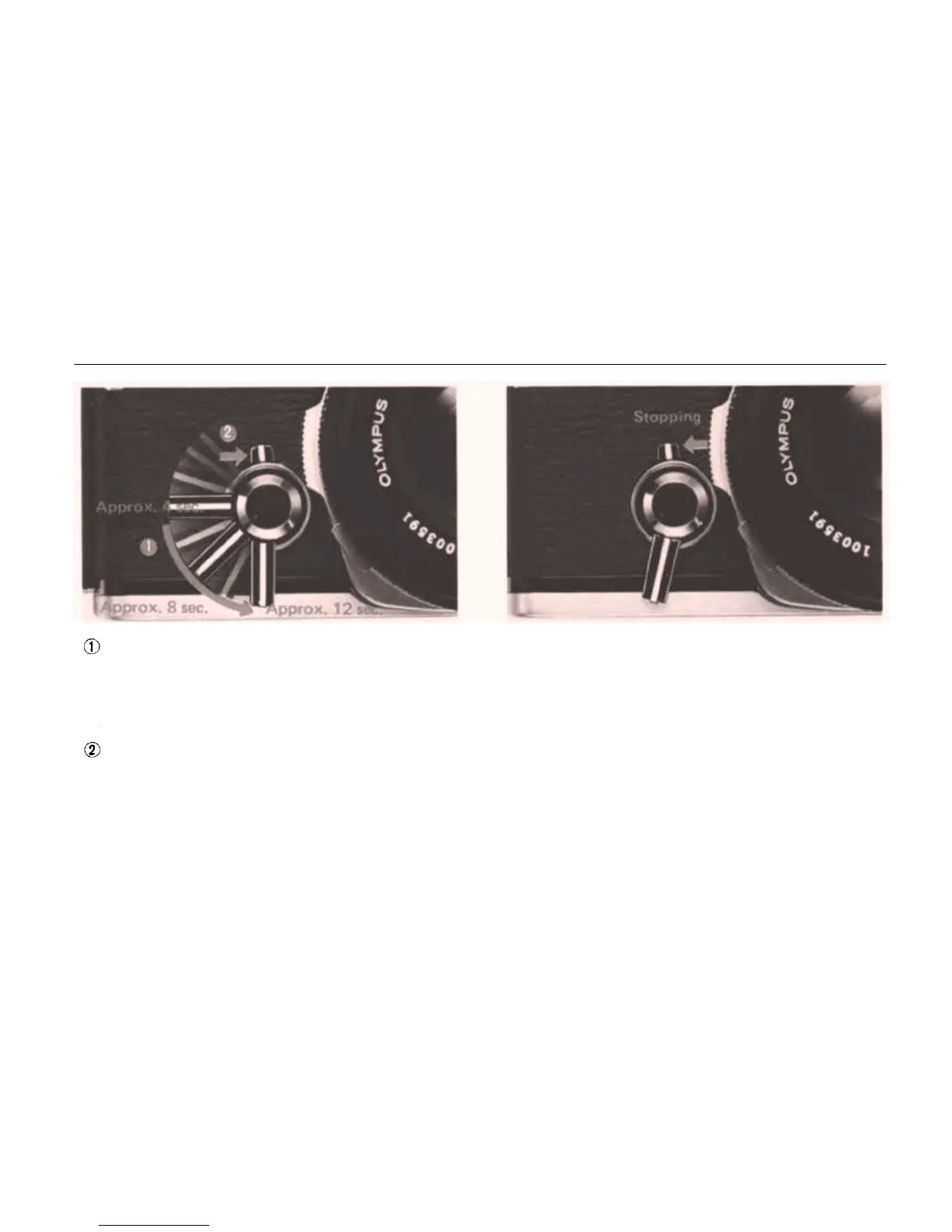
Rotate the self-timer lever counter-clockwise
so that the shutter can be released after an
elapse of delay time between 4 sec. to 12 sec.
according to the lever setting as shown above.
You may set the self-timer lever either before
or after advancing the film.
Turn the start lever clockwise to the vertical
position to activate the self-timer lever. The
shutter will then be released after the preset
time.
Stopping the Self-timer
To stop the self-timer during its operation, turn
the start lever counter-clockwise. If you turn the
start lever clockwise again, the self-timer can re-
sume its action.
NOTE: After setting the lever, you can release
the
shutter
by
pressing
the
shutter
release
button.
NOTE: If you do not reset the self-timer, the
timer lever will begin moving immediately after
advancing
the
film
and the
shutter
will
be
releas-
ed earlier than expected. If the film has not been
advanced fully, the timer lever will stop half-way.
To re-activate the timer, move the start lever
counter-clockwise to stop the timer lever, return
the timer lever to the starting position, and ad-
vance
the
film.
Then,
turn
the
start
lever
again.
21


 To Next Page