15
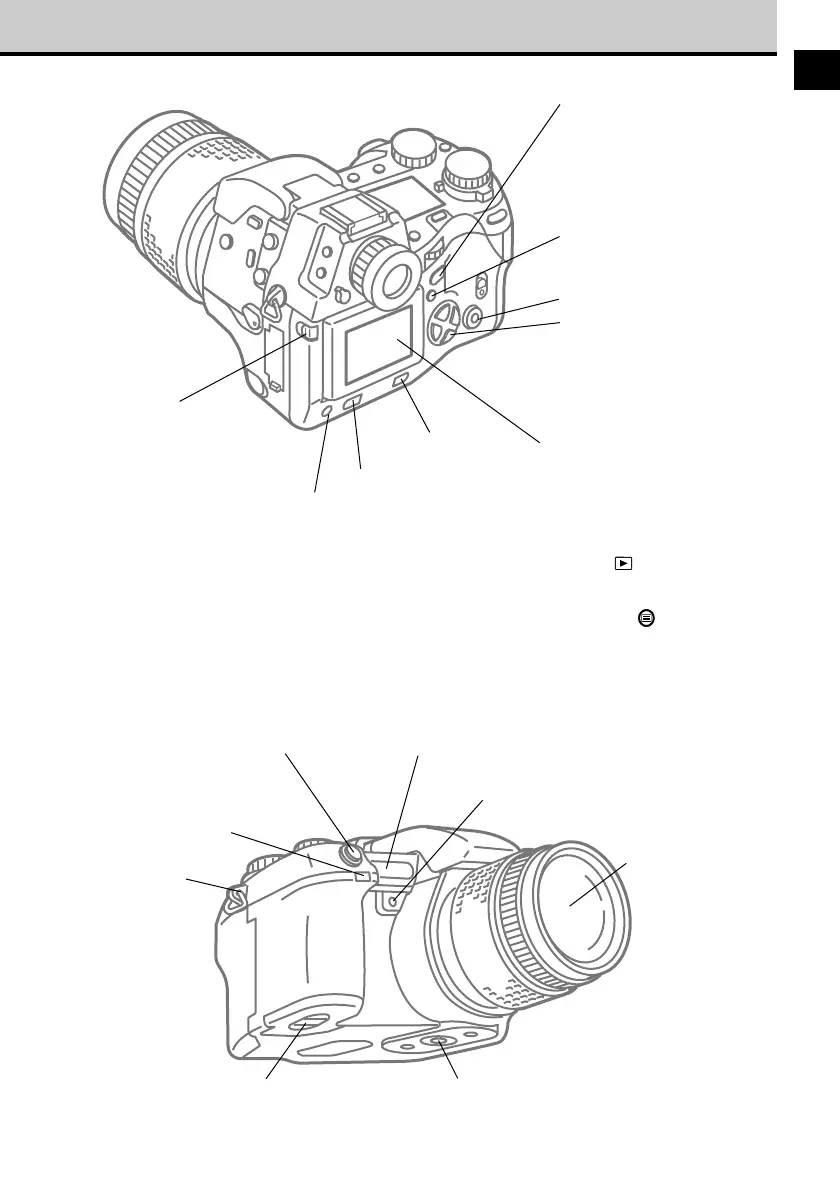
Remote control receiver/
self-timer lamp ➝ 113, 115
Shutter button ➝ 38
Quick reference
white balance button ➝ 101
AF port ➝ 64
Lens
Tripod socketBattery compartment ➝ 23
Strap eyelet
➝ 21
Monitor
lock/release button ➝ 37
Allows you to raise monitor
and change angle of view.
Monitor ➝ 17
If you press the monitor button
with the mode dial set to P, A,
S, or M, you can use the
monitor like the viewfinder,
with the mode dial set to
playback you can view
images of pictures that you
have taken. If you press the
menu button you can open
and use the menus.
Monitor button ➝ 37
Press to switch monitor
off/on. In P, A, S, or M
mode press twice rapidly to
enter playback mode,
press again to leave
playback mode.
INFO button* ➝ 17, 68, 138
When the histogram is set to
display, press to switch the
histogram display on/off.
Menu button ➝ 174
Press to open menu in the
monitor.
Arrow pad ➝ 174
When using the menus,
press the pointers on the
arrow pad to move the green
highlight to select options,
and then press the OK
button.
Erase button ➝ 51
OK button ➝ 174
Protect button ➝ 50


 To Next Page