175
13
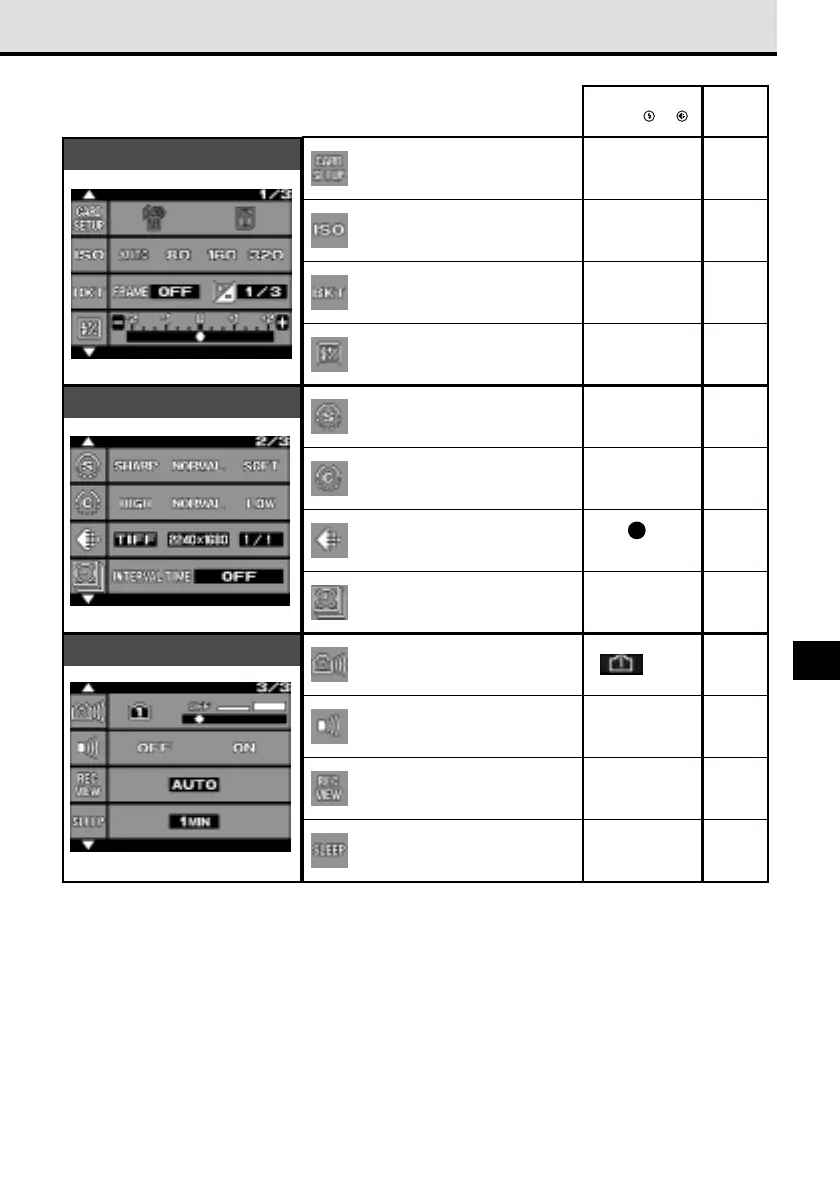
Shooting mode menus for P (Program mode), A (Aperture
priority mode), S (Shutter priority mode), M (Manual mode)
Delete all images from selected
SmartMedia or CompactFlash
card, and format a card.
ISO (sensitivity) setting.
Flash intensity control.
Sharpness.
Overall image contrast.
Warning sound (ON, OFF).
Bracket same subject with 3
rapid shots with different
exposures.
Record mode (quality,
resolution, compression).
Set interval time (specify time
interval between shots during
automatic time lapse photography).
Shutter sound setting (high,
low, OFF).
Image display after shooting.
Sleep mode timer setting.
Page
−
AUTO
OFF
±0EV
NORMAL
NORMAL
See 1 table,
page 103.
OFF
OFF
ON
OFF
1MIN
➞ 150
➞ 152
➞ 83
➞ 81
➞ 90
➞ 106
➞ 107
➞ 103
➞ 118
➞ 122
➞ 124
➞ 125
➞ 128
Default
Setting after and
pressed at the same time
1/3
2/3
3/3


 To Next Page