DISASSEMBLING/ASSEMBLING PROCEDURE CV-160
5-4
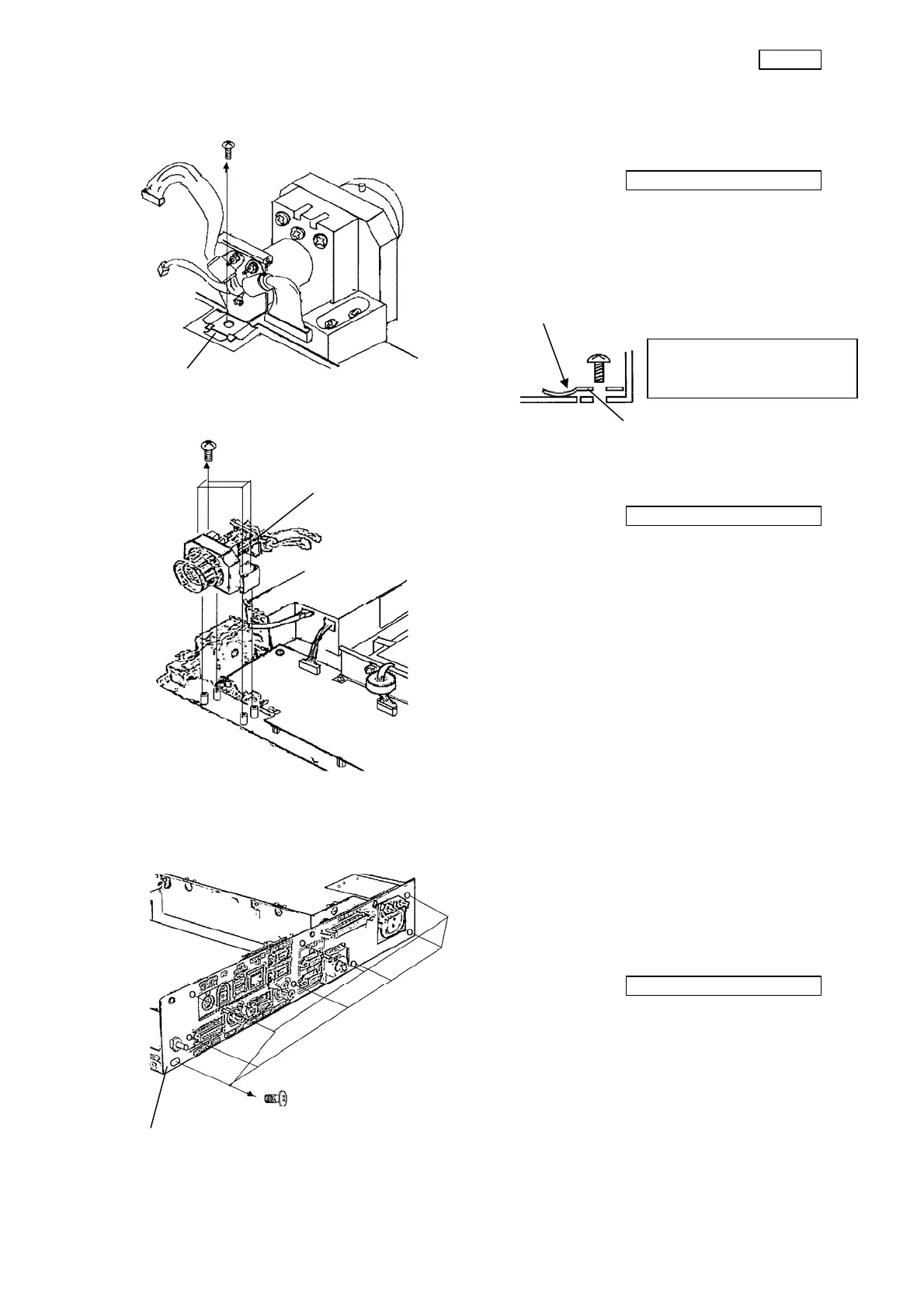
(7) Remove the screw (CCUK3x6SZ) that
secure the conductive spring.
Phillips screwdriver No. 2
(8) Remove the conductive spring.
※ Precaution on assembling
(9) Remove the four screws (CCUK4x10SZ)
that secure the connector unit.
Phillips screwdriver No. 2
(10) Remove the connector unit from the main
unit.
3-4. CPU board (UPCV16CPxx) and video board (UPCV16DPxx)
(1) Remove the cables from the CPU board,
the video board and the rear panel.
(2) Remove the eight screws (HCBK3x6SA)
that secure the rear panel.
Phillips screwdriver No. 2
(3) Remove the rear panel.
Conductive spring
Set the conductive spring with
the convex side down.
The conductive spring shall
not interfere with the parts
mounted on the board.
Conductive
spring
Connector unit
Rear panel


 To Next Page