2 FOCUS PX — Getting Started Guide
Package Contents
The FOCUS PX comes standard with several key accessories:
• Transport case
• DC power adaptor (power supply)
• Power cord (model varies according to country)
• USB flash drive, which contains:
—FocusPC software
—Calculator software
— FocusPC Viewer
— FocusControl software development kit
— FocusData software development kit
— FocusPC UT and Phased Array Data Acquisition and Analysis Software User’s Manual
— FocusPC UT and Phased Array Data Acquisition and Analysis Software Advanced User’s Manual
— FOCUS PX Getting Started Guide
— FOCUS PX Phased Array and Conventional Ultrasonic Data Acquisition Instrument User’s
Manual
• Crossover Ethernet cable (category 5e or higher) [5 m] (16.4 ft)
• Screwdriver for bumper removal
• Digital input cable (5 m) [16.4 ft]
• Digital output cable (5 m) [16.4 ft]
• Calibration certificate
Make sure that the contents of the package are complete before using the FOCUS PX. If any items are
missing or damaged, contact Olympus.
Connections
To reduce the risk of electric shock, avoid touching the inner conductor of the connectors. Up to 200 V
can be present on the inner conductor of the UT connectors, and up to 115 V can be present on the PA
connector.
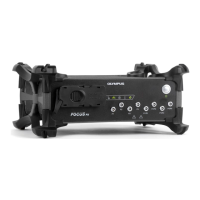
Figure 1 on page 3 shows the FOCUS PX front panel, which enables you to do the following:
• Connect a PA probe (or multiple PA and UT probes using a splitter)
• Connect the power earth connection to an appropriate cable or lug in a cabinet or on a suitable
grounded structure
• Connect up to 8 conventional UT probes
• Turn on and off the FOCUS PX
• Get the FOCUS PX status using the indicators


 To Next Page
 Loading...