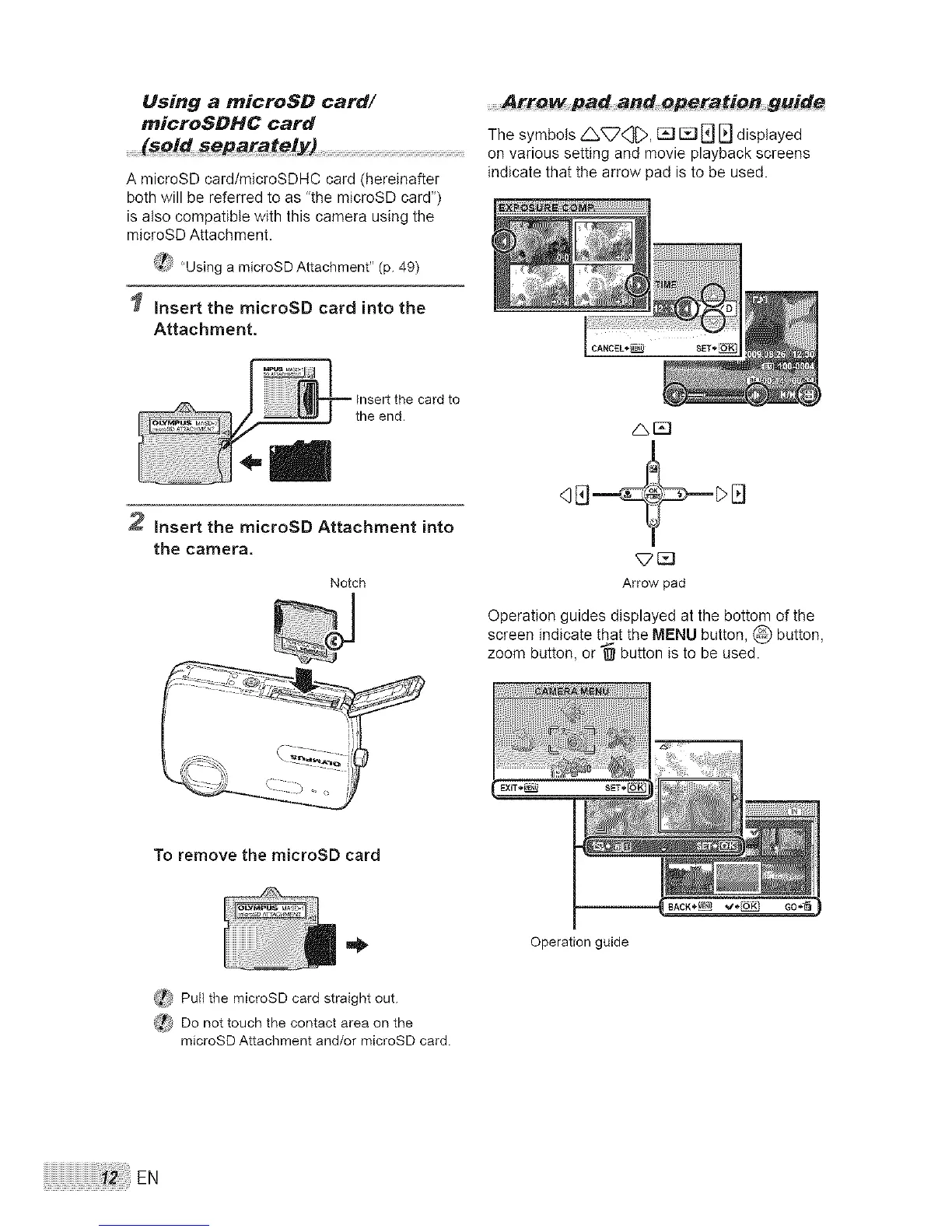
Using a microSO card/
microSOHC card
A microSD card/microSDHC card <hereinafter
both will be referred to as "the microSD card")
is also compatible with this camera using the
microSD Attachment.
(4_} "Using a microSD Attachment" (p. 49)
Insert the microSD card into the
Attachment.
guide
The symbols _<_, _ [] E] _ displayed
on various setting and movie playback screens
indicate that the arrow pad is to be used.
CANCEL*_
2 Insert the microSD Attachment into
the camera,
Notch
qEJ__
Arrow pad
Operation guides displayed at the bottom of the
screen indicate that the MENU button, @ button,
zoom button, or _ button is to be used.
To remove the microSD card
(_ Pull the microSD card straight out.
_ Do not touch the contact area on the
microSD Attachment and/or microSD card.
Operation guide
EN



 To Next Page