TH4
10
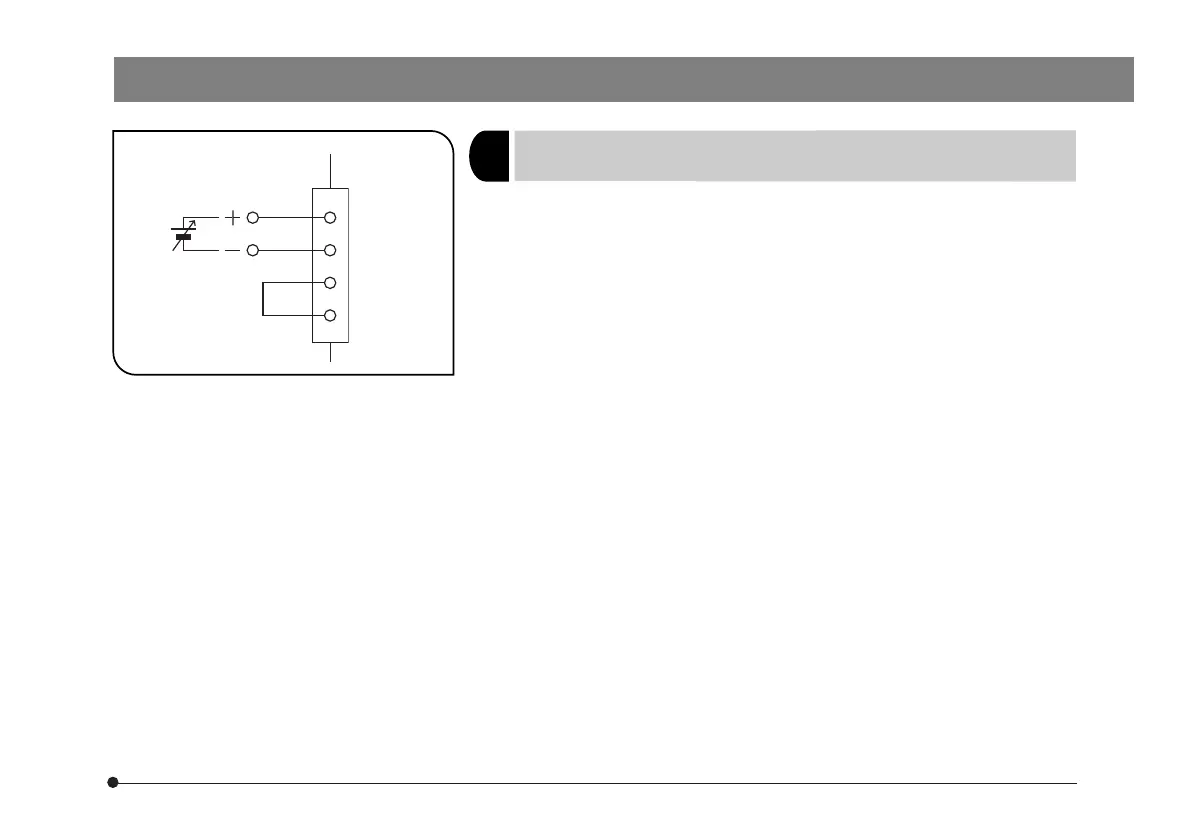
Fig. 5
1
Controlling the Amount of Light According to
External Analog Voltage
(Fig. 5)
}The amount of light can be varied between MIN and MAX by applying a
DC voltage input from 0 to 5 V.
1. Connect a DC power supply as shown in Fig. 5. Do not turn on the power
supply yet.
2. Set the main switch to “ I ” (ON).
3. Apply the external analog voltage.
DC voltages from 0 to 5 V correspond to the light amount from MIN to
MAX.
# The external wiring should have a wire gauge of AWG28 (0.1 mm
2
) or
more.
# Do not apply voltage above 5 V DC. Doing so will cause the unit to
malfunction.
#Do not apply the analog voltage before setting the main switch to
“ I ” (ON). Doing so will cause the unit to malfunction.
Inside the
power
supply unit
Control power
supply
(0-5 V DC)
1
4
5
3


 To Next Page