EasyManua.ls Logo

Olympus TRIP 35 - Focusing the Camera; Distance Scale Adjustment

Olympus TRIP 35
13 pages
Print Icon
To Next Page IconTo Next Page
To Previous Page IconTo Previous Page
Loading...
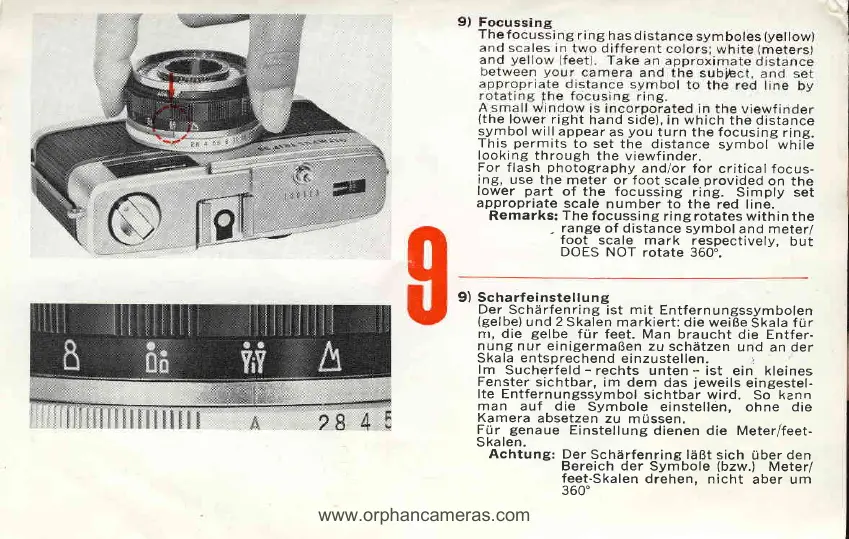
(the
lower right
hand
side),
in which
the distance
symbol will
appear
as
you
turn the focusing
ring.
This
permits
to set
the distance
symbol
while
looking
through
the viewfinder.
For
flash
photography
andlor for
criticalfocus-
ing,
use the
meter or foot
scale
provided
on
the
lower
part
of
the focussing
ring.
Simply set
appropriate
scale
number to the
red line.
Remarks:
The
focussing
ring rotates within
the
.
range
of distance
symbol
and meter/
foot
scale mark
respectively,
but
DOES NOT
rotate
360..
9) Scharfeinstellung
Der
Schiirfenring
ist
mit
Entfernungssymbolen
(gelbe)
und
2
Skalen
markiert: die weiBe
Skala
f
ur
nr, die
gelbe
frir
feet. Man braucht
die Entfer-
nung nur einigermaBen
zu
schdtzen
und
an der
Skala
entsprechend
einzustellen.
i
lm
Sucherfeld
-
rechts unten
-
ist
ein kleines
Fenster
sichtbar,
im dem
das
jeweils
eingestel-
Ite Entfernungssymbol
sichtbar
wird.
So
kann
man
auf die
Symbole
einstellen, ohne die
Kamera
absetzen
zu
mussen.
Frir
genaue
Einstellung
dienen die Meterffeet-
Skalen.
Achtung:
Der
Schdrfenring l?iBt
sich
Uber
den
Bereich der
Symbole
(bzw.l
Meter/
feet-Skalen
drehen, nicht
aber um
360'
www.orphancameras.com

Other manuals for Olympus TRIP 35

Related product manuals