EasyManua.ls Logo

Olympus TRIP 35 - Taking Pictures; Framing and Shutter Release

Olympus TRIP 35
13 pages
Print Icon
To Next Page IconTo Next Page
To Previous Page IconTo Previous Page
Loading...
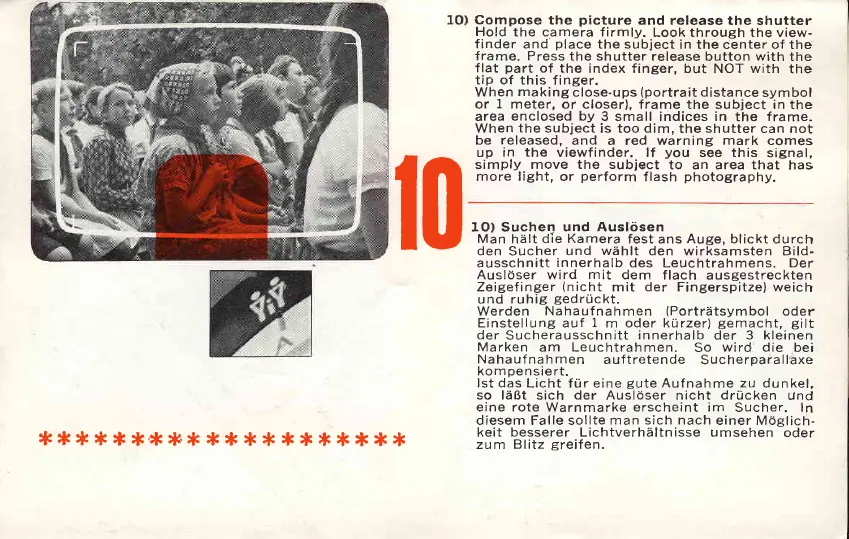
Compose
the
picture
and
release the shutter
Hold
the camera firmly.
Look through the view-
finder
and
place
the subject
in the center
of
the
frame. Press
the shutter release
button
with
the
flat
part
of the
index finger, but
NOT
with
the
tip of this
f inger.
When
making
close-ups
(portrait
distance
symbol
or
1
meter, or closer),
frame the subject in the
area
enclosed by
3 small indices in
the
frame.
When
the
subject
is too
dim,
the
shutter
can not
be
released,
and a red warning
mark
comes
up
in the
viewfinder. lf
you
see this
signal,
simply
move the subject
to an area that
has
more light, or
perform
flash
photography.
f0
****
****'* **
* *
*
* ****
*
1O) Suchen
und Ausltisen
Man
hiilt
die Kamera
fest ans Auge, blickt durch
den
Sucher
und
wiihlt
den wirksamsten Bild-
ausschnitt
innerhalb
des Leuchtrahmens. Der
Ausl6ser wird
mit
dem
flach ausgestreckten
Zeigefinger
(nicht
mit der Fingerspitze)
weich
und ruhig
gedrr,ickt.
Werden
Nahaufnahmen
(Portrdtsymbol
oder
Einstellung auf
1
m oder kiirzer)
gemacht, gilt
der
Sucherausschnitt
innerhalb
der 3
kleinen
Marken
am Leuchtrahmen.
So
wird'die
bei
Nahaufnahmen
auftretende
Sucheroaiallaxe
kompensiert.
lst das
Licht fr,ir eine
gute
Aufnahme zu
dunkel,
so liiBt sich der Ausl6ser
nicht
drucken
und
eine rote Warnmarke erscheint im
Sucher, In
diesem Falle sollte
man sich nach
einer Moglich-
keit besserer Lichtverhiiltnisse umsehen
oder
zum Blitz
greifen.

Other manuals for Olympus TRIP 35

Related product manuals