EasyManua.ls Logo

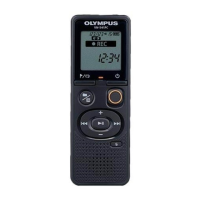
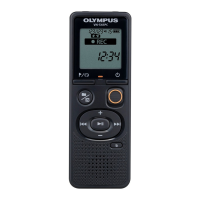
Olympus VN-541PC - User Manual

Olympus VN-541PC
43 pages
Print Icon
To Next Page IconTo Next Page
Loading...
Thank you for purchasing an Olympus digital voice recorder.
Please read these instructions for information about using the product correctly and safely.
Keep the instructions handy for future reference.
• To ensure successful recording, we recommend that you test the record function and volume
before use.
• If there are additions and/or modifications of functions due to firmware update, contents may
differ. For the latest information, please visit Olympus website.
Getting started
Recording
Playback
Editing
Use with a PC
Other information
1
2
3
4
5
6
VN-541PC
DIGITAL VOICE
RECORDER
USER MANUAL
EN

Other manuals for Olympus VN-541PC

Questions and Answers

  • R
    rubencarterAug 21, 2025
    Why is Olympus VN-541PC playback inaudible?
    • J
      Jennifer Hull DDSAug 21, 2025
      If the playback on your Olympus Voice Recorder is inaudible, check if earphones are connected to the jack; disconnect them to output the playback through the built-in speaker. Also, the volume might be set to [00]; adjust the volume to a suitable level.
  • A
    Allen JohnsonSep 3, 2025
    How to fix noise when monitoring a recording on Olympus Voice Recorder?
    • S
      stokesianSep 3, 2025
      If you experience noise when monitoring a recording on your Olympus Voice Recorder, it may be due to feedback. Connecting a speaker with a built-in amplifier may cause feedback during recording, so using earphones to monitor recording is recommended. You may also adjust the recording setup such as by moving the earphones and microphone farther apart, or ensuring the microphone is not facing the earphones.
  • J
    Justin SnyderSep 1, 2025
    Why is Olympus VN-541PC unable to operate?
    • S
      Seth JohnsonSep 1, 2025
      If your Olympus Voice Recorder is not operating, the battery power might be low, so replace the batteries. Also, check if the power is OFF and turn it ON. Another possibility is that the voice recorder is in HOLD mode; release HOLD mode to enable operation.
  • K
    Kelly BerryAug 31, 2025
    What to do if Olympus VN-541PC is not recording?
    • S
      Sandra NicholsonAug 31, 2025
      If your Olympus Voice Recorder is not recording, it might be due to a lack of memory. Erase unnecessary files to free up space. Another reason could be that the maximum number of recordable files (199) has been reached, so deleting files will also solve this.
  • J
    James CarrollAug 29, 2025
    Why is Olympus Voice Recorder display blank?
    • A
      austincourtneyAug 29, 2025
      The display might be blank because the batteries are not inserted properly. Ensure the positive and negative terminals of the batteries are correctly placed. Alternatively, the remaining battery power could be low, so try replacing the batteries. Finally, check if the power is OFF and turn it ON.
  • L
    Laura MonroeAug 27, 2025
    Why is the playback inaudible on my Olympus VN-541PC?
    • C
      chelsea99Aug 27, 2025
      If the playback on your Olympus Voice Recorder is inaudible, it could be because the earphones are connected to the jack; disconnect the earphones to output the playback through the built-in speaker. It's also possible that the volume is set to [00], so adjust the volume.
  • H
    Heather WhitneyAug 27, 2025
    Why is my Olympus Voice Recorder making noise during playback?
    • T
      Teresa WilsonAug 27, 2025
      If your Olympus Voice Recorder is making noise during playback, it could be due to a couple of things. It might be that objects brushed against the voice recorder while recording, so try not to touch the voice recorder during recording. Alternatively, the voice recorder may have been placed near a mobile phone or fluorescent light during recording or playback. If this is the case, redo the operation with the voice recorder in a different location.
  • A
    Angel NelsonAug 25, 2025
    What to do if Olympus VN-541PC has missing audio file?
    • C
      Carrie BarrAug 25, 2025
      If you can't find an audio file on your Olympus Voice Recorder, it may have been recorded in a different folder; select another folder to locate the file.
  • T
    Timothy GomezAug 23, 2025
    What to do if Olympus Voice Recorder has noise during playback?
    • M
      Marvin ParksAug 23, 2025
      If you are experiencing noise during playback on your Olympus Voice Recorder, it could be due to objects brushing against the voice recorder while recording; try your best not to touch the voice recorder during recording. Alternatively, the voice recorder might have been placed near a mobile phone or fluorescent light during recording or playback; redo the operation with the voice recorder in a different location.

Summary

Getting Started

Recording

Basic Recording Process

Step-by-step guide to starting and stopping audio recordings.

Playback

Playing Back Audio Files

How to select and play recorded files, including volume adjustment.

Editing

Information Screen and File Lock

Navigating display screens and protecting files from accidental deletion.

File Erasure Procedures

Detailed steps for erasing single files or all files in a folder.

Formatting Internal Memory

Erasing all data and resetting the device's storage.

Use with a PC

Connecting and Disconnecting the Recorder

Safe procedures for linking and unlinking the voice recorder from a PC.

Other Information

Troubleshooting Guide

Solutions for common operational problems and error messages.

Safety Precautions and Warnings

Essential safety guidelines for using the device, batteries, and handling.

Olympus VN-541PC Specifications

General IconGeneral
Mac compatibilityYes
Mac operating systems supportedMac OS X 10.10 Yosemite, Mac OS X 10.11 El Capitan, Mac OS X 10.12 Sierra, Mac OS X 10.5 Leopard, Mac OS X 10.6 Snow Leopard, Mac OS X 10.7 Lion, Mac OS X 10.8 Mountain Lion
Windows operating systems supportedWindows 10 Education, Windows 10 Education x64, Windows 10 Enterprise, Windows 10 Enterprise x64, Windows 10 Home, Windows 10 Home x64, Windows 10 Pro, Windows 10 Pro x64, Windows 7 Enterprise, Windows 7 Enterprise x64, Windows 7 Home Basic, Windows 7 Home Basic x64, Windows 7 Home Premium, Windows 7 Home Premium x64, Windows 7 Professional, Windows 7 Professional x64, Windows 7 Starter, Windows 7 Starter x64, Windows 7 Ultimate, Windows 7 Ultimate x64, Windows 8, Windows 8.1
Playback time46 h
WMA bit rates5 - 32 Kbit/s
Recording modesLong Play (LP)
LP mode recording time1570 h
Maximum recording time60 h
Audio formats supportedWMA
LP mode frequency response200 - 3000 Hz
Compatible battery sizesAAA
Number of batteries supported2
InterfaceUSB
Output power200 mW
Number of built-in speakers1
Product colorBlack
Frequency range40 - 13000 MHz
Internal memory4 GB
Microphone direction typeOmnidirectional
Number of folders messages4
Number of messages per folder199
Display diagonal1.39 \
FM radio-
Cables includedMicro-USB
Operating temperature (T-T)0 - 42 °C
Weight and Dimensions IconWeight and Dimensions
Depth20 mm
Width37.5 mm
Height108 mm
Weight67 g

Videos

How to Playback Recordings on the Olympus VN-541PC Voice Recorder

Related product manuals