EasyManua.ls Logo

Omega CDTX-90 Series - User Manual

Omega CDTX-90 Series
20 pages
Print Icon
To Next Page IconTo Next Page
Loading...
www.omega.com
e-mail: info@omega.com
Users Guide
Shop online at
CDTX-90 Series
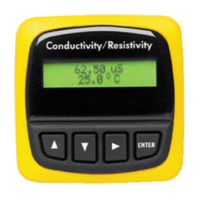
Conductivity/Resistivity Transmitters
Conductivity/Resistivity
62.50 uS/cm
25.0°C
ENTER

Questions and Answers

  • D
    donald76Jul 29, 2025
    Why does my Omega CDTX-90 Transmitter display erratic readings, showing "0" or "------" intermittently?
    • L
      Lori NicholsonJul 30, 2025
      The erratic display on your Omega Transmitter, showing "0" or "------" intermittently, could be due to the auxiliary power not being connected. Connect auxiliary power to resolve this issue.
  • A
    Allison SmithAug 4, 2025
    What to do if Omega CDTX-90 Transmitter displays 'Too much Error Check Sensor'?
    • M
      Molly AlvarezAug 4, 2025
      If your Omega Transmitter displays 'Too much Error Check Sensor', it could be due to several reasons: a defective, dirty, or coated sensor; a wiring error; fluid conductivity being too low; or a defective temperature element. Here are some steps to resolve this issue: * Clean or replace the sensor. * Check and correct the wiring. * Replace the sensor.
  • S
    Shelby YoungAug 8, 2025
    What to do if Omega CDTX-90 display is over range?
    • E
      Emily FloresAug 9, 2025
      If the display on your Omega Transmitter is over range, this might be normal if your process operates near the sensor range limits. To address this, check the sensor for the correct range, verify the decimal setting in the OPTIONS menu, and ensure the Calibrate menu settings have compatible SOURCE and RANGE values.
  • T
    tammy33Aug 13, 2025
    What to do if my Omega Transmitter says 'Value Must be less than 3'?
    • A
      Amy EdwardsAug 13, 2025
      If your Omega Transmitter shows 'Value Must be less than 3', it means the PPM factor is set to a value outside the acceptable range. The PPM factor must be between 0.00 and 3.00. Set a PPM value less than 3 to resolve this issue.
  • E
    Erik ZhangAug 18, 2025
    What to do if my Omega Transmitter says 'Value must be 400 or less'?
    • M
      margaret29Aug 19, 2025
      If your Omega Transmitter displays 'Value must be 400 or less', it indicates that the pulse rate value is too high. The pulse rate cannot exceed 400. To fix this, set a pulse rate value less than 400.
  • C
    Curtis Duncan Jr.Aug 25, 2025
    Why does my Omega Transmitter say 'Value must be greater than 0'?
    • V
      vanceashleyAug 25, 2025
      If your Omega Transmitter displays 'Value must be greater than 0', it's because the custom cell constant cannot be set to 0. To resolve this, set the cell constant to a value greater than 0.

Summary

Users Guide

Product Specifications

Electrical Connections

Sensor Selection

Guide for choosing the correct sensor for the application.

Wiring Procedure

Step-by-step guide for connecting wires to the terminals.

Sensor Connections

Details on connecting sensors to specific terminals.

CDTX-90-1 Terminal Connections

CDTX-90-1 Power;Loop Connections

Wiring diagrams for system power and loop configurations.

CDTX-90-2 Terminal Connections

CDTX-90-2 Power;Loop Connections

Wiring diagrams for CDTX-90-2 power and loop.

CDTX-90-3 Terminal Connections

CDTX-90-3 Power;Loop Connections

Wiring diagrams for CDTX-90-3 power and loop.

Relay and Open Collector Outputs

Editing Procedure

Accessing Configuration Menus

Procedure to access configuration menus.

Entering the Key Code

Inputting the required key sequence for menu access.

CDTX-90-1 Calibrate Menu

Conductivity Unit Selection

Choosing measurement units for conductivity.

Loop Output Configuration

Setting source, range, and mode for current loop output.

CDTX-90-1 Options Menu

CDTX-90-2 Calibrate Menu

Relay 1 Configuration

Setting source, mode, setpoint, and hysteresis for Relay 1.

CDTX-90-2 Options Menu

Output Adjustments

Adjusting loop output limits and temperature compensation.

CDTX-90-3 Calibrate Menu

Cell Constant Configuration

Setting the cell constant for the conductivity sensor.

Standard Sensor Calibration

Performing single-point wet calibration for standard sensors.

CDTX-90-3 Options Menu

Calibration Procedure

Calibration with NIST Solutions

Method for calibrating using NIST traceable solutions.

Calibration with Precision Resistors

Method for calibrating using precision resistors.

Temperature Coefficient

Troubleshooting

Omega CDTX-90 Series Specifications

General IconGeneral
BrandOmega
ModelCDTX-90 Series
CategoryTransmitter
LanguageEnglish

Related product manuals