transmitter is used in this example.
The following steps show how to calibrate a temperature transmitter:
1. From the Main Menu select upper display, and choose current
loop [mA LOOP].
2. Switch to lower display from the Main Menu, and select [TC]
from the primary parameters. Choose output [OUT] from the
input/output control, and select TC type.
3. Set the 0 % and 100 % span points using the keypad and the
0% and 100% keys (refer to Setting 0 % and 100 % Parameters
section).
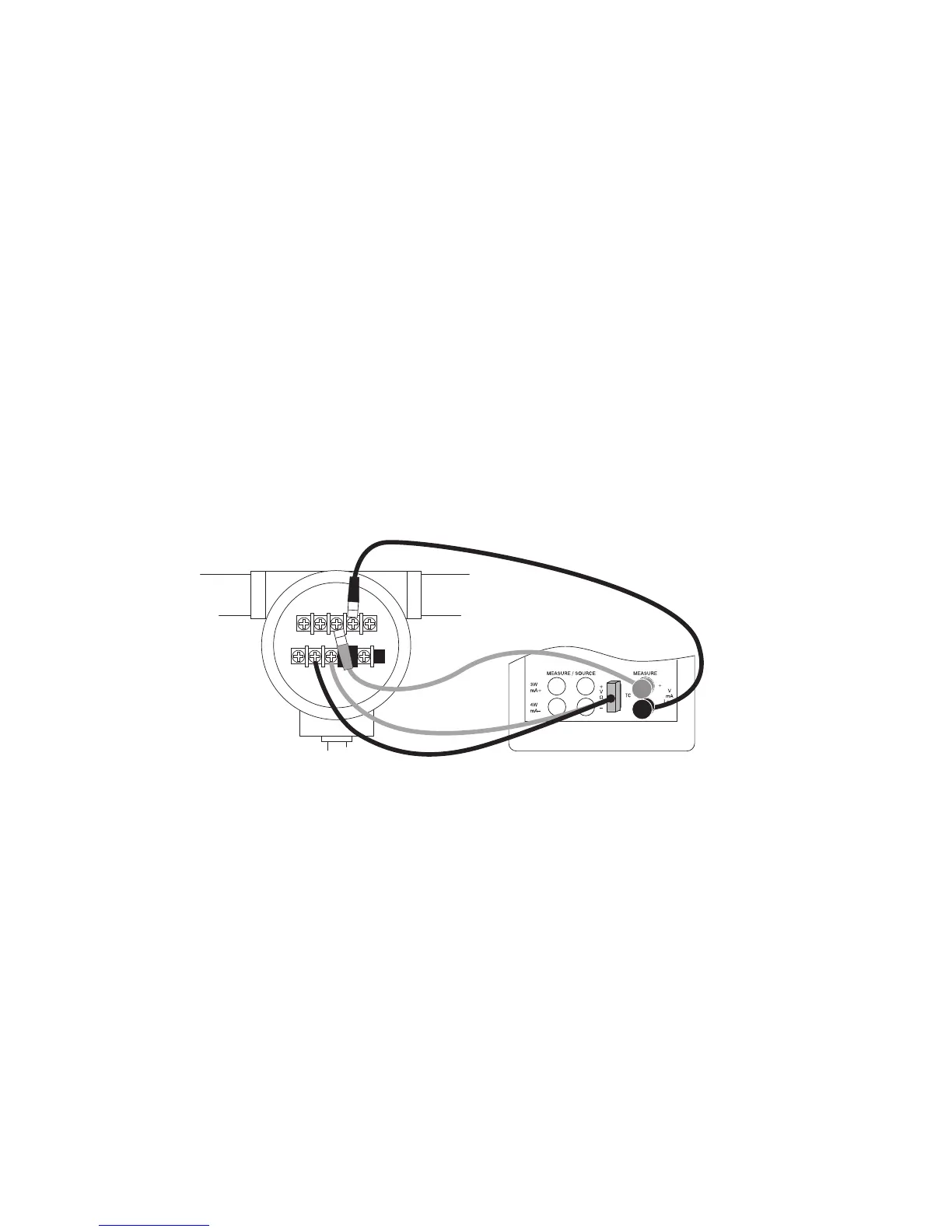
4. Connect the calibrator to the transmitter as shown in Figure 21.
5. Test transmitter at 0- 25- 50- 75- 100 % using the 25 % step
function (25% key).
Adjust the transmitter a necessary.
To calibrate a different transmitter, follow the above steps with the
exception of choosing TC on the lower display. Replace TC with the
correct parameter for the transmitter.
Figure 21. Calibrating a Transmitter
6.4 Calibrating a Pressure Transmitter
To calibrate a pressure transmitter, use these steps:
1. Select upper display from the Main Menu, and choose current
[mA LOOP] from the primary parameters. Return to Main Menu.
2. Select lower display, and choose [PRESSURE] from the primary
parameters.
3. Connect the calibrator to the transmitter and the pressure
module as in Figure 22.
4. Zero the pressure module.
5. Test the transmitter at 0 % and 100 % of the span, and adjust as
necessary.
28


 To Next Page