10
PAIR YOUR
CONTOUR
®
NEXT
ONE BG METER
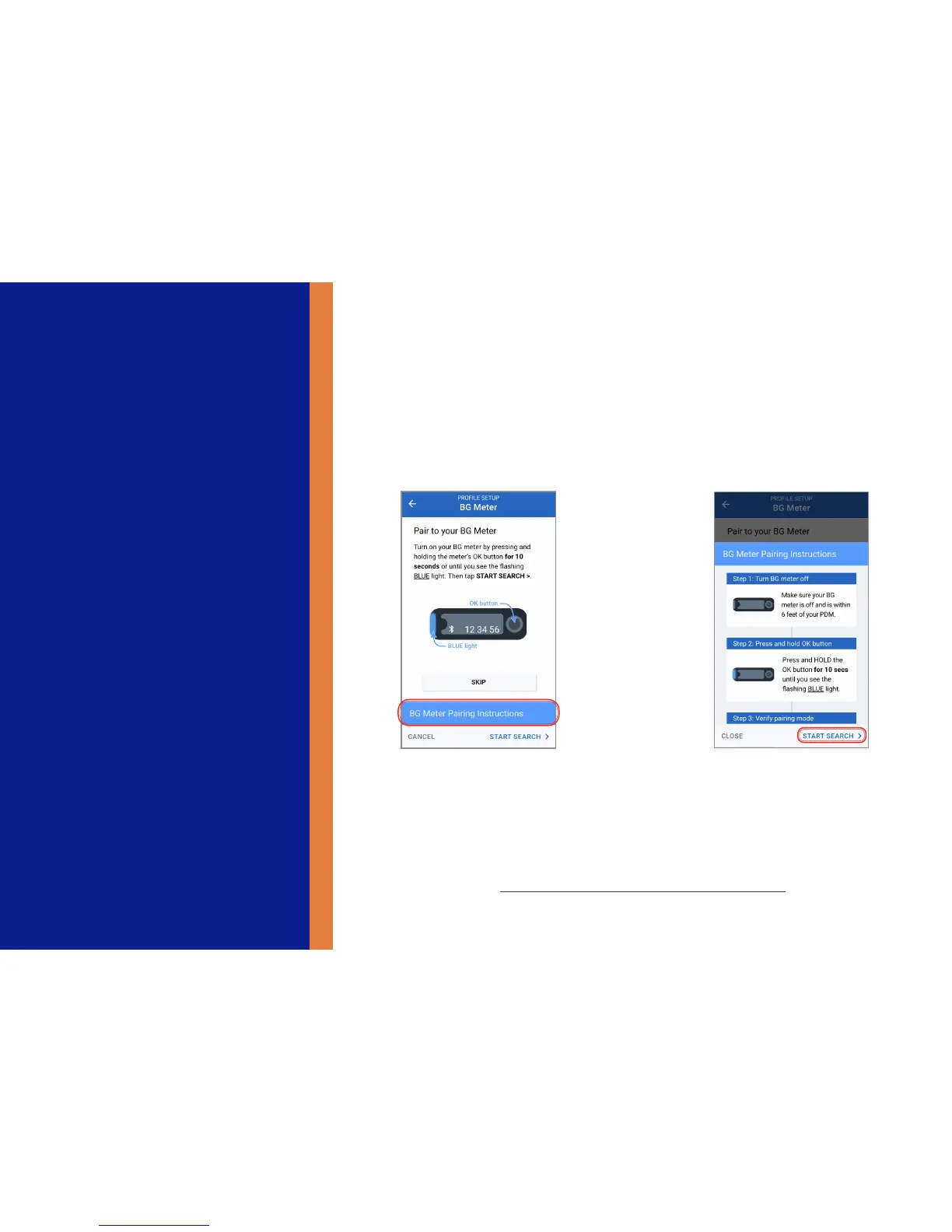
1. Tap “BG Meter Pairing
Instructions”
If you do not want to pair to a
BG meter, tap “SKIP”
2. Follow the on-screen
instructions, then tap “START
SEARCH”
Pair your CONTOUR
®
NEXT ONE BG Meter
+ Pair your CONTOUR
®
NEXT ONE Blood Glucose Meter with your PDM during the initial
setup, or you can do so later through the PDM settings screens. Only readings taken on
a paired CONTOUR
®
NEXT ONE meter will be transferred wirelessly to the PDM’s bolus
calculator.
+ BG readings taken on a different meter can only be entered manually. If you do not want to
pair a CONTOUR
®
NEXT ONE BG Meter at this time, tap SKIP.



 To Next Page