Home
OmniPod
Medical Equipment
DASH System
Page 15 (Set a Temporary Basal Rate)
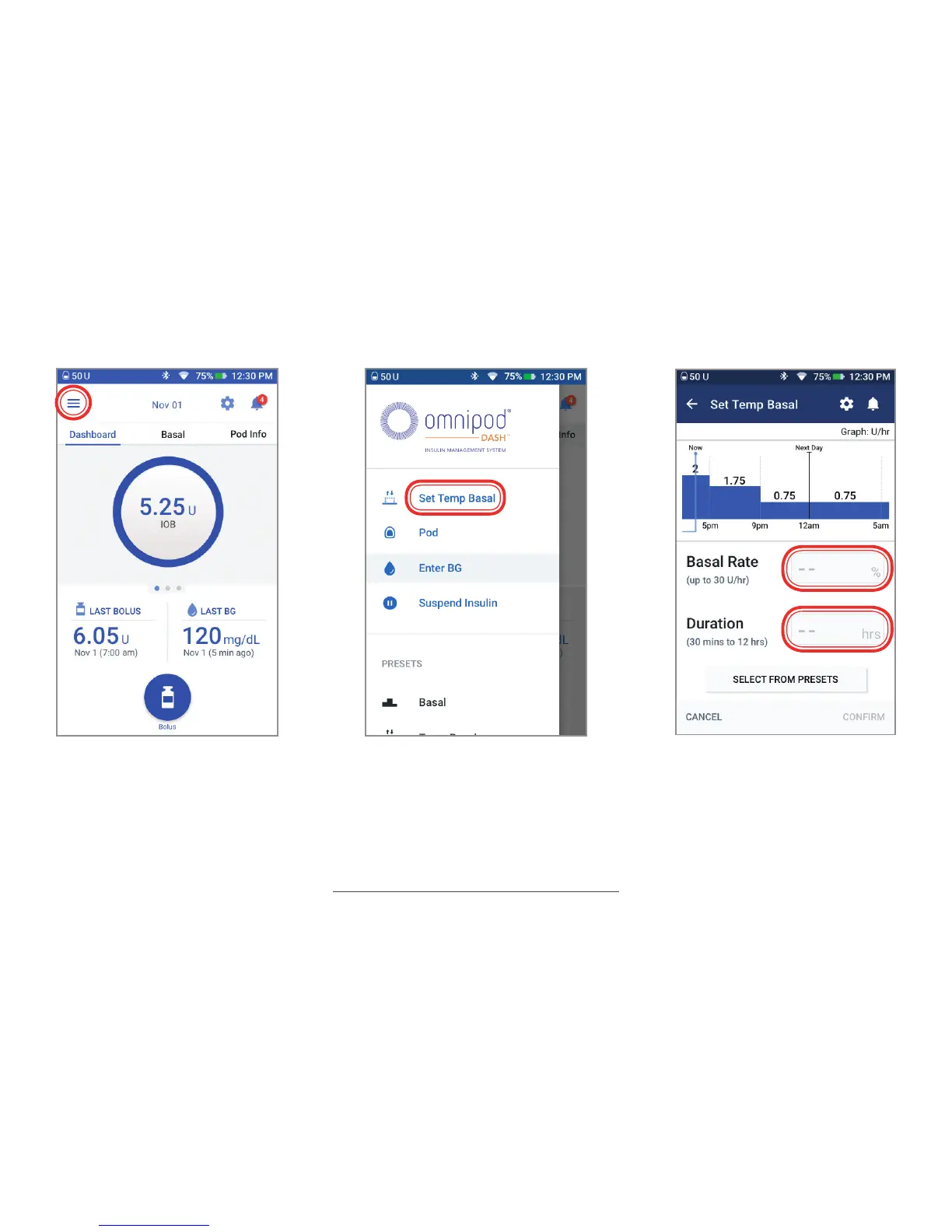
OmniPod DASH System - Set a Temporary Basal Rate; Configure Temporary Basal Rate and Duration
20 pages
Manual
Save Page as PDF
To Next Page
To Next Page
To Previous Page
To Previous Page
Loading...
15
1.
T
ap Menu icon on the Home
screen
2.
T
ap “Set T
emp Bas
al”
3.
T
ap “Bas
al Rate” entry box
and select your % change.
T
ap “Duration” entry box and
select your time duration. T
ap
“Confirm”
Set a T
emp
orary Basal Rate
14
16
Related product manuals
OmniPod DASH
60 pages
OmniPod PDM Series
40 pages
OmniPod 5
366 pages
OmniPod ENT450
202 pages



 To Next Page