00030007.DOC, Version 1.214/25
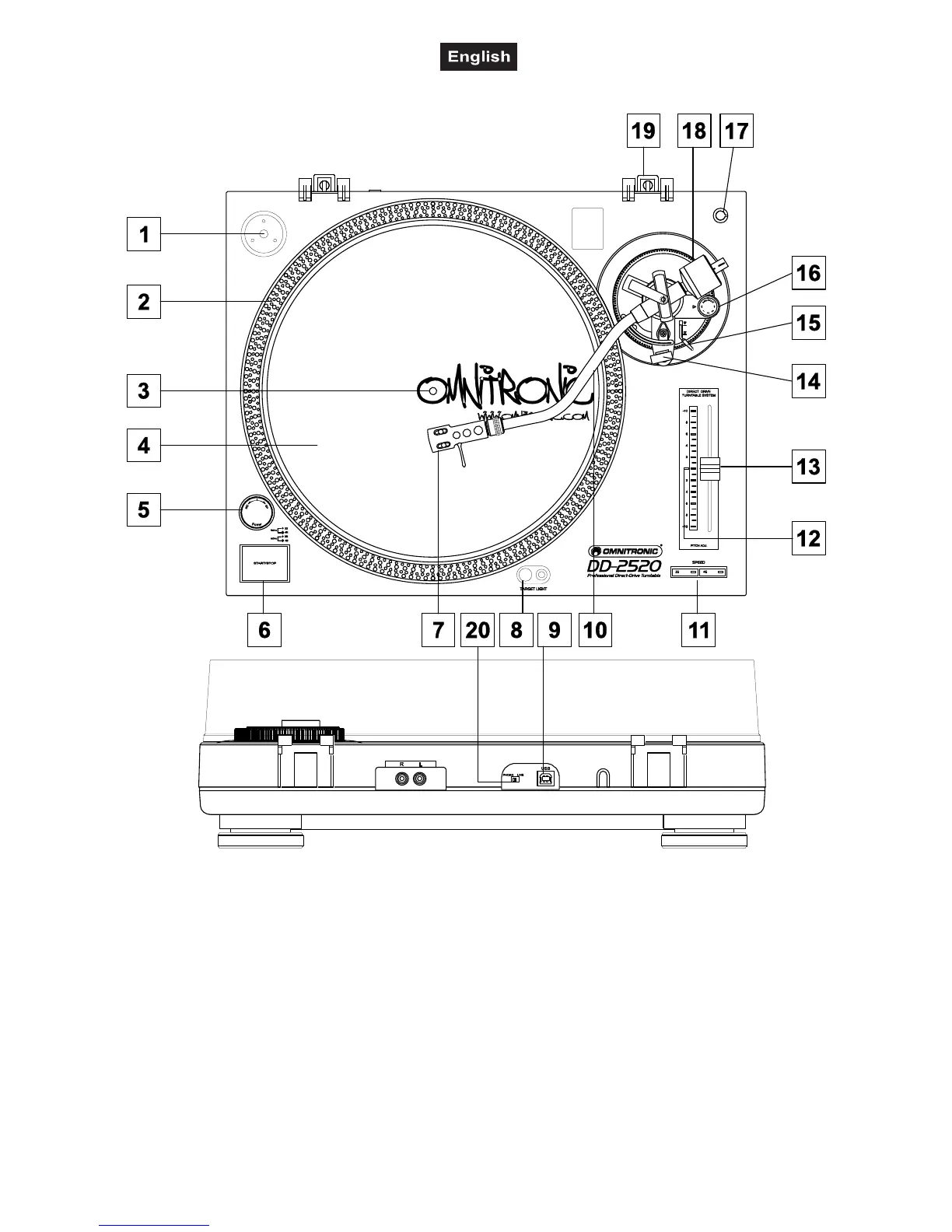
GENERAL DESCRIPTION
1. 45 RPM adaptor
2. Platter
3. Center
4. Voltage selector
(underneath the platter)
5. Power switch with
strobe-lamp
6. START/STOP-button
7. Headshell
8. Target light with switch
9. USB-port
10. Ton earm
11. Speed-s elector
12. Pitch disp lay
13. Pitchfade r
14. Armrest
15. Ton arm-lift
16. Anti-Skat ing-w heel
17. Cartridge holder
18. Counterweight
19. Hinge
CONNECTIONS
Connect the RCA-cables (white=left channel, red=right channel) with the PHONO IN-sockets of your
amplifier or mixer. You can also use a line input if you set the PHONO/LINE-switch to line.
Connect the turntable via the USB-port to the computer.
Connect the turntable to the mains.



 To Next Page