20
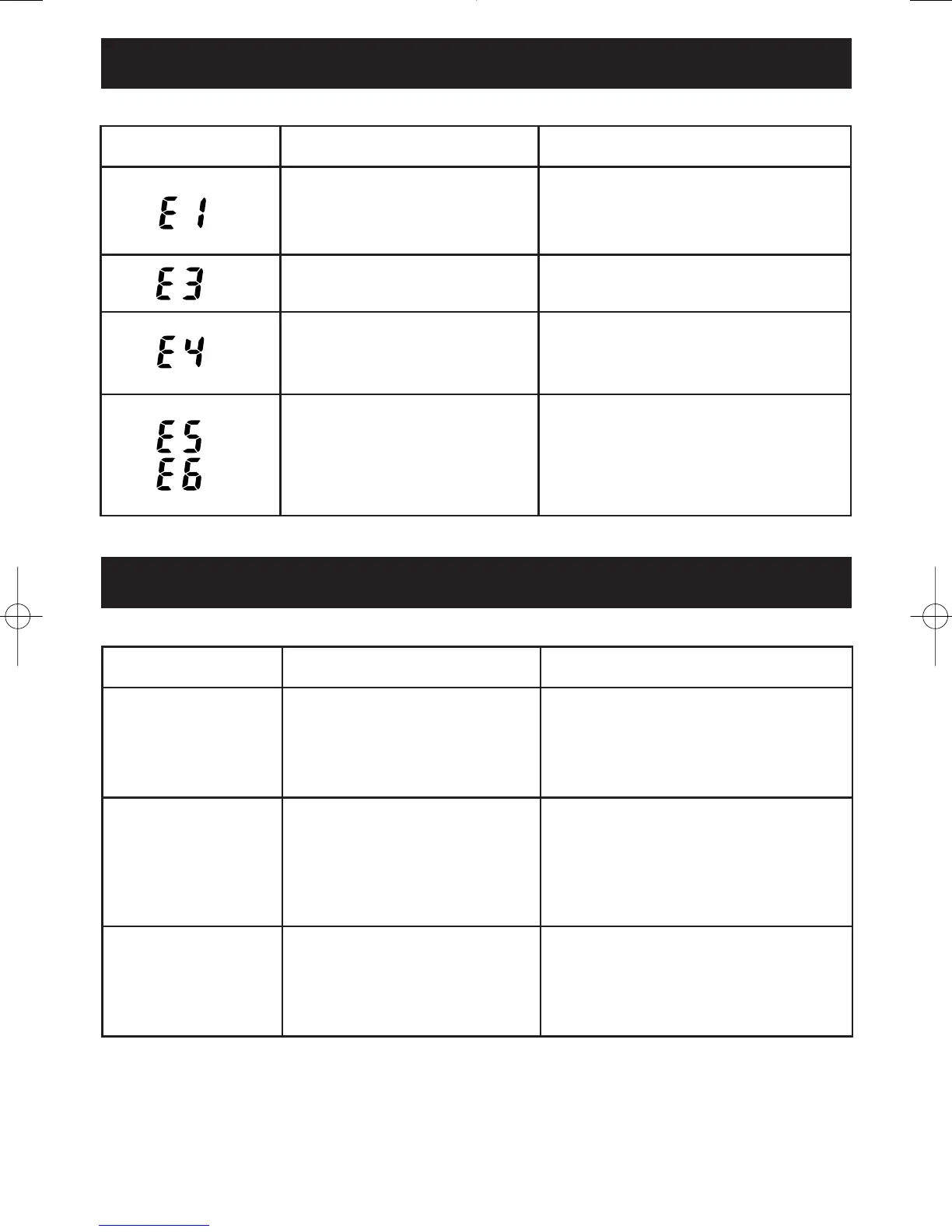
ERROR INDICATORS
NUMBER CAUSE CORRECTION
Electrodes were not
firmly grasped.
Grasp the electrodes correctly.
Refer to page 17, number 4, under
“How to take a measurement”.
Hands are dry.
Slightly moisten hands with
a wet towel.
Body Fat Percentage and
BMI values are outside the
measurable range.
Verify your personal data is
correct. Refer to page 14,
“Setting the Personal Data”.
Irregular Operation
Turn the unit off, then on.
Take another measurement.
If the error occurs again contact
Customer Service at
800-634-4350.
TROUBLESHOOTING TIPS
PROBLEM COMMON CAUSE CORRECTION
No power.
The batteries are worn
or not inserted corrected.
Replace the batteries. Check the
direction of the polarities on the
batteries and the unit. Refer to
page 12, “Battery Installation”.
Measured values
extremely differ
Change of water content
in the body.
Use the monitor in the same
environment and circumstances
for accurate trending. Refer to
page 7, “Recommended
Measurement Times”.
Body Fat
Percentage is
unusually high
or low
Incorrect posture or
movement during
measurement.
Check the correct position for
feet, arms and hands. Refer to
page 17, “How to take
a measurement”.
HBF-306C Rev D 2/7/06 9:14 AM Page 20








 To Next Page