Section 2 Connect the Video Cable and USB Touch Power Cable
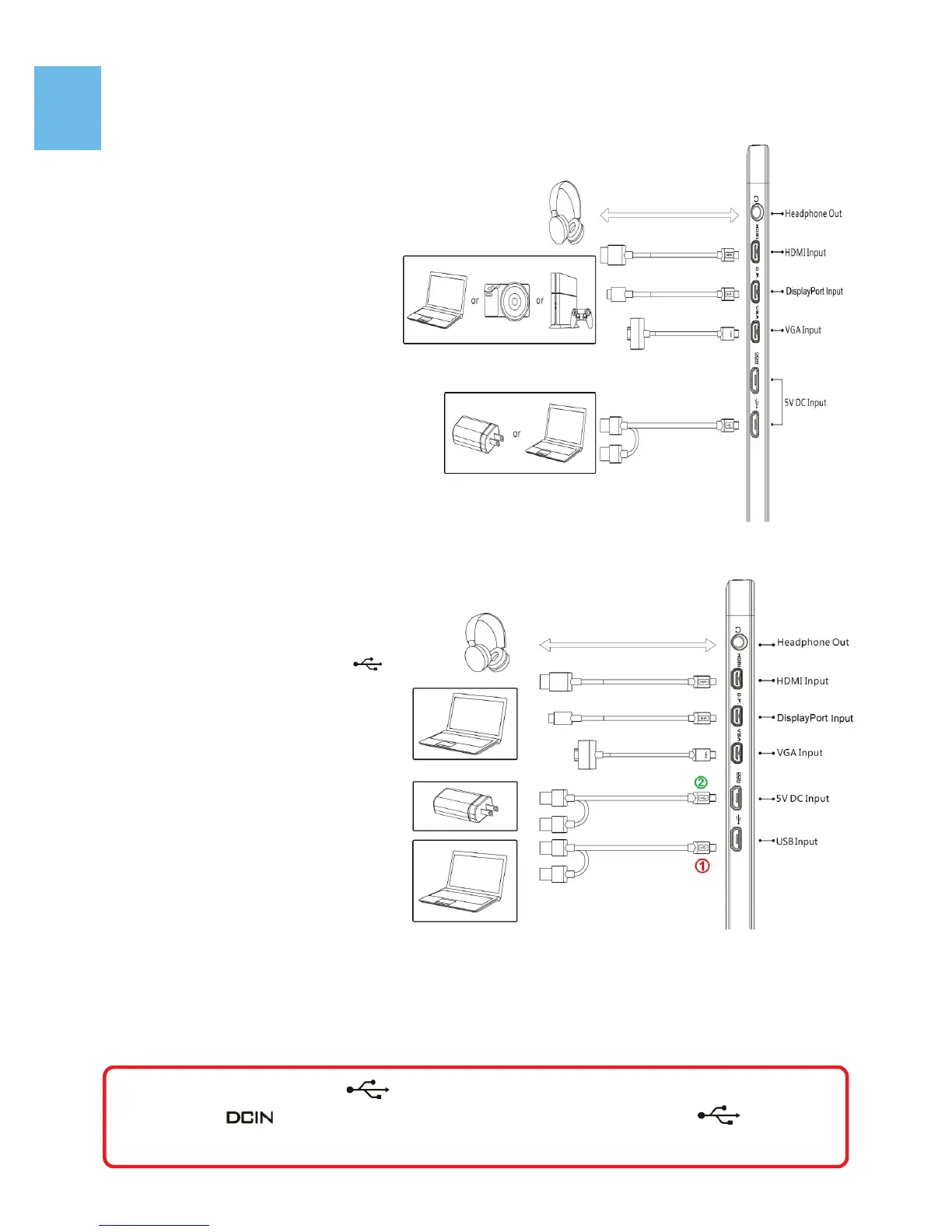
1. Connection method for On-Lap 1303H & 1303A
Connect USB Power cable first
and then connect Video ca-
ble. USB power Cable can be
connected to USB port of
laptop or 5V 2A USB charger.
Voice is transmitted by micro-
HDMI or DisplayPort ports.
VGA does not support voice
transmission.
PS: if one USB port of laptop
does not supply enough
power. Please insert another
USB plug to laptop, which
supply double power.
2. Connection method for On Lap 1303I
○
1
Connect USB Touch Output
and Power Cable’s Micro USB
(B type) connector to On-Lap
1303I’s Micro USB port.
Connect the other end, USB
connector to USB port of lap-
top. With this connection,
laptop will provide power and
touch signal to On-Lap 1303I.
If one USB port on laptop is
unable to provide enough
power, please connect the two
USB connectors to two USB
ports on laptop, this can pro-
vide double power.
○
2
Or connect the second USB power cable to the 5V 2A charger.
After then connect Video cable. Only when micro-HDMI or DisplayPort is
connected will the Monitor have sound. VGA does not support voice transmis-
sion.
Caution: Micro USB port can transmit both touch signal and power , but
Power port can only transmit power. If Micro USB port is not con-
nect to USB port of laptop, touch function can not be enabled.
7


 To Next Page