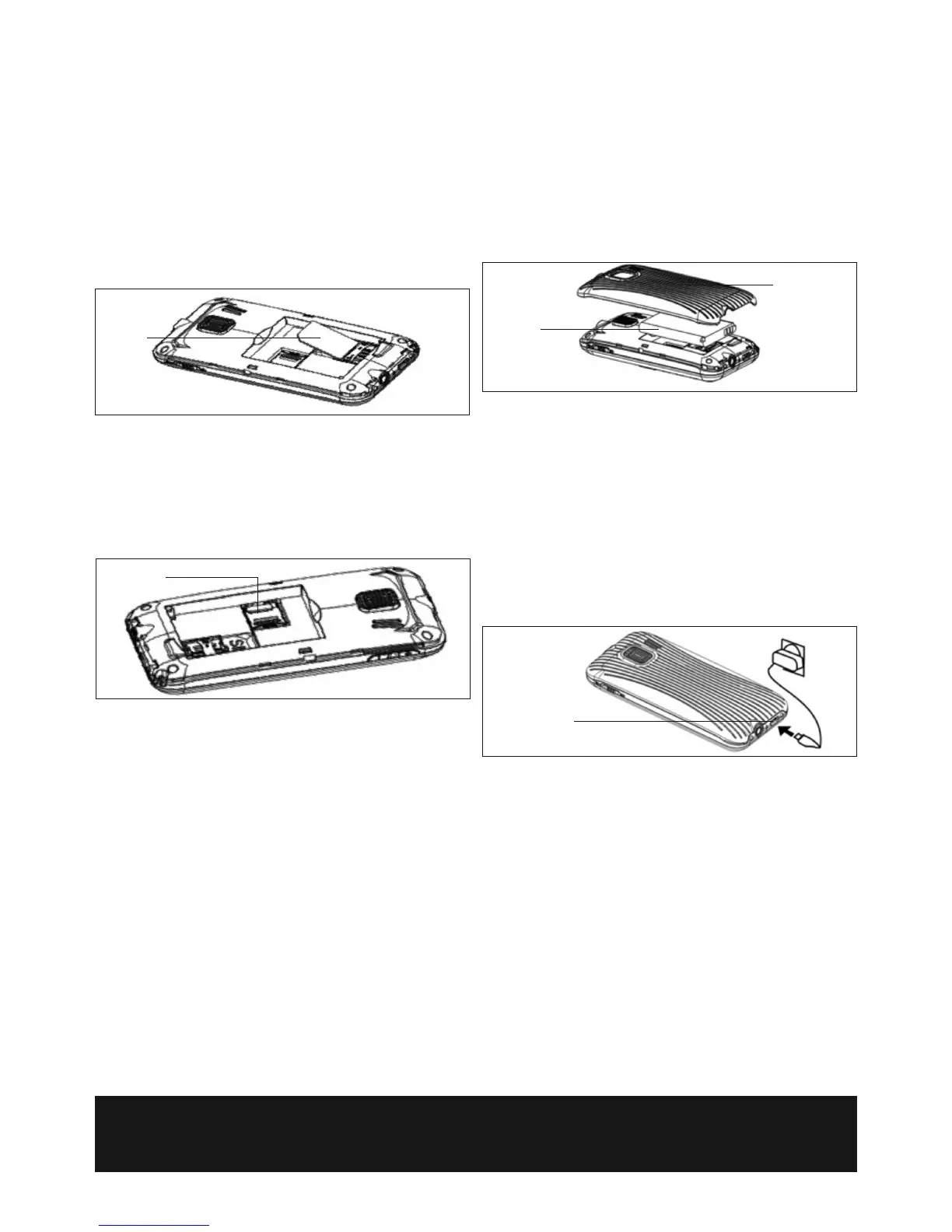
SIM Card
Memory Card
Charging port
PREPARATION BEFORE USE
Install your SIM Card (not supplied).
Warning: Do not distort or scratch the SIM card and keep it away from static,
dust or moisture. If it is lost, please immediately contact your network
operator for help.
Before SIM card installation, please switch off the mobile phone.
Remove the back of the phone, (there is a small recess on one side at the
bottom of the back where you can use a blunt instrument to help prise the
back off if necessary).
Remove the battery (if already in place) and install the SIM card as shown
below.
Note: Keep the SIM card away from children.
Install Memory Card (optional).
If using a memory card install as below. (This mobile phone uses a MICRO SD
card, maximum 500MB).
Install the memory card: Open the back cover to take out the battery, release
the memory card lock, insert the MICRO SD card into its slot, and restore the
lock and the battery before restarting the mobile phone.
Note: As the memory card is a small object, keep away from children.
BATTERY INSTRUCTIONS
Installing the Battery
T
he mobile phone is suitable for use with the original battery and accessories
only. When the phone is not going to be used for extended periods, please
remove the battery and keep it in a cool, clean, dry place.
N
ote: Carefully install the battery as shown to prevent damage.
Notices on using the battery
The performance of the battery is affected by many factors, including radio
barrier network settings, signal strength, work temperature, chosen and used
functions or settings as well as phone accessories, tones, data or other
applications.
For optimal performance, please follow the rules below:
• Charge new batteries or completely flat batteries for at least 12 hours.
During charging, keep the battery at room temperature or similar
temperature.
• Batteries may degrade over time. If call duration decreases but charging
time increases, you may need to buy another battery from the original
supplier.
WARNING! Do not throw the battery into fire as this may cause an
explosion.
When the battery charge is running low (as indicated by battery icon on the
top right of the screen) install the charger as shown. Do not let the battery
charge run too low.
Follow the diagram above to connect the charger.
The Easy Use Mobile Phone also comes with a desktop docking charger.
Connect the power cable to the port on the side, plug it in and the phone will
charge whilst in it.
WARNING! Only use chargers supplied by the original supplier, other
chargers may damage your phone. Always charge indoors in a dry place.
Using the USB
Always connect and remove the USB device carefully.
Never use Windows formatting commands to format the mobile disk of the
mobile phone as it could cause permanent damage.
The connection between PC and the mobile phone cannot be conducted
unless USB driver is installed.
Battery
Back of phone



 To Next Page