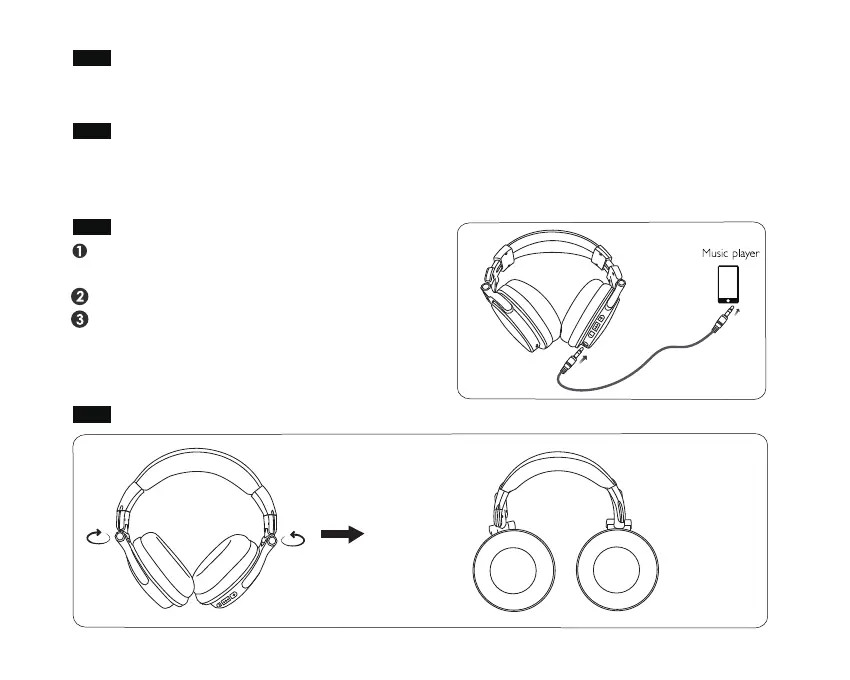
Turn to Wired Mode
How to Rotate (Maximum swivel angle:90°)
Ensure the headphones are switched off during
wired use
Connect the 3.5mm cable into the 3.5mm Aux-in
Connect the other end of the 3.5mm cable into
your device
Note: Inserting 3.5mm cable disables wireless
functions
Call-handling
Siri and Clear Up Memory
Press the Play/Pause① once to answer/end the call. During the call, you can adjust the volume by
using the volume + ③ and volume – ② buttons on the headphones.
For Siri, long press ① and hold for one or two seconds until you hear a "Di" prompt tone. Let go
once you hear prompt tone, otherwise the headphones will be turned off.
Clear the paired device memory, please press the volume button ② ③ at the same time.
left-hand
rotation only
right-hand
rotation only


 To Next Page